

Headless CMS Development Company – Built Around Your Business
Quick Answer
A headless CMS development company designs content platforms that let teams manage content independently from the websites and apps displaying it. Anglara works across Strapi, Contentful, Sanity, Payload, Storyblok, and headless WordPress, choosing the platform around your needs. In Anglara’s US home-services Strapi + Next.js build, typical page creation and editing turnaround improved from 2–3 days to 1–2 hours.
Your marketing team should publish content. Not wait in a developer queue.
Anglara designs and builds scalable content platforms that help editors publish independently and engineers deliver reliable digital experiences.

What Is A Headless CMS?
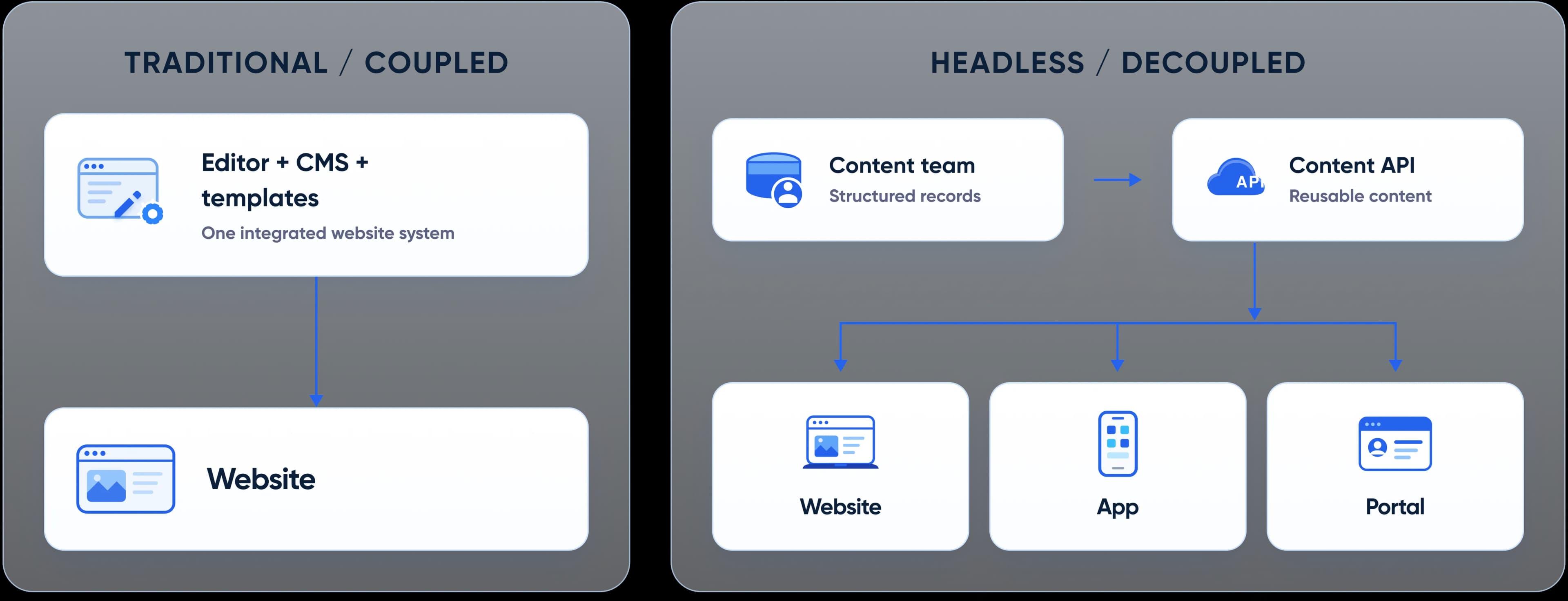
A headless content management system (CMS) separates the place where you create and manage content from the interface that displays it. In a traditional, coupled CMS, the content editor and the website presentation are usually delivered together. In a headless CMS, the content is made available through APIs, while a separate frontend decides how to display it.
Think of a restaurant kitchen and dining room. A traditional CMS has the kitchen and dining room built as one unit. A headless CMS is more like a well-organized kitchen serving several dining rooms: your website, mobile app, customer portal, or other digital touchpoints can request the content they need without maintaining separate copies.
That distinction matters because a content update and a frontend code change are not the same task. A marketer adjusting a headline should not need a developer to deploy new code. A developer changing a component, on the other hand, can work without rewriting your content inventory.
Headless does introduce additional architectural decisions, such as preview, caching, routing, and hosting. It is not automatically the best option for every site. The value appears when the flexibility of separate systems solves a real operating problem.
For businesses publishing frequently, operating across locations, or delivering content to several channels, that separation can turn a website from a development bottleneck into a manageable content platform.
Why Go Headless? Business Benefits
A headless CMS is worth considering when your organization needs more than a different way to edit a blog post. The real advantages come from how marketing, product, and engineering can work together as your digital presence grows.
Faster content velocity without developer dependency
Every campaign has a deadline. Yet in many organizations, publishing one landing page means raising a ticket, waiting for engineering capacity, reviewing a pull request, and deploying a release. That is an expensive workflow for a routine content update.
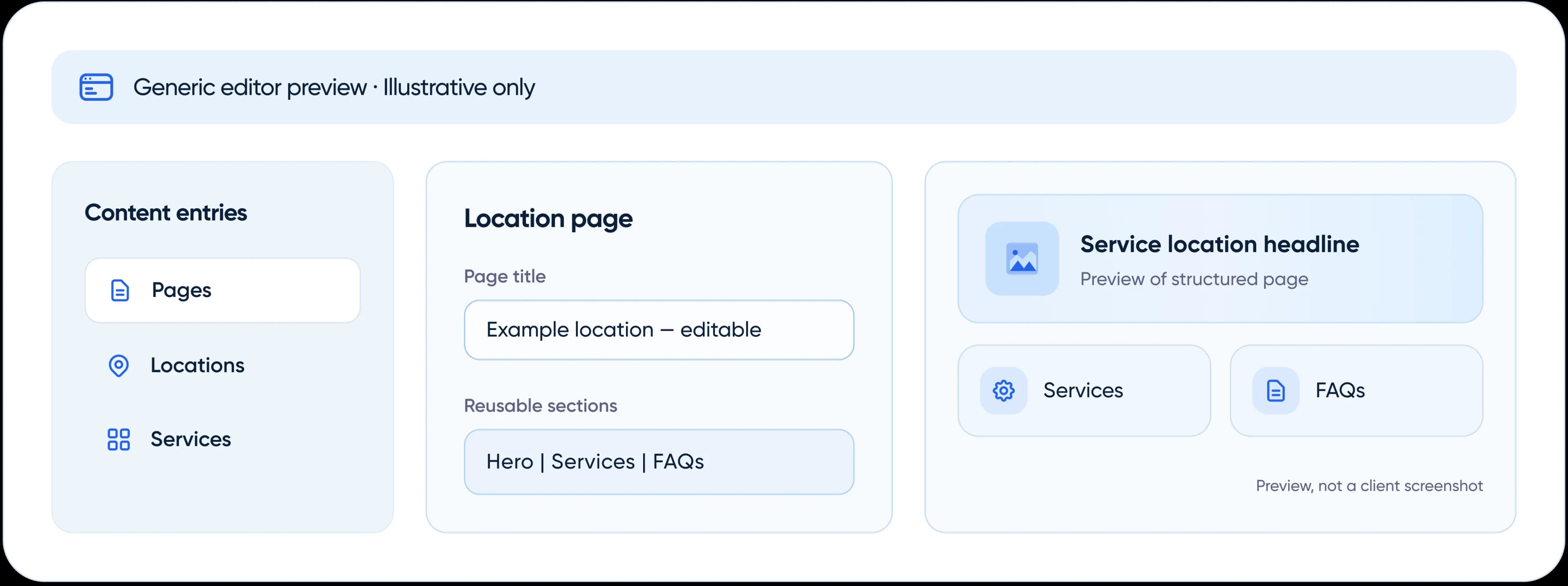
With a well-designed headless system, editors can use approved, reusable components to assemble pages and make changes themselves. Developers still own the design system and custom functionality, but ordinary content changes no longer need to compete with feature development.
In Anglara's US HVAC home-services project, page creation or meaningful edits previously took 2–3 days. After the Strapi + Next.js implementation and editor handover, the usual turnaround was 1–2 hours. The improvement came from structured content, reusable page sections, and a publishing workflow the marketing team could actually operate—not simply from choosing a newer technology.
Measure this benefit using request-to-publish time, developer tickets per content change, and pages launched per month. These are more actionable than saying a CMS is merely 'faster.'
Faster content velocity without developer dependency
Every campaign has a deadline. Yet in many organizations, publishing one landing page means raising a ticket, waiting for engineering capacity, reviewing a pull request, and deploying a release. That is an expensive workflow for a routine content update.
With a well-designed headless system, editors can use approved, reusable components to assemble pages and make changes themselves. Developers still own the design system and custom functionality, but ordinary content changes no longer need to compete with feature development.
In Anglara's US HVAC home-services project, page creation or meaningful edits previously took 2–3 days. After the Strapi + Next.js implementation and editor handover, the usual turnaround was 1–2 hours. The improvement came from structured content, reusable page sections, and a publishing workflow the marketing team could actually operate—not simply from choosing a newer technology.
Measure this benefit using request-to-publish time, developer tickets per content change, and pages launched per month. These are more actionable than saying a CMS is merely 'faster.'
How We Build Headless Platforms
The right headless CMS is the one your content team can use confidently and your developers can extend without unnecessary constraints. We are platform-flexible: Anglara recommends an architecture based on editorial needs, integrations, hosting preferences, growth plans, and total cost of ownership.
- 1

Start with Workflows, Then Select The Platform
We first map how your team creates service pages, manages locations, previews changes, approves content, and publishes across channels. Those workflows guide the content model and the shortlist. Strapi, Contentful, Sanity, Storyblok, Payload, and headless WordPress each have different strengths. Our platform comparison makes those trade-offs explicit.
- 2

Choose The Frontend and Integrations for Your Use Case
We build API-first experiences that connect structured content to marketing websites, portals, and applications. As a Next.js development company, Anglara can deliver React-based frontends with server rendering and flexible integrations when they fit the brief. We also plan SEO metadata, previews, caching, forms, analytics, and deployment workflows independently of CMS choice.
- 3

Strapi + Next.js: A Proven Example, Not a Mandatory Stack
One of our best-documented implementations used Strapi + Next.js for a US HVAC home-services business with multiple service and location pages. Anglara created reusable page sections and trained editors to make updates without relying on a development release for routine work. Typical page turnaround improved from 2–3 days to 1–2 hours. Explore the project and its architecture.
- 4

Build for Day-to-Day Operations, Not Just Launch Day
Preview environments, role permissions, content relationships, redirects, error handling, access controls, and an editor handover are part of a usable content platform. Anglara designs these around the people responsible for publishing and maintaining the system, so the architecture remains useful after launch.
Headless CMS vs Traditional CMS
Headless CMS vs traditional CMS is not a contest with one universal winner. A coupled WordPress site can be an excellent choice for a small marketing website. A headless system makes more sense as requirements become more custom, content becomes structured, or several digital channels need the same information.
| Decision Factor | Traditional / Coupled CMS | Well-Designed Headless CMS |
|---|---|---|
| Content edit turnaround | Often quick for built-in layouts; can depend on developers for custom hard-coded pages | Can be editor-led for modeled pages and approved components |
| Anglara's observed project | Before: 2–3 days per meaningful edit or new page on the client's static coded site | After: 1–2 hours using Strapi + Next.js |
| New channel | Often needs separate templates, integrations, or another system | Same structured content can be exposed to additional frontends |
| Scalability | Can scale well with sound engineering | Frontend and CMS layers can evolve independently |
| Security surface | CMS administration and public presentation may share infrastructure | Can isolate administration, but adds API and infrastructure controls |
| Developer coupling | Often depends on theme and plugin architecture | Frontend freedom; extra responsibility for rendering, routing, and previews |
| Vendor lock-in | Depends on CMS, plugins, and custom implementation | Depends on platform, data model, extensions, and hosting arrangement |
| Migration friction | May avoid migration if current CMS still meets needs | Requires content mapping, redirects, QA, and editor retraining |
Important Context: The before-and-after number above compares an existing static coded website with the headless rebuild. It is not evidence that all traditional CMS websites are slower to edit than headless websites.
Choose traditional WordPress when your team primarily manages a straightforward website, benefits from established themes or plugins, and has no clear cross-channel requirement. Choose headless when you need custom content structures, many repeatable location or service pages, integration-heavy workflows, or a frontend that must evolve independently from content operations.
There is a middle path, too: headless WordPress. It keeps WordPress as the content backend while using a separate frontend such as Next.js. For businesses with years of editorial investment in WordPress, that can be worth comparing before moving to Strapi or another platform.
Our Headless CMS Development Services
We support the full content-platform lifecycle: deciding what to build, designing how information should be modeled, moving existing content safely, creating the frontend experience, and maintaining the result after launch.

New Headless CMS Development
Starting a new website or digital platform? We design the content model, publishing workflow, APIs, frontend architecture, and reusable component library from the beginning. Your team gets a system built around real publishing requirements rather than a demo-friendly default.

WordPress, Drupal, and Sitecore Migration
Moving from an existing platform demands more than copying posts into a new database. We inventory URLs, metadata, content types, relationships, media, internal links, and redirects before choosing the migration approach. Our goal is a carefully planned transition with SEO safeguards, testing, rollback options, and minimal avoidable disruption—not an unsupported guarantee of zero downtime or zero ranking changes.
For businesses exploring headless WordPress, we can assess whether keeping WordPress as the backend is better than a complete CMS switch. We also examine phased migration, where legacy and new systems run in parallel during validation.

Headless Commerce Integrations
For content-rich shopping experiences, a headless CMS can work alongside an e-commerce engine rather than replace it. We can architect storefront content around commerce APIs, including platforms such as Shopify and, where suitable, Medusa, while leaving checkout, catalog inventory, tax, and order rules in the systems designed to manage them.

Multi-Brand and Multi-Region Content Platforms
Growing across brands or regions? We structure shared and local content so teams can maintain brand consistency without overwriting market-specific needs. This may include separate brands, locale-specific content, region-aware routes, translation workflows, and permissions for regional editors.

AI-Assisted Content Operations
AI can assist with drafting, classification, tagging, summaries, or translation workflows connected to a CMS. We focus on human review, permissions, content provenance, and workflow approvals before any automated publication. AI is an optional capability, not a reason to give autonomous systems unrestricted publishing access.

Support, Maintenance, and Ongoing Development
After launch, CMS and frontend dependencies still need updates, security reviews, backups, monitoring, regression testing, and occasional changes to content models. Anglara supports existing teams with fixes, integrations, new components, performance improvements, and planned product enhancements rather than treating launch as the end of responsibility.
Which Headless CMS Is Right For You? Platform Guidance
The best headless CMS is not necessarily the one with the longest feature list. It is the one your editors can manage, your developers can maintain, and your business can afford to operate as it grows. Before recommending a platform, we review content complexity, editing needs, preview experience, integrations, localization, hosting, compliance, and total cost of ownership.
| Platform | Often a good fit for | Consider before choosing |
|---|---|---|
| Strapi | Open-source headless CMS projects, custom content models, Node.js-focused teams, and self-managed deployments | Plan for hosting, security, upgrades, editorial UX, and relevant paid features |
| Contentful | Enterprise structured content, many channels, governance requirements, and mature SaaS workflows | Licensing, API usage, content-model limits, and long-term commercial terms |
| Sanity | Highly customized editorial experiences and content modeling with developer control | Configuration effort, training, usage-based pricing, and required integrations |
| Storyblok | Marketing-led websites needing a strong visual editing experience | Component architecture, pricing, and the fit of visual tooling to complex data |
| Payload | TypeScript-centric applications where CMS and application code can share types and infrastructure patterns | Engineering ownership, deployment choices, and editor workflow requirements |
| Headless WordPress | Teams with an established WordPress editorial process who want a different frontend | Plugin compatibility, preview integration, security, and maintaining two application layers |
Strapi is frequently our first evaluation for a custom, API-first content platform because it supports flexible modeling and suits our Next.js/Node.js engineering work. But that is a starting hypothesis, not a purchasing rule. A visually oriented marketing team may prefer Storyblok, and a larger enterprise may find Contentful better aligned with governance and procurement.
Ask each shortlisted system to demonstrate three tasks: create a service page, translate it, and preview it before publication. Then compare configuration, training, licensing, and development effort.
When headless is not a good fit
If your website has a handful of static pages, one publishing channel, simple editorial needs, and a limited maintenance budget, a conventional CMS may be the more responsible investment. Migrating purely because 'headless is modern' often creates extra hosting, QA, integration, and ownership work without a meaningful business benefit.
We are comfortable recommending that you keep WordPress if it already solves the problem. The objective of an architecture audit is a better decision, not an automatic platform replacement.
Security, Compliance and Enterprise Readiness
A headless architecture creates opportunities to separate the editor interface from the public website, but it also introduces more systems and connections to protect. Security comes from how the solution is designed and operated—not from the word 'headless.'
For production systems, Anglara plans security controls around roles, identities, credentials, APIs, infrastructure, and data flows. Depending on the project, the delivery checklist includes role-based access control, minimal API permissions, protected admin access, server-side secret storage, encrypted connections, rate limiting, environment separation, backups, logging, and vulnerability management.
For content operations, the questions go beyond whether someone can log in. Can regional editors change only their assigned records? Can a draft be seen by the public? Who can publish a price change or delete a location? How do you restore a mistakenly removed page? Are approvals or audit histories available in the selected platform and plan?
For healthcare or financial services, we also map sensitive information, data residency, access histories, vendor obligations, and relevant privacy rules. A platform can be architected to support GDPR or HIPAA obligations, but deploying Strapi or Next.js does not itself make an organization legally compliant. Formal compliance needs an appropriately scoped assessment and operational safeguards.
What Anglara pays particular attention to
We test preview links, webhook authenticity, API tokens, and draft-versus-published behavior before launch. These small boundaries are easy to overlook when a CMS proof-of-concept becomes a customer-facing platform.
Our Process: From Discovery to Launch
- 1

Discovery and Architecture Assessment
We review your current site, content inventory, stakeholder workflows, SEO baseline, systems, integrations, and constraints. We interview the people who create and approve content—not just the people responsible for code. Together, we define what success means: fewer tickets, faster time-to-publish, better governance, or support for several channels.
Outputs:
- Current-state assessment
- Platform recommendation
- Delivery scope
- Risks
- Baseline measures
- Phased roadmap
- 2

Content Modelling and Editor Experience
We design content types, reusable components, relationships, slugs, localization requirements, editor permissions, and publishing rules. Before coding the full site, we walk through representative authoring journeys so your team can flag anything confusing.
Outputs:
- Content model
- Component map
- Sample page patterns
- Preview workflow
- Editorial acceptance criteria
- 3

API, Frontend and Integration Development
Our team implements the CMS configuration, REST or GraphQL integration, frontend components, page templates, and required business systems. This can include forms, lead routing, analytics, search, authentication, and location-based content logic.
Outputs:
- Working staging environment
- Tested APIs
- Reusable UI components
- Integration checks
- Initial performance/SEO setup
- 4

Content Migration and Quality Assurance
For an existing site, we map source records to the new content structure, migrate selected content and assets, and validate the results. We test internal links, redirects, canonicals, metadata, sitemaps, image paths, forms, accessibility basics, and key conversion journeys before cutting over.
Outputs:
- Migration mappings
- QA results
- Redirect plan
- Content review sign-off
- Launch/rollback checklist
- 5

Controlled Launch and Monitoring
We choose a cutover process appropriate to the infrastructure, with backups, DNS and deployment preparation, monitoring, and a fallback plan. After launch, we check indexing signals, key templates, form submissions, analytics events, and cache invalidation.
Outputs:
- Production release
- Monitoring checklist
- Issues register
- Handover notes
- Post-launch validation
- 6

Training, Documentation and Ongoing Support
We provide practical guidance for editors, clarify which changes require development, and establish a support path for updates and future enhancements. A successful handover is not a screen recording of the CMS admin: editors should be able to complete real tasks with confidence.
Outputs:
- Editor guide
- Operating procedures
- Access ownership
- Maintenance plan
- Recommendations for the next iteration
Investment and Engagement Models
How much does headless CMS development cost?
The answer depends more on the structure and complexity of the platform than on the number of pages you can see in a menu. A 30-page site built from a small reusable component library may be easier to deliver than a 10-page application with complex integrations and approval workflows.
The main budget drivers are content architecture, page components, frontend design, migration volume, localization, custom integrations, access controls, infrastructure, and quality assurance. Existing data can add significant effort if it contains inconsistent URLs, duplicated content, missing relationships, or poorly structured metadata.
Anglara Supports Two Common Engagement Options:
Fixed-Scope Project
Appropriate when the content model, templates, integrations, migration volume, and acceptance criteria can be agreed in advance. We define deliverables, milestones, assumptions, and change handling before development begins.
Ongoing Engineering and WebOps Support
Appropriate when your team needs continuous enhancements, new page patterns, technical SEO support, integration work, security maintenance, or planned platform upgrades after launch.
Some teams benefit from a short paid discovery phase before a full build. This helps reveal hidden content-model or migration complexity before either side commits to a larger scope. We do not publish a generic fixed price for all headless builds because doing so could misrepresent the work involved. You can request a scope-specific estimate through the architecture consultation.
Headless CMS Case Study
Featured: from developer-dependent publishing to a marketing-managed platform
US HVAC home-services business | Strapi + Next.js | Two-month delivery
A home-services company serving multiple locations and service categories operated a static coded website. New pages and significant edits had to move from marketing to engineering, review, and deployment. As the content footprint expanded, this created a queue for work the marketing team needed to do routinely.
Anglara rebuilt the platform with Strapi as the content backend and Next.js as the frontend. The delivery introduced reusable page sections for heroes, content, services, locations, testimonials, FAQs, CTAs, and forms. The content structure supported services and locations without hard-coding every new page.
The project also connected website enquiries to Strapi for lead management, included GA4 and Google Tag Manager, and provided an editor guide to support handover. The team delivered the work in approximately two months with three people.
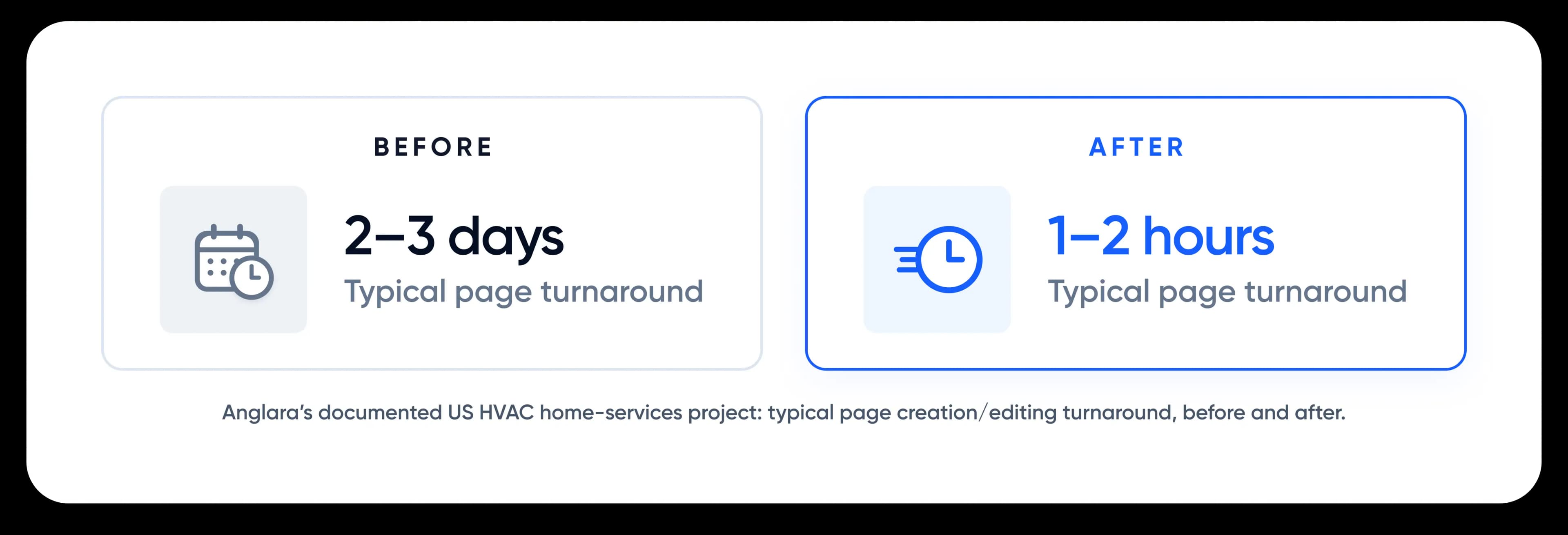
Documented outcome: Typical page creation and editing turnaround improved from 2–3 days to 1–2 hours. The case study also documents a site structure of 62 indexable URLs, 12 location pages, 20 service/service-category pages, and 18 blog articles. These are project-scope details, not claims of traffic, rankings, or revenue gains.
Why Businesses Work with Anglara
Choosing a headless CMS development partner means choosing who will design the content model, support your editors, connect systems, and maintain the platform after launch. Anglara focuses on those operational details as closely as the code.

Real Headless Delivery
Our published US home-services project covers a Strapi + Next.js rebuild, reusable sections, a multi-location content model, analytics setup, and editor training. Its measured publishing turnaround is the proof point featured on this page.

Platform-First Advice, Not Platform Lock-In
We assess Strapi, Contentful, Sanity, Storyblok, Payload, and headless WordPress against your real workflows and integration requirements. When a traditional CMS is the sensible fit, we say so.

Independent Company Credibility
Anglara’s Clutch profile currently displays 17 reviews and a 4.8/5 overall rating across its services. These are company-level reviews, not claims of 17 headless CMS projects.
Independent client feedback
See Anglara’s company-wide ratings and individual reviews directly on Clutch. These reviews span different services, not only headless CMS.

Ready to Stop Treating Every Content Update as a Development Task?
Your CMS should help marketing move independently while giving engineering a reliable foundation for growth. If you're planning a new site, managing dozens of locations, or considering a WordPress-to-headless migration, Anglara can help you determine what to keep, what to change, and what it will take to launch safely.
Book a free 30-minute architecture audit. We'll review your current publishing bottlenecks, preferred content workflows, existing stack, SEO considerations, and major integration risks. You will receive practical next-step recommendations and a clearer view of which platform approach is worth exploring.

CEO Journey

Started in 2013 as a self-taught developer, now leading a 20+ member team.

Built long-term partnerships with US brands like Convoso.

Empowered 100+ businesses — from local SMBs to funded startups and US enterprises.
Anglara Partner with Google Communities

Trusted by Enterprises Across World