
A user experience audit gives you evidence, not guesswork, about why visitors leave without converting. This checklist walks you through every layer of the review — from navigation and microcopy to WCAG accessibility and Core Web Vitals — so you can prioritize fixes that move real metrics.
Quick answer: A UX audit is a structured review of a digital product's usability, accessibility, and conversion paths. It combines heuristic evaluation, analytics, and behavior data to identify friction points — then ranks them by severity and business impact so teams know exactly what to fix first.
What Is a User Experience Audit?
A user experience audit is a structured review of a digital product that identifies where users struggle, drop off, or fail to complete tasks. It combines behavioral data, heuristic evaluation, and accessibility checks to produce a prioritized list of fixes. A UX audit tells you why users leave — not just that they do.
Key takeaways
- A UX audit reviews usability, accessibility, performance and conversion paths, then ranks every issue by severity.
- It pairs an expert heuristic review with real analytics (GA4, Microsoft Clarity or Hotjar) — neither alone is enough.
- Run one when conversions drop, after a redesign or replatform, when support tickets rise, or before a major build.
- Fix severity-1 blockers first, before any visual polish.
- If nothing on the current product is worth keeping, skip the audit and rebuild.
- At Anglara, a fixed-scope UX audit starts from $999.
| Method | What it finds | When to use |
| UX audit | Friction across the full user journey — navigation, flow, accessibility, performance | Before a redesign, after a traffic drop, or when conversion stalls |
| UI audit | Visual inconsistencies, broken components, off-brand elements | After a brand refresh or design-system migration |
| Usability testing | Real user behavior on specific tasks — confusion, hesitation, errors | When you need observed evidence to validate or challenge audit findings |
A UX/UI audit and usability testing are complementary, not interchangeable. The audit surfaces candidates for investigation; user testing confirms whether the fix works.
When Does Your Website Need a UX Audit?
A UX design audit is not a routine maintenance task — it is a diagnostic tool you reach for when something is measurably wrong or when a large decision is about to be made. If any of the four situations below sounds familiar, an audit is overdue.
Conversion or Sign-Up Drop-Off
Traffic is healthy but fewer visitors are completing the action you want. Users are leaving at a predictable point — a form, a pricing page, a checkout step — and you don't know why.
Signs to look for:
- Funnel drop-off visible in Google Analytics 4 or Hotjar recordings
- High bounce rate on a page that should convert
- Cart or sign-up abandonment with no obvious technical error
Post-Redesign or Replatform Check
A new design went live and satisfaction or conversion moved in the wrong direction. Visual polish does not equal usability, and a heuristic evaluation after launch catches what pre-launch review missed.
Signs to look for:
- Support tickets increased after the launch date
- Session recordings show confusion at previously smooth points
Rising Support Tickets and Repeated User Questions
When the same questions arrive week after week — "Where do I find X?" or "How do I do Y?" — that is a navigation or labeling problem, not a documentation gap. An audit pins down the exact point in the journey where users lose their way.
Before a Major Build or Product Investment
Committing to a full web app development project without a user experience audit first is the fastest way to build the wrong thing correctly. Audit the existing flows, validate assumptions, then build.
What Does a UX Audit Include?
A thorough website UX audit covers five overlapping layers: heuristic evaluation, analytics review, accessibility compliance, performance measurement, and user flow analysis. Skipping any layer produces a partial picture — a heuristic review without analytics is just an opinion, and analytics without heuristics tells you what broke but not how to fix it.
Heuristic Evaluation
A trained reviewer assesses the product against Jakob Nielsen's 10 usability heuristics (Nielsen Norman Group), scoring each screen for issues such as poor error recovery, missing system status, or inconsistent navigation. Each finding is logged with a severity rating from 1 (critical — blocks the task) to 4 (cosmetic), adapted from Nielsen Norman Group's severity scale.
Analytics and Behavioral Data Review
Google Analytics 4 event data, funnel reports, and session recordings in tools like Microsoft Clarity or Hotjar reveal drop-off points, rage-click clusters, and scroll depth. This layer turns subjective observations into quantified evidence.
Accessibility and WCAG 2.2 Compliance
The audit checks color contrast, keyboard navigability, screen-reader compatibility, and form labeling against WCAG 2.2 success criteria. Accessibility guidelines are not optional — they affect real users and carry legal weight in many markets.
Performance and Core Web Vitals
PageSpeed Insights reports the three Core Web Vitals — Largest Contentful Paint, Cumulative Layout Shift, and Interaction to Next Paint — while Lighthouse lab tests cover load speed and layout stability. Slow pages lose users before the user experience audit even begins — performance is a usability problem.
User Flow and Task Analysis
The audit maps the critical journeys — checkout, sign-up, onboarding — and identifies where the fewest steps produce the most value. Start with the checkout, not the homepage; it is where revenue is lost.
How Do You Run a UX Audit, Step by Step?
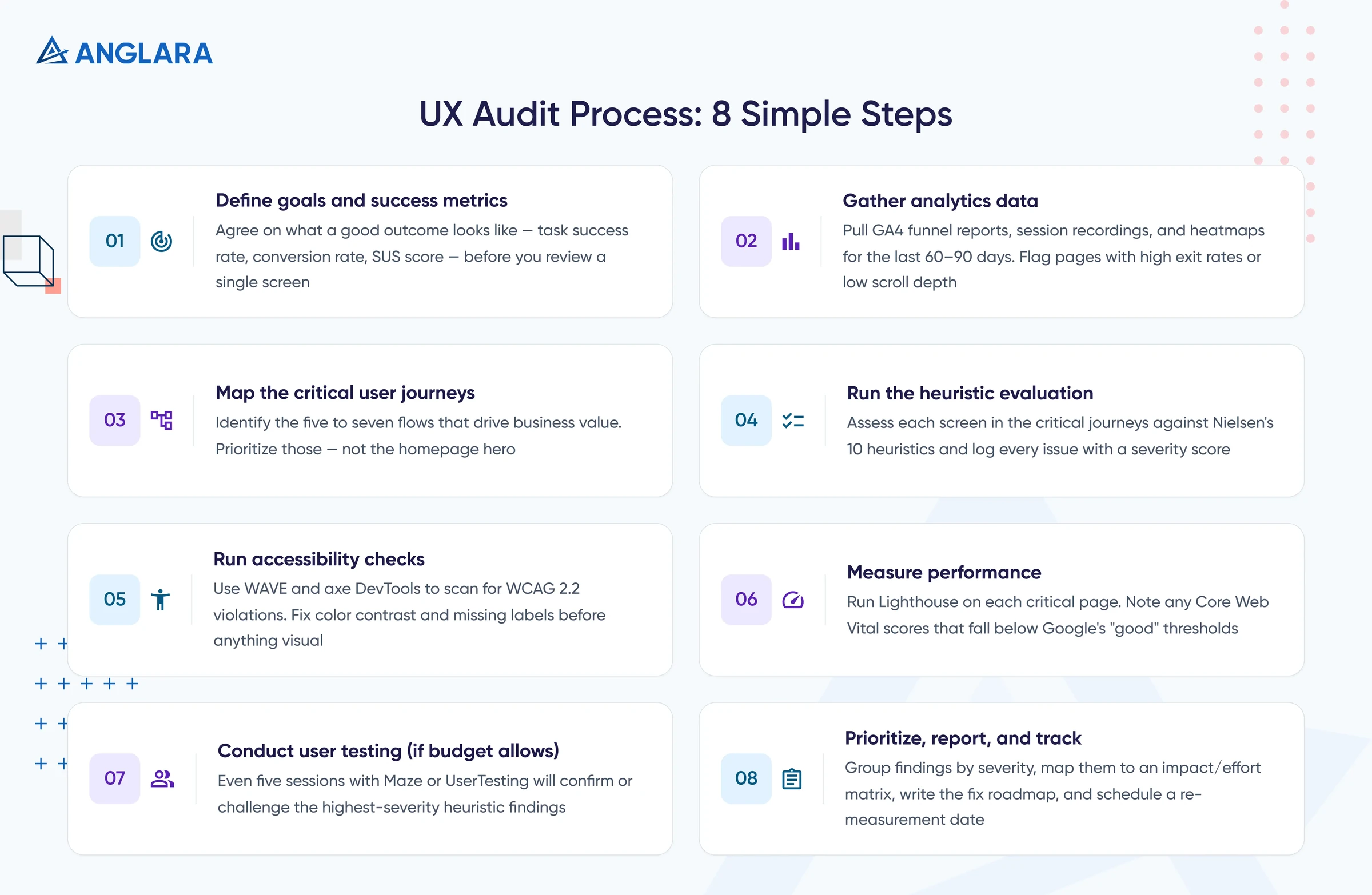
A UX audit runs in eight stages, from goal-setting to tracking post-fix results. Following the sequence matters: steps done out of order — accessibility checks before analytics, or recommendations before you have watched a user struggle — produce findings that miss the real problems. Build your UX audit checklist around these eight stages.
The UX Audit Checklist
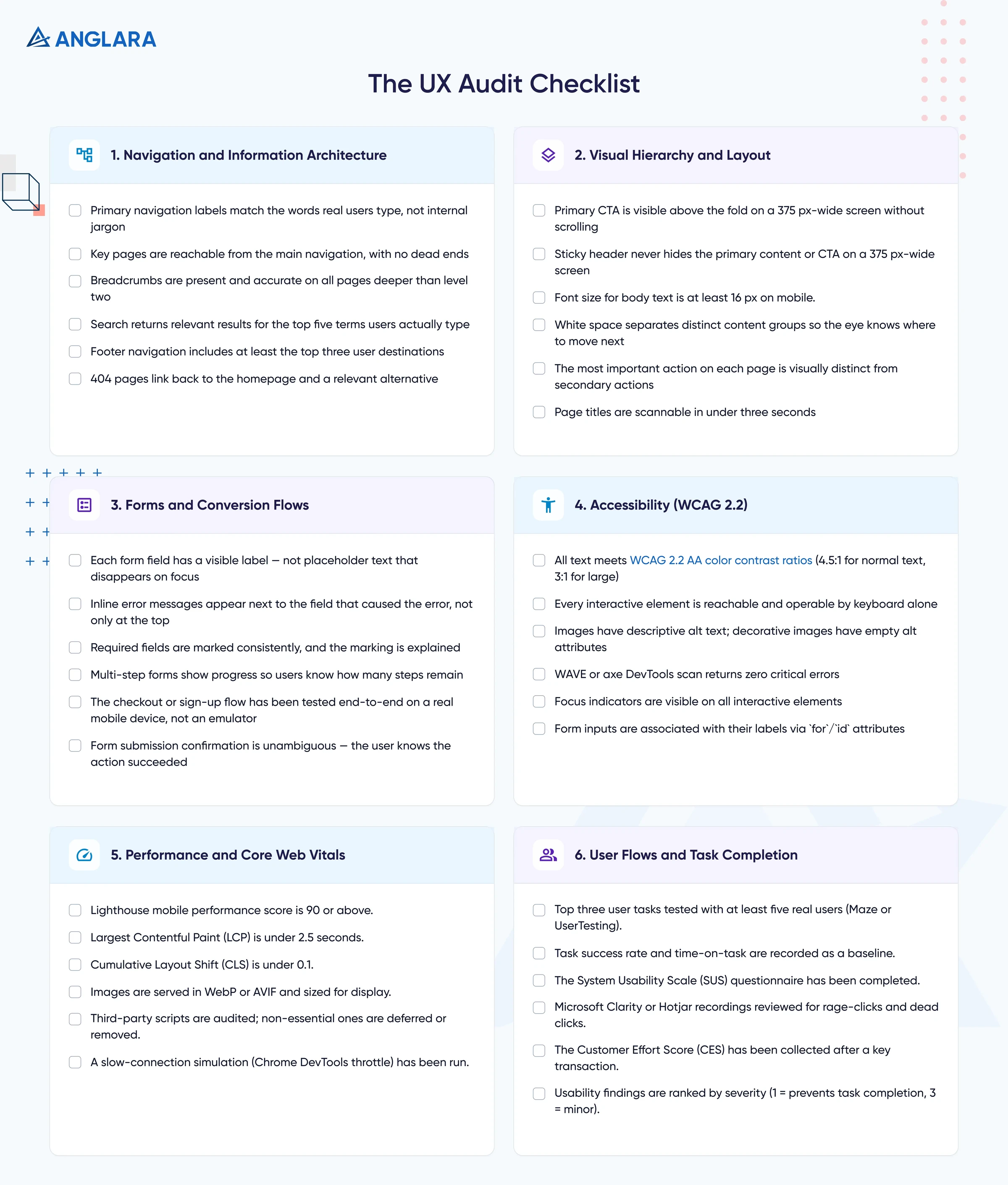
A thorough user experience audit covers six distinct areas. This checklist is grouped so you can work through one area at a time, assign items to team members, or use it to compare an agency's scope against your own needs. Copy the groups directly into a Notion doc or FigJam board to track progress.
Rather have an expert run this checklist? A fixed-scope UX audit starts from $999. Book a UX Audit Consultation
Which Tools Help With a UX Audit?
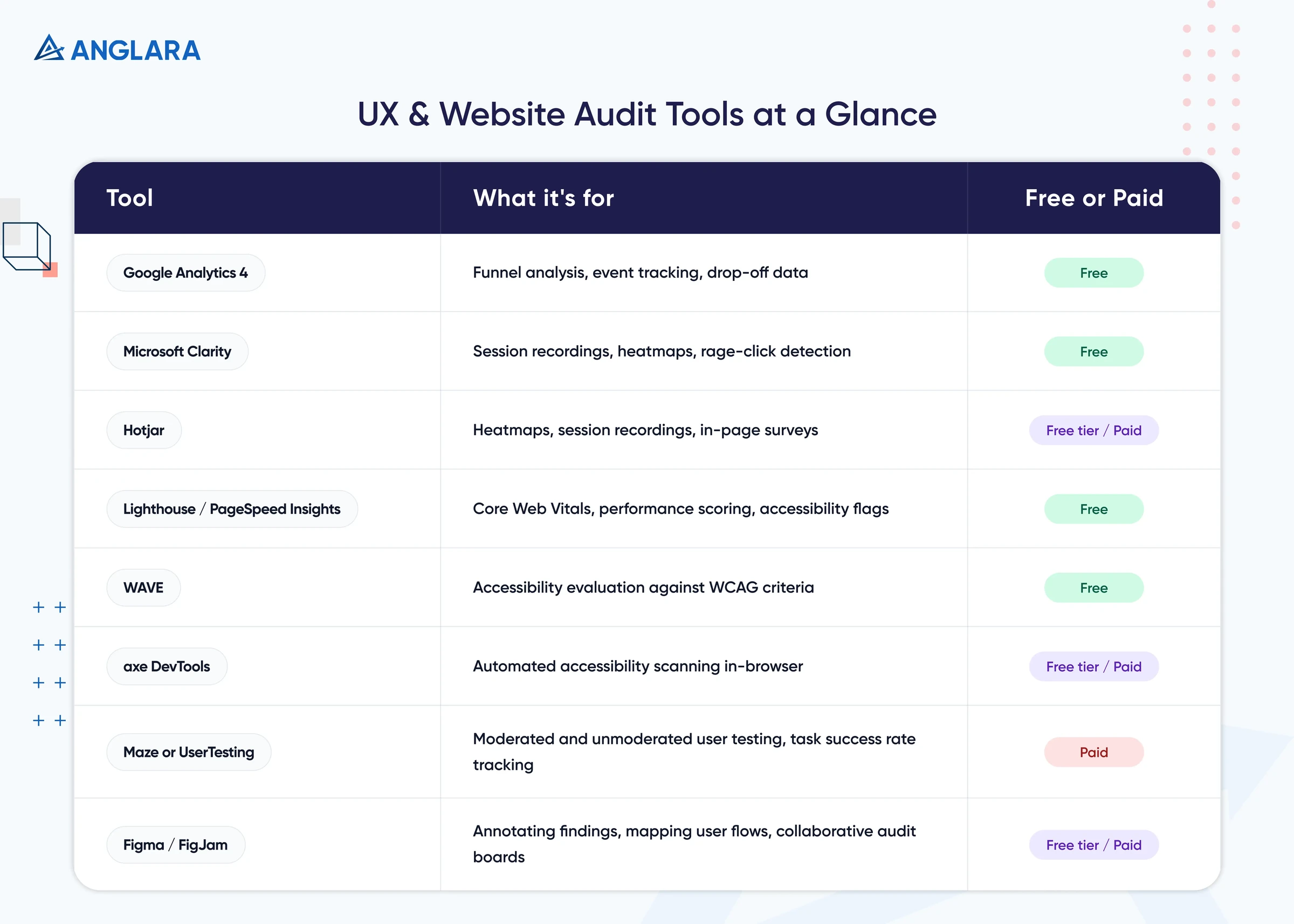
The core UX audit toolkit is Google Analytics 4, Microsoft Clarity or Hotjar, Lighthouse and PageSpeed Insights, WAVE or axe DevTools, and a user-testing tool such as Maze. A UX audit is only as reliable as the evidence behind it. Opinions without data are hard to defend in a stakeholder meeting — and hard to act on without a baseline. The eight tools below cover every layer of a thorough audit, from raw behavioral data to accessibility scanning.
How Do You Prioritize UX Audit Findings?
A thorough user experience audit surfaces far more issues than a team can fix at once. Without a prioritization framework, teams either freeze or fix the easiest things first — which are rarely the highest-impact things. Rate every finding before you plan a single sprint.
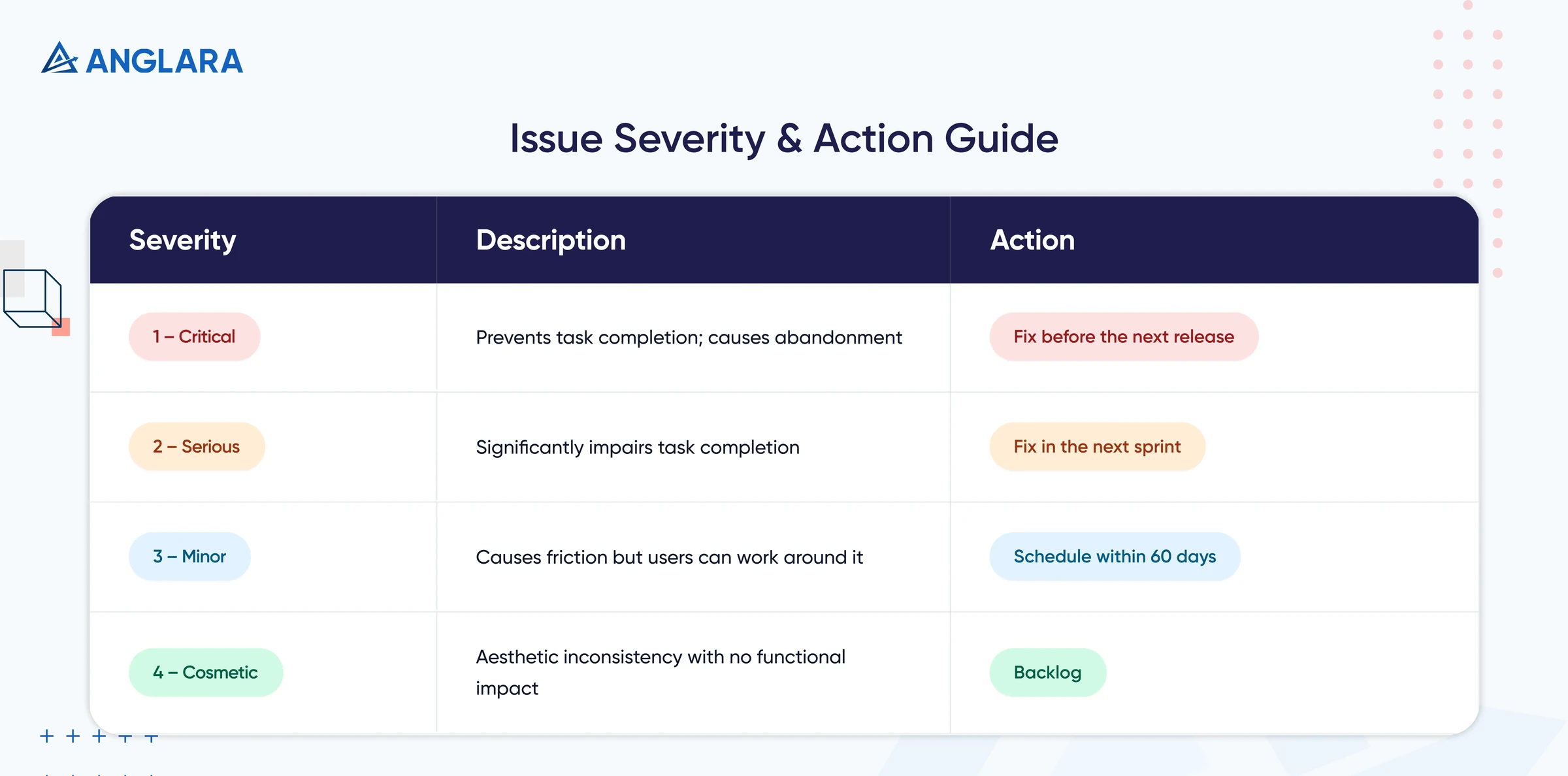
After severity scoring, plot each finding on a 2×2 impact/effort matrix. High impact, low effort items — a missing form label, a buried CTA — go first. Fix the top five severity-1 issues before you touch any visual polish.
Track four metrics before and after fixes to prove the audit's return:
- Task success rate — percentage of users who complete a defined task
- Conversion rate — primary goal completions per session
- System Usability Scale (SUS) — standardized 10-question usability score
- Customer Effort Score (CES) — how much effort users report spending to complete a task
What Should a UX Audit Report Deliver?
A good audit report does not just list problems — it tells the product team exactly what to fix, in what order, and how to know when the fix worked. If the report ends at "here are the issues", it has not done its job.
A complete report includes:
- Prioritized issue log with screenshots — every finding documented with annotated screen captures, the heuristic or guideline it violates, and a severity rating
- Severity ratings — each issue scored 1–4 so the team can triage without additional meetings
- Quick wins list — severity-1 and high-impact/low-effort fixes separated out so development can start immediately
- Larger fix roadmap — phased recommendations for structural issues (navigation, information architecture, flow redesigns) with estimated scope
- Baseline metrics — recorded task success rate, conversion rate, SUS score, and CES before any changes, so improvement can be measured
- Re-measurement plan — specific dates and metrics to check after the top fixes are live
What Are the Most Common UX Audit Mistakes?
The most common UX audit mistakes are auditing without goals, relying on opinion without data, fixing everything at once, ignoring mobile, skipping accessibility, and never re-measuring. Most failed audits do not fail because the reviewer missed something — they fail because the process was set up incorrectly before a single screen was reviewed. A thorough user experience audit avoids these six pitfalls.
- Auditing without defined goals. An audit without agreed success metrics produces a list of observations, not a decision-making tool. Set measurable goals — task success rate, conversion rate — before you start
- Running opinions without data. Heuristic findings that are not backed by analytics or session recordings are hard to prioritize and easy for stakeholders to dismiss. Always pair expert review with behavioral evidence
- Trying to fix everything at once. Prioritize severity-1 issues and ship them before moving to cosmetic changes. Fixing 40 minor issues before the checkout blocker is still broken wastes every hour spent
- Ignoring mobile. Check your own analytics before scoping: if most of your sessions are on mobile and the audit only covers desktop, it misses the experience most users actually have
- Skipping accessibility. Accessibility issues are often severity-1 by definition — they block task completion entirely for users with disabilities. WCAG 2.2 compliance is not a separate workstream; it belongs inside every audit
- No re-measurement. An audit without a follow-up check has no way to prove value. Schedule a re-measurement date before the report is delivered
How Anglara Runs a UX Audit
At Anglara Digital Solutions LLP, the first audit question is whether the product has anything worth keeping.
On a comedy theater website revamp, the answer was no — the old site had so little working that an audit would have documented problems nobody planned to keep. We skipped it and rebuilt from scratch: new information architecture, new UX, and a new site. The result was a 90+ performance score and an increase in ticket sales.
That judgment comes from 8+ years and 70+ projects of design and build work, rated 4.8 on Clutch across 17 reviews.
The consistent principle: a heuristic review without supporting analytics is just an opinion. Anglara runs both together, then ranks findings by severity so the team fixes what actually breaks the experience before touching visuals.
Read the comedy theater case study →
Should You Do a UX Audit Yourself or Hire an Expert?
A solo practitioner can run a credible UX audit on a small product using free tools. The case for hiring a specialist grows with product complexity, audit scope, and when findings need to carry weight with stakeholders who will not accept internal opinions as evidence.
| Factor | DIY | Hired specialist |
| Cost | Time only; free tools available | From $999 for a fixed scope |
| Objectivity | Risk of familiarity bias | Outside perspective finds issues the team is blind to |
| Speed | Slower without process templates | Structured methodology, faster delivery |
| Stakeholder credibility | May be dismissed as internal opinion | Third-party findings are harder to deprioritize |
| Tool access | Free tier limitations | Full-license tools and established panel access |
| Best for | Small sites, internal teams with UX skills, low-stakes products | Pre-launch products, conversion-critical flows, accessibility compliance |
Cost drivers for a professional audit include: number of user journeys in scope, number of screens reviewed, platform count (web, iOS, Android), whether user testing sessions are included, and the detail level of the deliverable.
If you would rather have an outside team run it end to end, our UX audit and heuristic evaluation service covers this checklist and hands you a prioritized fix list.
What a UX audit costs at Anglara
| Package | What's included | Price |
| Fixed-scope UX audit | One website or app, up to 3 key user journeys: heuristic review, GA4 and Microsoft Clarity analytics review, WCAG 2.2 AA accessibility check, Core Web Vitals check, prioritized fix list with a walkthrough call | From $999 |
| Extended audit | More journeys or platforms, moderated user testing sessions | Quoted after a short discovery call |
You get a written quote before any work starts. The timeline is agreed when the scope is set.
Book a UX Audit Consultation
We respond the same business day.
Frequently Asked Questions
How long does a UX audit take?
A UX audit's length depends on how many user journeys are in scope and whether user testing sessions are included; the timeline is agreed when the scope is set.
How much does a UX audit cost?
Cost depends on scope: number of screens, platforms covered, depth of accessibility review, and whether the engagement includes moderated user testing. A fixed-scope UX audit — one website or app, up to three key user journeys — starts from $999. Larger products, multiple platforms, or audits with moderated user testing are quoted after a short discovery call.
Is a UX audit the same as usability testing?
No. An audit combines heuristic evaluation, analytics review, and accessibility checks — it does not require real users to be observed. Usability testing brings actual users in to complete tasks and captures behavior directly. The two methods complement each other; audits identify what to test, testing confirms whether a fix works.
How is a UX audit different from a UI audit?
A UI audit focuses on visual consistency — color, typography, spacing, and component design. A UX design audit examines the entire user journey: information architecture, task flows, error handling, performance, and accessibility. Visual issues are part of the picture, but UX scope goes much further than what the product looks like.
How often should you run a UX audit?
As a rule of thumb, we recommend a full audit about once a year, with lighter heuristic spot-checks after major releases. Any significant product change — a navigation restructure, a new checkout flow, a replatform — should trigger an audit before launch, not six months after.
Does a UX audit include accessibility and WCAG compliance?
A thorough audit always includes accessibility. Automated checkers like WAVE and axe DevTools catch only part of WCAG issues; manual keyboard and screen-reader testing is needed for the rest. Accessibility findings are treated as usability issues, not a separate workstream.
Can I run a UX audit myself?
Yes, with the right tools and a structured process. Start with GA4 funnel data, run Lighthouse on your critical pages, then walk through each journey against Nielsen's 10 heuristics. The main risk is familiarity bias — teams often miss issues they have stopped noticing. An outside reviewer typically surfaces more findings.
What happens after a UX audit?
The report hands you a prioritized issue log. The standard next step is to fix severity-1 issues first — those that block task completion — and ship them before addressing lower-priority findings. Set a re-measurement date and track task success rate, conversion rate, SUS, and CES to confirm the fixes worked.