

Think B2B marketing automation is just about sending drip emails?
Think again.
B2B marketing automation helps revenue teams connect CRM, website forms, email nurture, lead scoring, sales routing, reporting, and AI-assisted workflows into one repeatable system. The goal is simple: fewer manual follow-ups, faster sales response, better lead visibility, and a smoother buyer journey.
In this guide, we’ll break down what B2B marketing automation really means, where it helps most, how to build nurture campaigns, what to automate first, and how to avoid the common mistakes that turn automation into another messy tool stack.
B2B marketing automation is the use of software, workflows, CRM data, email sequences, lead scoring, sales alerts, and reporting to automate repetitive marketing and sales-support tasks across a long B2B buying cycle.
It helps teams capture leads, segment prospects, run nurture campaigns, identify sales-ready accounts, notify the right salesperson, and measure which campaigns influence pipeline. For most SMB and mid-market teams, the best starting point is not buying a bigger tool. It is mapping the lead journey clearly: capture the lead, track the source, update the CRM, segment the contact, send relevant follow-ups, alert sales when intent increases, and report what happened.
Done well, B2B marketing automation improves speed, consistency, visibility, and buyer experience. Done badly, it creates duplicate contacts, messy CRM fields, ignored alerts, robotic emails, and reporting no one trusts.
Who This Is For
This guide is for B2B teams that already generate some leads but still rely too much on manual follow-up.
You may be a good fit if:
- Your website forms go to email but not properly into CRM
- Sales keeps asking, “Where did this lead come from?”
- Leads are followed up inconsistently
- Prospects download content but never receive a relevant next step
- CRM records are incomplete, duplicated, or poorly tagged
- Marketing cannot clearly show which campaigns influence pipeline
- Founders or managers still manually check every inquiry
- Your team uses tools like HubSpot, Salesforce, Zoho, Pipedrive, ActiveCampaign, Mailchimp, or Zapier, but the workflow still feels disconnected
This is especially useful for:
- B2B founders
- CMO and RevOps leaders
- SaaS and product teams
- Consulting firms
- Marketing agencies
- IT service companies
- Sales operations teams
- SMB and mid-market businesses with longer sales cycles
This is not only for enterprise teams. In many smaller teams, automation creates faster impact because it reduces founder dependency and gives everyone a clearer process.
What Is B2B Marketing Automation?
B2B marketing automation is the process of using technology to automate marketing workflows for companies that sell to other businesses.
In practical terms, it helps your team automatically handle tasks like:
- Capturing leads from website forms
- Creating or updating CRM contacts
- Tagging prospects by service interest
- Sending welcome or follow-up emails
- Running nurture campaigns
- Scoring leads based on fit and intent
- Assigning leads to the right salesperson
- Creating follow-up tasks
- Sending sales alerts
- Tracking campaign performance
- Re-engaging cold prospects
- Creating reports for leadership
Here’s a simple example.
A prospect visits your website and downloads a guide about AI automation.
Without automation, someone has to notice the form submission, copy the details, add the lead to CRM, send an email, decide whether the person is sales-ready, and remember to follow up later.
With automation, the system can:
- Create or update the CRM contact
- Tag the person as interested in AI automation
- Capture source and campaign details
- Send a relevant email sequence
- Score the lead based on behavior
- Alert sales if the person visits a consultation page
- Create a follow-up task
- Add the lead to a reporting dashboard
That is B2B marketing automation at work.
The goal is not to remove humans from the buying journey. The goal is to remove repetitive manual work so your team can focus on better conversations, stronger strategy, and closing revenue.
Why Marketing Automation For B2B Matters Now
B2B buyers are doing more research before they ever speak to sales.
They compare vendors, read blogs, ask peers, join communities, download guides, attend webinars, and revisit service pages multiple times before starting a conversation.
Gartner reported in 2026 that 67% of B2B buyers prefer a rep-free buying experience. That does not mean sales is dead. It means buyers want to educate themselves before speaking to sales.
This changes how B2B teams need to operate.
Your website, content, CRM, email journeys, and sales handoff process need to support the buyer before they are ready to talk.
That is where marketing automation for B2B becomes useful.
It helps you:
- Educate prospects before a sales call
- Respond faster to high-intent actions
- Personalize follow-ups by role, industry, or service interest
- Prevent good leads from going cold
- Keep sales and marketing aligned
- Track which content and campaigns influence pipeline
- Reduce manual work across marketing and sales
A buyer who downloads a checklist today may not be ready to book a call tomorrow. But if they receive relevant content, see useful examples, and get a timely human follow-up when their intent increases, your chances improve.
That is the real promise of B2B marketing automation.
Not “set it and forget it.”
More like “build a system that keeps the right conversation moving.”
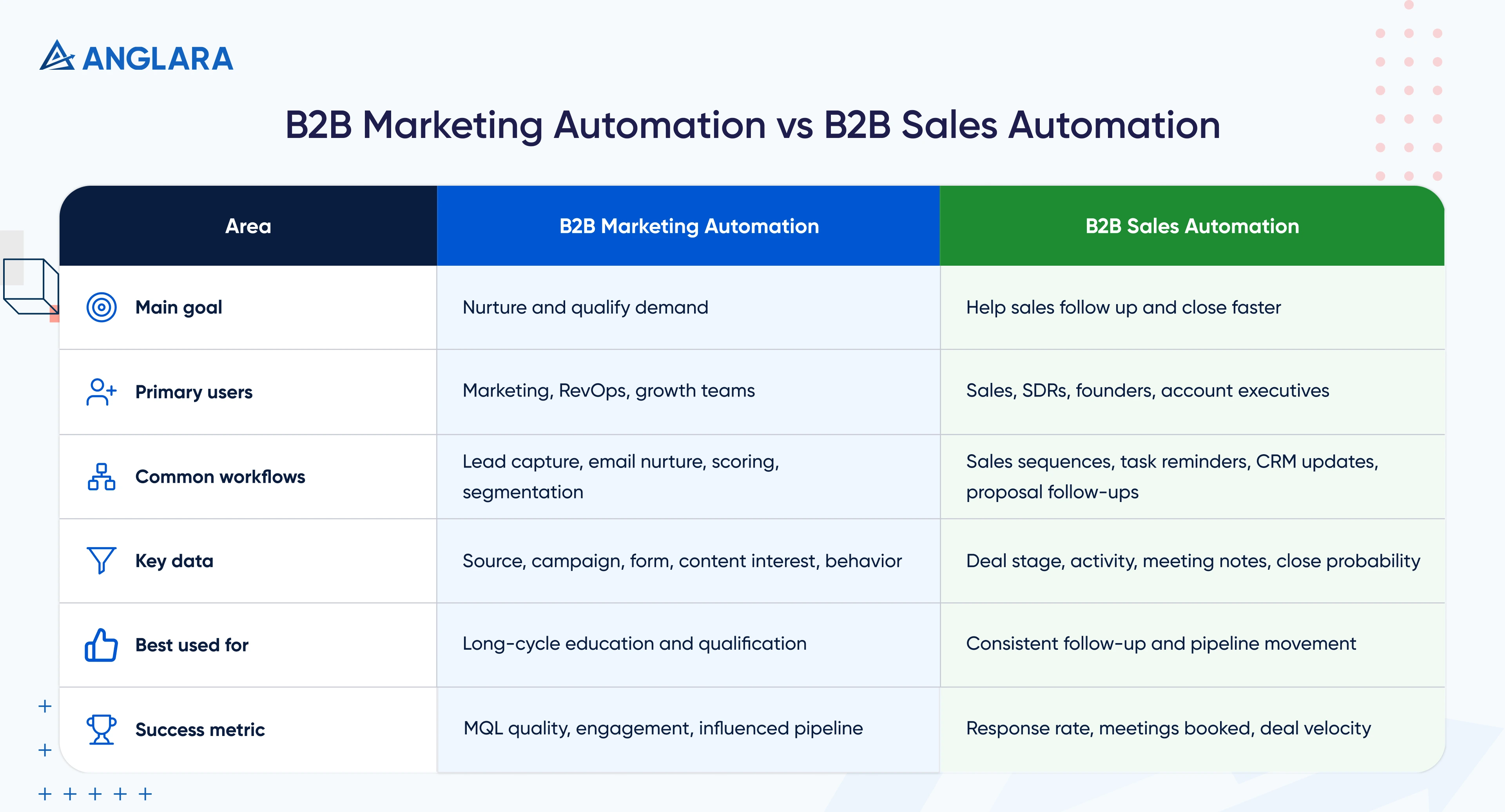
B2B Marketing Automation vs B2B Sales Automation
B2B marketing automation and B2B sales automation are connected, but they are not the same.
Marketing automation focuses on demand generation, lead capture, segmentation, nurture campaigns, scoring, and campaign reporting.
B2B sales automation focuses on sales productivity: outreach sequences, follow-up reminders, proposal follow-ups, CRM updates, meeting notes, task automation, and pipeline movement.
Both should work together.
Salesforce reported that sales reps spend 60% of their time on non-selling tasks. That is exactly why automation matters on both sides. Marketing automation prepares better leads, while sales automation helps salespeople spend more time on actual selling conversations.
The strongest revenue systems connect both.
For example:
- Marketing captures and nurtures the lead
- Scoring identifies intent
- Sales receives an alert when the lead is ready
- Sales follows up with context
- CRM updates the opportunity
- Reporting shows which campaign influenced the deal
That is where automation becomes useful for revenue, not just marketing activity.
Core Workflows Every B2B Team Should Automate
You do not need to automate everything at once.
In our experience, teams get better results when they start with a few high-impact workflows and improve them over time.
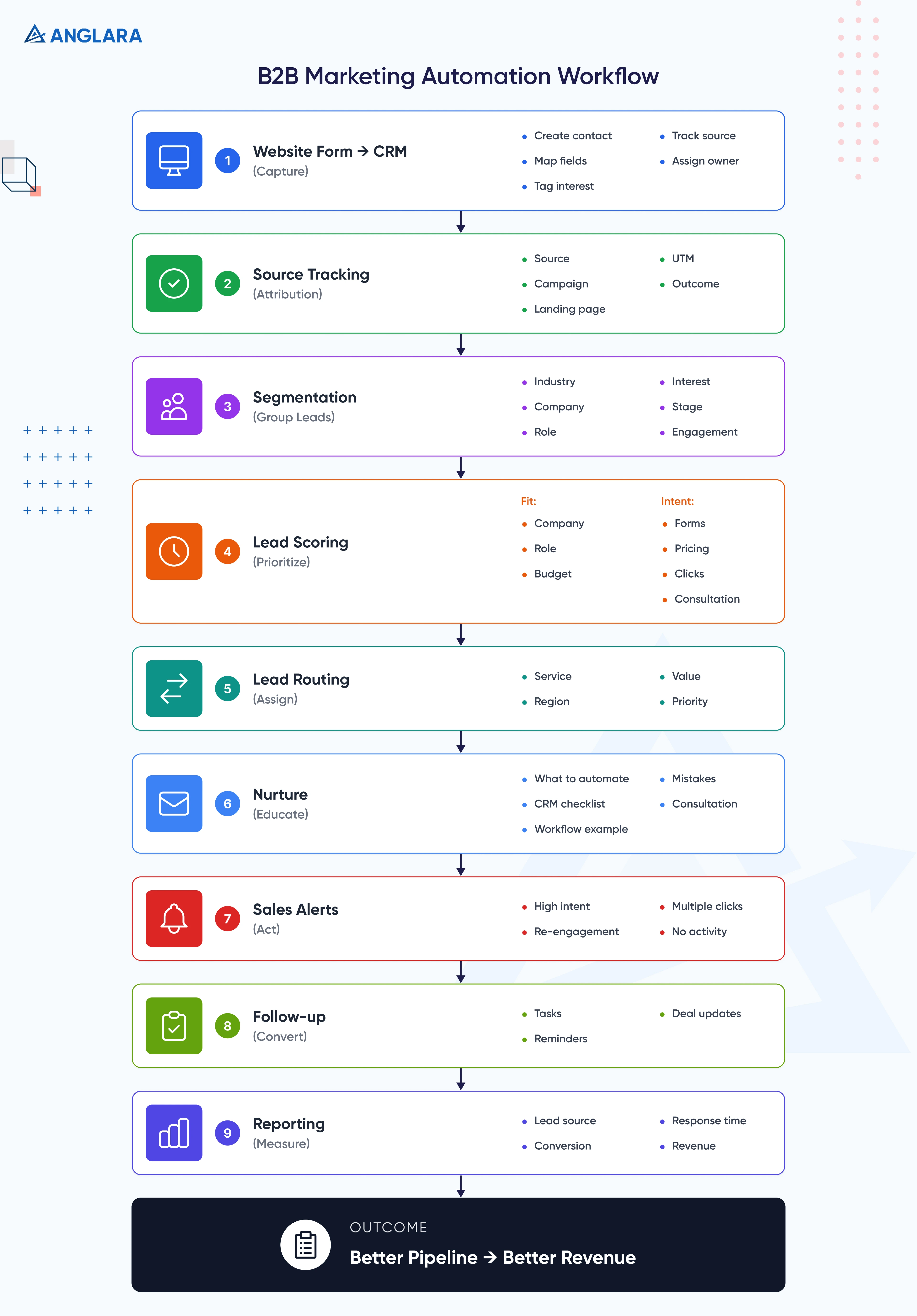
Website Form to CRM Workflow
This is the foundation.
Every inquiry from your website should automatically enter your CRM with the right source, page, service interest, lifecycle stage, and owner.
A proper form-to-CRM workflow should include:
- Contact creation or update
- Company field mapping
- Service interest tagging
- Lead source tracking
- UTM capture
- Notification to the right team member
- Auto-response email
- CRM task creation
- Duplicate check
What often breaks:
- Form data goes to email only, not CRM
- UTM data is lost
- Team members manually copy details
- Different forms use different field names
- Leads get assigned to the wrong person
- No one checks whether the workflow still works after a form or CRM update
What Anglara Would Do First
Before building automation, we would map every form field, CRM field, source, owner, and follow-up rule.
This prevents the most common issue: leads entering the system but becoming useless because the data is incomplete.
For example, a “Book consultation” form should not simply create a contact. It should also capture:
- Page submitted from
- Service interest
- Source and campaign
- Preferred contact method
- Lead owner
- Lifecycle stage
- Next follow-up task
- Sales notification
This is basic, but many teams skip it. Then they wonder why reporting is unclear.
Lead Source and Campaign Tracking
Many teams spend money on SEO, ads, LinkedIn, email outreach, webinars, and referrals but cannot clearly answer which source creates qualified pipeline.
Automation can help you track:
- Original source
- Latest source
- Campaign
- Landing page
- Form submitted
- UTM parameters
- Content downloaded
- Sales outcome
This matters because “more leads” is not always the goal. Better leads are.
When campaign tracking is clean, you can see whether a blog, ad campaign, LinkedIn post, event, or referral partner is actually contributing to pipeline.
Lead Segmentation
Not every lead should receive the same message.
A founder interested in AI automation should not receive the same nurture sequence as a marketing manager looking for WordPress support.
Useful B2B segments include:
- Industry
- Company size
- Role
- Service interest
- Buying stage
- Lead source
- Content topic
- Engagement level
- Existing customer vs new prospect
- Region or time zone
Segmentation is where automation starts to feel personal.
A simple example:
If someone downloads a guide on AI chatbots, they can enter an AI chatbot nurture campaign. If they later visit a consultation or pricing page, they can receive a sales follow-up task instead of staying inside a generic email sequence.
Lead Scoring
Lead scoring helps teams decide which prospects deserve faster human attention.
A practical B2B lead scoring model should include two types of signals.
Fit signals:
- Company size
- Industry
- Job title
- Location
- Technology stack
- Budget range
- Target account status
Intent Signals:
- Form submission
- Pricing page visit
- Case study visit
- Webinar attendance
- Email clicks
- Repeat website sessions
- Consultation page visit
- Reply to outreach
The mistake many teams make is scoring every activity equally.
A blog view should not be treated the same as a consultation page visit. A student downloading a guide should not be treated the same as a CTO requesting an implementation estimate.
Start simple. Improve later.
Lead Routing
Lead routing decides who receives the lead and what happens next.
Routing can be based on:
- Service interest
- Region
- Company size
- Deal value
- Existing account owner
- Industry
- Form type
- Priority score
For example:
- AI automation inquiry goes to the AI consulting owner
- WordPress maintenance inquiry goes to the web team
- Existing client inquiry goes to account management
- High-value enterprise inquiry goes to founder or senior sales
Good routing reduces delay. Bad routing creates confusion.
Nurture Campaigns
Nurture campaigns are automated sequences that educate prospects over time.
They can be email-based, CRM-based, retargeting-based, or multi-channel.
A good nurture campaign does not simply say:
“Just checking in.”
It should help the buyer move forward.
For example, a prospect interested in marketing automation may receive:
- Email 1: Plain-English explanation of what to automate first
- Email 2: Checklist for CRM and lead routing readiness
- Email 3: Example workflow for lead nurture and sales handoff
- Email 4: Common mistakes and how to avoid them
- Email 5: CTA to book a free 30-minute consultation
According to a HubSpot article citing Forrester Research, companies that excel at lead nurturing generate 50% more sales-ready leads at 33% lower cost.
That is the business case for nurture campaigns. They are not just email sequences. They are a way to turn early interest into better sales conversations.
Sales Alert and Task Automation
Sales should not have to check every dashboard manually.
Automation can create alerts when:
- A lead submits a high-intent form
- A target account visits a key page
- A dormant lead re-engages
- A prospect clicks multiple emails
- A deal has no activity for several days
- A proposal has not been followed up
This is where marketing automation supports B2B sales automation.
The sales team gets context, not just a name.
Proposal and Follow-Up Automation
Many B2B deals are lost after the first call because follow-up becomes inconsistent.
Automation can help by:
- Creating proposal follow-up tasks
- Sending reminder emails
- Updating deal stages
- Alerting managers when no action happens
- Sending internal summaries after calls
- Tracking proposal views, where supported
The key is to avoid robotic follow-ups. Use automation to remind and support humans, not to replace judgment.
Reporting Automation
Reporting should not depend on one person manually preparing numbers every Friday.
A useful B2B automation dashboard can show:
- Leads by source
- Leads by service interest
- MQL to SQL conversion
- Sales response time
- Email engagement
- Campaign-influenced deals
- Pipeline by source
- Lost reason trends
- Revenue by channel
This turns marketing automation from “email software” into a revenue visibility system.
How to Build Nurture Campaigns That Actually Convert
Nurture campaigns are one of the biggest opportunities in B2B marketing automation.
They are also one of the easiest things to get wrong.
A weak nurture campaign sends the same generic emails to everyone.
A strong nurture campaign understands what the buyer is trying to solve and sends useful, timely, relevant content.
Start with the Buying Stage
Before writing emails, define the stage.
Most B2B nurture campaigns can be mapped to four stages:
This simple mapping prevents one of the biggest mistakes: asking for a sales call too early.
Segment by Interest
Interest-based nurture usually performs better than one broad newsletter sequence.
Examples:
- AI automation nurture
- CRM automation nurture
- Website conversion nurture
- WordPress maintenance nurture
- SaaS product development nurture
- Local SEO nurture
- Marketing operations nurture
Each sequence should speak to a specific problem.
For example, a marketing automation nurture campaign for a B2B service company may focus on:
- Manual follow-up issues
- CRM visibility gaps
- Slow sales response
- Poor source tracking
- Weak lead handoff
- Unclear reporting
That is far more relevant than a generic “monthly newsletter.”
Build A Simple 5-Email Nurture Campaign
Here is a practical structure:
The goal is not to push hard in every email.
The goal is to make the next action feel logical.
Use Behavior-Based Triggers
A nurture campaign should not be completely fixed.
Add simple behavior triggers:
- If the user clicks a consultation CTA, create a sales task
- If the user visits a pricing or service page, notify sales
- If the user ignores three emails, reduce frequency
- If the user downloads another guide, update interest score
- If the user replies, stop automated emails and hand off to a human
This keeps automation helpful rather than annoying.
Add Human Moments
B2B buyers still want confidence, context, and trust.
Automation should create space for better human follow-up.
For example:
“Hi Sarah, noticed you downloaded our B2B automation checklist and also looked at the CRM workflow section. Happy to share a simple workflow map if useful.”
That feels better than:
“Just checking in.”
Measure The Right Metrics
Do not judge nurture campaigns only by open rates.
Track:
- Click-through rate
- Reply rate
- Consultation bookings
- MQL to SQL conversion
- Sales accepted leads
- Opportunity creation
- Pipeline influenced
- Unsubscribe rate
- Time to first sales touch
A nurture campaign that gets fewer clicks but creates better sales conversations is more valuable than a sequence with vanity engagement.
B2B Marketing Automation Platforms: What to Look For
There are many B2B marketing automation platforms. The right one depends on your team size, CRM setup, budget, sales cycle, and technical needs.
Common options include:
- HubSpot
- Salesforce Marketing Cloud Account Engagement
- Adobe Marketo Engage
- Oracle Eloqua
- ActiveCampaign
- Zoho Marketing Automation
- Mailchimp
- Customer.io
- 6sense or Demandbase for ABM-heavy teams
Do not choose based only on feature lists.
Choose based on workflow fit.
Platform Selection Checklist
When This Is A Good Fit
B2B marketing automation is a good fit when:
- You have consistent lead flow
- Your sales cycle takes more than a few days
- Prospects need education before buying
- You have multiple services or buyer segments
- Sales follow-up is inconsistent
- Your CRM is underused
- You want better campaign-to-pipeline reporting
- You want to reduce manual work without hiring more people
When This Is Not A Good Fit
It may not be the right priority if:
- You do not have clear offers yet
- You have almost no website traffic or lead flow
- Your CRM data is unusable
- Your team is not ready to follow a process
- You expect automation to fix poor positioning
- You want to spam cold lists at scale
- You do not have consent and compliance basics in place
Automation amplifies the system you already have.
If the system is messy, automation makes the mess faster.
Benefits and Outcomes of B2B Marketing Automation
When implemented correctly, B2B marketing automation can improve both marketing performance and sales execution.
Faster Lead Response
Speed matters.
When a prospect fills out a form, downloads a high-intent asset, or books a demo, the system can notify the right person immediately.
A faster response can improve the chance of a real conversation, especially for high-intent leads.
Better Lead Nurturing
Most B2B buyers are not ready to buy the first time they interact with your company.
Nurture campaigns keep your brand useful while they research, compare, and discuss internally.
Stronger Sales and Marketing Alignment
Automation helps both teams work from shared data.
Marketing can see which leads convert. Sales can see what content a lead engaged with before the call.
That shared context improves the quality of follow-up.
Less Manual Work
Common manual tasks like lead entry, tagging, reminders, reporting, and basic follow-ups can be automated.
This does not remove the need for people. It helps people spend less time on repetitive admin and more time on strategy, conversations, and closing.
Better Pipeline Visibility
When source tracking, lifecycle stages, and CRM updates are clean, leadership can see what is working.
You can answer:
- Which campaigns generate qualified leads?
- Which sources convert to deals?
- Where do leads drop off?
- Which services attract the most interest?
- Which sales follow-ups are delayed?
This is where automation becomes a management tool, not just a marketing tool.
Risks, Governance, and What Usually Breaks
B2B marketing automation can create real value, but it can also create problems if it is rushed.
Poor Data Quality
Bad data is the fastest way to break automation.
Common issues include:
- Duplicate contacts
- Missing company names
- Wrong lifecycle stages
- Inconsistent service interest fields
- Old email lists
- Poor source tracking
- Manual edits that override workflow logic
If data is messy, lead scoring and reporting become unreliable.
Overcomplicated Workflows
Many teams try to build a huge automation system on day one.
That usually fails.
Start with a small number of workflows:
- Website lead capture
- CRM field mapping
- Welcome or nurture sequence
- Lead scoring
- Sales alert
- Basic dashboard
Then improve.
Robotic Messaging
Automation should not make your brand sound cold.
Avoid:
- Over-personalization that feels creepy
- Too many “just checking in” emails
- Email sequences with no useful value
- Generic copy sent to every segment
- Aggressive meeting pushes too early
The best automation feels timely and helpful.
No Ownership
Someone needs to own the system.
Without ownership, workflows become outdated, broken, or duplicated.
Assign responsibility for:
- CRM fields
- Email sequences
- Workflow logic
- Reporting dashboards
- Integrations
- QA testing
- Compliance checks
Weak Sales Handoff
Marketing automation fails when sales ignores the output.
Define:
- What counts as sales-ready
- Who follows up
- How fast they should respond
- What context they receive
- What happens if the lead is not ready
- How feedback returns to marketing
This loop matters more than the tool.
AI Without Guardrails
AI can help summarize leads, draft follow-ups, categorize inquiries, and analyze intent.
But AI should not be left unchecked in sensitive workflows.
Use guardrails for:
- Data privacy
- Message approval
- Hallucination checks
- CRM write permissions
- Brand tone
- Human review for high-value deals
- Compliance-sensitive industries
What Anglara Would Watch Closely
We would use AI where it reduces manual effort, but keep humans in control of important buyer-facing and CRM-changing decisions.
For example, AI can summarize a lead’s activity and suggest a follow-up, but sales should approve the final message for important prospects.
What teams usually underestimate:
- CRM field hygiene
- Duplicate contact logic
- Sales handoff rules
- Consent and unsubscribe management
- Reporting ownership
- Workflow QA after tool updates
What often breaks during implementation:
- Form fields do not match CRM fields
- UTM data gets lost
- Sales alerts go to the wrong owner
- Leads enter nurture even after replying
- Old workflows keep running after new ones are added
- Reports show activity but not pipeline quality
Automation is powerful only when the process underneath is clean.
30-Day Starter Plan For B2B Marketing Automation
You do not need a six-month transformation project to begin.
Here is a practical 30-day starter plan.
Week 1: Audit Your Current Lead Flow
List every place a lead can come from:
- Website forms
- Contact page
- Calendly or booking tools
- Chat widget
- Email outreach
- Ads
- Referrals
- Events
- Downloadable assets
For each source, document:
- Where the lead goes
- Who receives it
- Whether it enters CRM
- Which fields are captured
- Whether the source is tracked
- Whether a follow-up happens
- What happens after the first reply
You will usually find 3–5 obvious leaks in this step alone.
Week 2: Fix CRM Ffields And Lifecycle Stages
Before building workflows, clean the CRM structure.
Useful fields include:
- Name
- Company
- Role
- Website
- Country
- Service interest
- Lead source
- Original source
- Lifecycle stage
- Lead score
- Sales owner
- Last activity
- Next follow-up date
- Lost reason
Then define lifecycle stages clearly.
A simple model:
- Subscriber
- Lead
- Marketing qualified lead
- Sales qualified lead
- Opportunity
- Customer
- Lost
- Re-engage later
Do not automate unclear stages.
Week 3: Build Your First Automation Workflows
Start with high-impact workflows.
Recommended first set:
- Contact form to CRM
- Consultation form to sales alert
- Downloadable asset to nurture campaign
- High-intent page visit to sales task
- No-response follow-up reminder
- Weekly lead source report
Keep workflows simple and test every condition.
Week 4: Test, Report, And Improve
Test the system with real sample submissions.
Check:
- Does the form create or update the contact?
- Is the lead source captured?
- Is the service interest correct?
- Is the owner assigned properly?
- Is the right email triggered?
- Is sales notified?
- Is the lead added to the right report?
- Is the unsubscribe logic working?
- Does the nurture stop when a human conversation starts?
Then review the first set of results.
Look at:
- Lead quality
- Sales response time
- Email engagement
- Workflow errors
- Source tracking accuracy
- CRM field completion
- Sales feedback
This 30-day plan gives your team a real foundation without overbuilding.
Implementation Roadmap
Once your starter system is working, you can expand in stages.
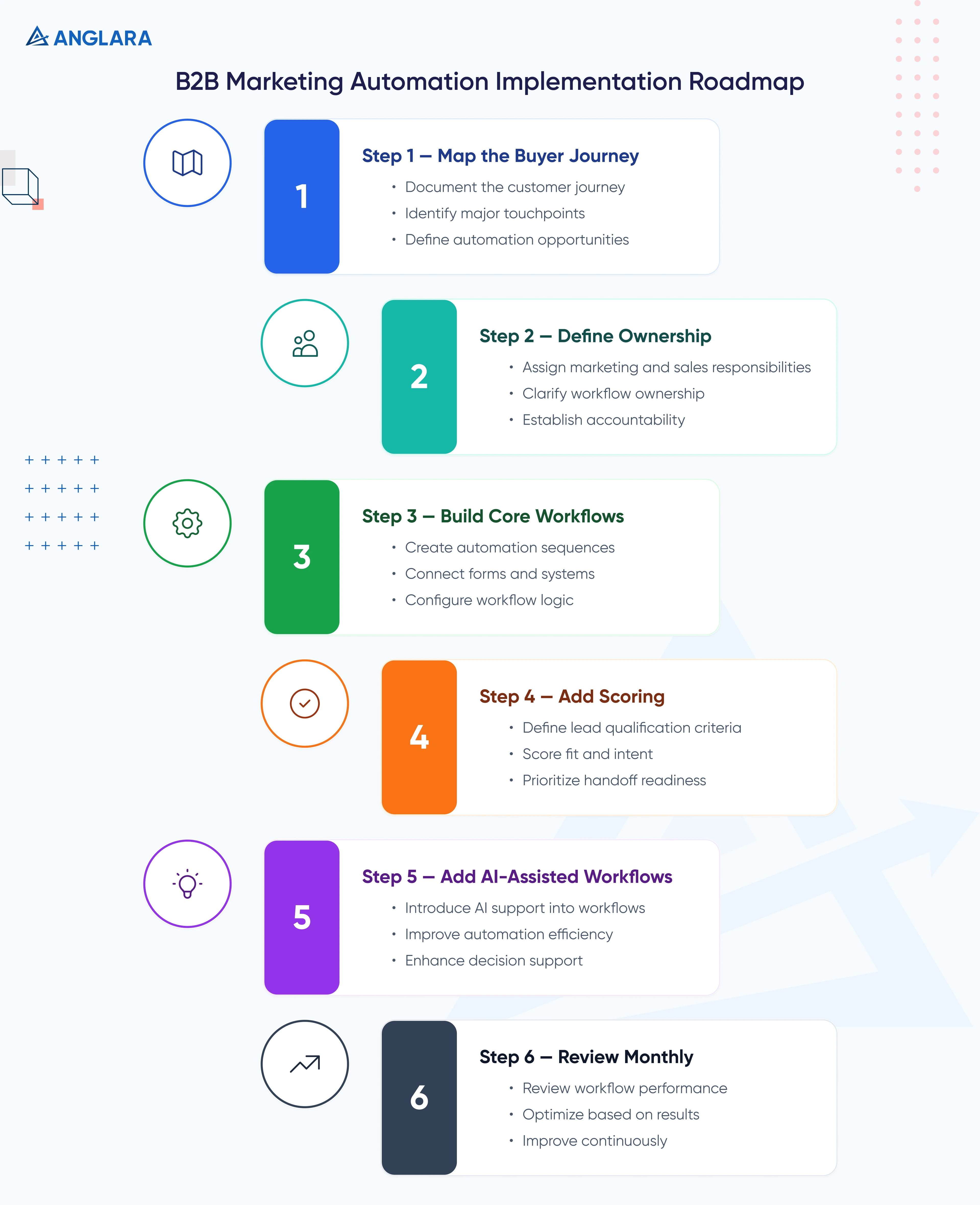
Step 1: Map The Buyer Journey
Document how a prospect moves from first touch to closed deal.
Include:
- Awareness content
- Website visit
- Form submission
- Nurture sequence
- Sales alert
- Discovery call
- Proposal
- Follow-up
- Close or lost reason
This map becomes the base for automation.
Step 2: Define Ownership
Decide who owns:
- CRM data quality
- Workflow logic
- Email copy
- Sales handoff
- Reporting
- Tool integrations
- Monthly optimization
If no one owns it, it will break slowly.
Step 3: Build Core Workflows
Start with:
- Form-to-CRM
- Lead source tracking
- Lead segmentation
- Nurture campaigns
- Sales alerts
- Follow-up tasks
- Basic dashboard
Keep documentation for every workflow.
Step 4: Add Scoring
Add simple lead scoring only after CRM fields and source tracking are stable.
Example:
- +10 for service page visit
- +20 for form submission
- +25 for consultation page visit
- +5 for email click
- +15 for repeat visit within 7 days
- -10 for irrelevant inquiry
- -15 for inactivity after 60 days
Do not make scoring too complicated too early.
Step 5: Add AI-Assisted Workflows
Once the basic system is stable, AI can support:
- Lead summaries
- Call note summaries
- Email draft suggestions
- Lead categorization
- Intent detection
- CRM cleanup suggestions
- Weekly pipeline summaries
Keep human review for important sales communication.
Step 6: Review Monthly
Automation is not a one-time setup.
Review monthly:
- Which emails perform?
- Which workflows fail?
- Which leads are ignored?
- Which sources create pipeline?
- Which scores are misleading?
- Which fields are incomplete?
- Which sales tasks are overdue?
Small monthly improvements usually produce better results than one large automation project no one maintains.
Cost, Effort, and Timeline
The cost of B2B marketing automation depends on your tool stack, CRM complexity, workflow count, integrations, data quality, and whether AI is included.
Typical Effort Ranges
What Drives Cost
The biggest cost drivers are:
- Number of workflows
- CRM complexity
- Tool integrations
- Data cleanup required
- Custom dashboard needs
- AI-assisted workflows
- Approval and compliance rules
- Number of nurture sequences
- Sales team handoff complexity
A small B2B team may not need a large enterprise platform.
Often, the better move is to improve your existing CRM and workflow setup first.
Common Mistakes
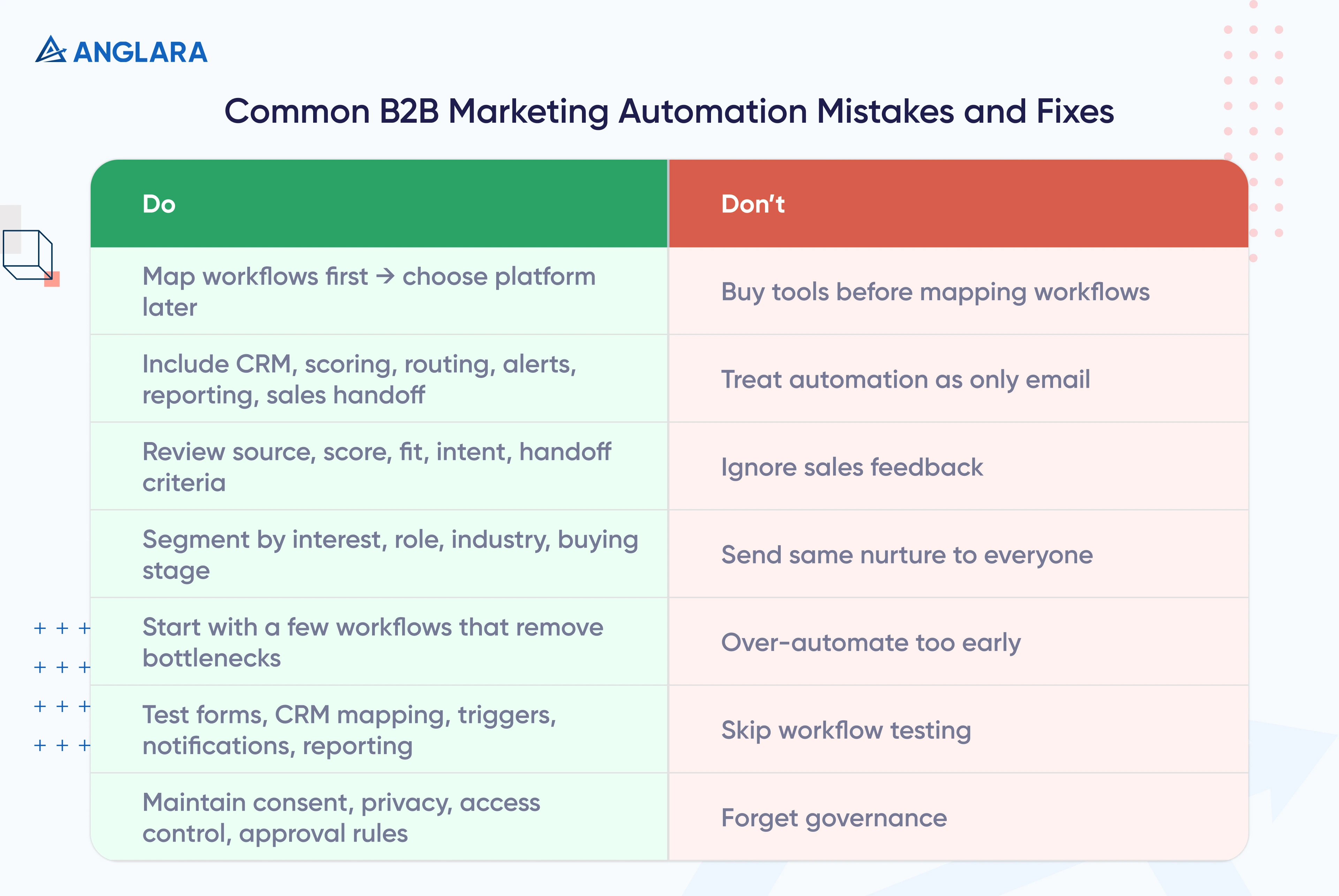
Buying Tools Before Mapping Workflows
A new tool will not fix unclear processes.
Map the workflow first. Then choose the platform.
Treating Automation As Only Email
B2B marketing automation includes CRM updates, scoring, routing, alerts, reporting, and sales handoff.
Email is just one part.
Ignoring Sales Feedback
If sales says the leads are poor quality, do not just send more leads.
Review source, score, fit, intent, and handoff criteria.
Sending The Same Nurture Campaign to Everyone
Different buyers need different journeys.
Segment by interest, role, industry, and buying stage where possible.
Over-Automating Too Early
A complicated workflow is not automatically better.
Start with a few automations that remove real bottlenecks.
Not Testing Workflows
Always test:
- Form submissions
- CRM field mapping
- Email triggers
- Sales notifications
- Unsubscribe logic
- Duplicate handling
- Lifecycle stage updates
- Reporting
One broken field can ruin the whole reporting chain.
Forgetting Governance
Make sure your system respects consent, privacy, access control, and approval rules.
This is especially important if you use AI to generate or summarize buyer data.
FAQs
What is B2B marketing automation?
B2B marketing automation is the use of software and workflows to automate lead capture, segmentation, email nurture, lead scoring, sales alerts, CRM updates, and reporting for companies that sell to other businesses.
It helps teams manage longer buying cycles and multiple decision-makers without manually following up with every prospect.
How is B2B marketing automation different from B2C automation?
B2B automation usually deals with longer sales cycles, buying committees, higher deal values, and more educational content.
B2C automation often focuses on faster purchase decisions, cart abandonment, offers, and individual customer behavior.
In B2B, automation must support trust, education, qualification, and sales alignment.
What are examples of B2B marketing automation?
Common examples include:
- Website form to CRM automation
- Lead nurture campaigns
- Demo request routing
- Lead scoring
- Sales alert workflows
- Proposal follow-up reminders
- Webinar follow-up emails
- Re-engagement campaigns
- CRM lifecycle updates
- Weekly campaign performance reports
What is a nurture campaign?
A nurture campaign is an automated sequence that educates and follows up with prospects over time.
In B2B, nurture campaigns usually help buyers understand the problem, compare options, evaluate vendors, and decide when to speak with sales.
A good nurture campaign is helpful, segmented, and based on buyer intent.
What is B2B sales automation?
B2B sales automation helps sales teams reduce repetitive work and follow up more consistently.
It can include automated sales sequences, CRM task reminders, proposal follow-ups, lead assignment, meeting summaries, pipeline updates, and activity tracking.
Marketing automation creates and warms up demand. Sales automation helps convert that demand into conversations and deals.
Which B2B marketing automation platforms are best?
The best platform depends on your CRM, budget, team size, and sales process.
HubSpot is often strong for SMB and mid-market teams that want CRM and marketing together. Salesforce Account Engagement can work well for Salesforce-first organizations. Marketo and Eloqua are common in larger enterprise environments. Zoho, ActiveCampaign, Mailchimp, and Customer.io may fit smaller or more specific use cases.
The best platform is the one your team can implement, maintain, and measure properly.
How much does B2B marketing automation cost?
The cost depends on platform fees, setup effort, workflow complexity, CRM integrations, data cleanup, and reporting needs.
A basic setup can be relatively lightweight if your CRM is clean and workflows are simple. More advanced implementations with custom integrations, AI workflows, and multi-stage reporting require more time and budget.
The safest approach is to start with a workflow audit before buying new software.
Can small B2B teams use marketing automation?
Yes. Small teams can benefit from automation when they focus on practical workflows.
A small team should start with:
- Website form to CRM
- Auto-response emails
- Sales notifications
- Simple lead nurture
- Follow-up reminders
- Basic reporting
You do not need enterprise-level complexity to get value.
Does marketing automation replace salespeople?
No.
Marketing automation should support salespeople, not replace them.
It helps sales teams receive better context, respond faster, and spend less time on repetitive admin. Human conversations still matter in B2B, especially for complex deals, service decisions, and high-trust buying journeys.
How do we start with B2B marketing automation?
Start by auditing your current lead flow.
Map where leads come from, where they go, who follows up, what data is captured, and where leads drop off.
Then build a simple system for CRM capture, segmentation, nurture, scoring, sales alerts, and reporting.
If you need help, Anglara can map your current workflow and build a practical automation system around your CRM, website, email, and sales process.
Key Takeaways
- B2B marketing automation is more than email. It connects lead capture, CRM, nurture, scoring, sales alerts, and reporting.
- The best automation starts with workflow mapping, not tool buying.
- Nurture campaigns work best when they are segmented by buyer interest and buying stage.
- B2B sales automation and marketing automation should work together.
- Data quality is the foundation. Bad CRM data breaks automation.
- AI can help with summaries, routing, and recommendations, but needs governance.
- Start small, test carefully, and improve monthly.
- The goal is not to remove humans. It is to help humans focus on better conversations and revenue work.
Next Steps
If your team is still managing leads, follow-ups, and CRM updates manually, this is a good time to simplify.
Anglara can help you map your current lead flow, identify automation opportunities, connect your tools, build nurture campaigns, and set up reporting that shows what is actually moving pipeline.
Book a free 30-minute consultation and we’ll help you identify the first workflows worth automating.