

Think marketing automation implementation means picking a tool, connecting a form, and turning on a few emails? Think again.
The software is rarely the hard part. What usually decides success is whether your funnel is clear, your CRM data is usable, your handoffs make sense, and someone inside the business actually owns what happens after launch.
That matters even more now because marketing teams are under pressure to do more with tighter resources. Salesforce’s latest State of Marketing report, based on insights from nearly 5,000 marketers worldwide, shows that marketers are actively investing in AI, data, and implementation changes at the same time. HubSpot’s 2026 State of Marketing report also says 61% of marketers believe marketing is experiencing its biggest disruption in 20 years due to AI. (Salesforce | HubSpot)
This guide explains what marketing automation implementation actually involves, how to roll it out without creating a mess, and what teams usually underestimate when they try to go too fast.
Marketing automation implementation is the process of turning repeatable manual marketing work into a live, measurable system with clear workflow logic, clean data, tested handoffs, and defined ownership. For most B2B teams, the right approach is to start with one or two revenue-critical workflows, not a full “automate everything” rollout. Done well, implementation improves response time, nurture consistency, and reporting visibility. Done badly, it creates workflow sprawl, messy CRM data, and software nobody fully trusts.
Who This Is For
This article is for:
- CMOs who want cleaner execution without buying more software than the team can manage.
- RevOps and marketing ops teams that need lead routing, lifecycle logic, and better reporting.
- Founders trying to decide whether to start with a platform, a consulting partner, or a custom workflow layer.
- B2B teams that already have demand but still rely on manual follow-ups, disconnected tools, or inconsistent handoffs.
If your team already knows automation could help but is unsure how to implement it without wasting time or budget, this guide is for you.
What Marketing Automation Implementation Actually Means
Marketing automation implementation is not the same as buying a platform.
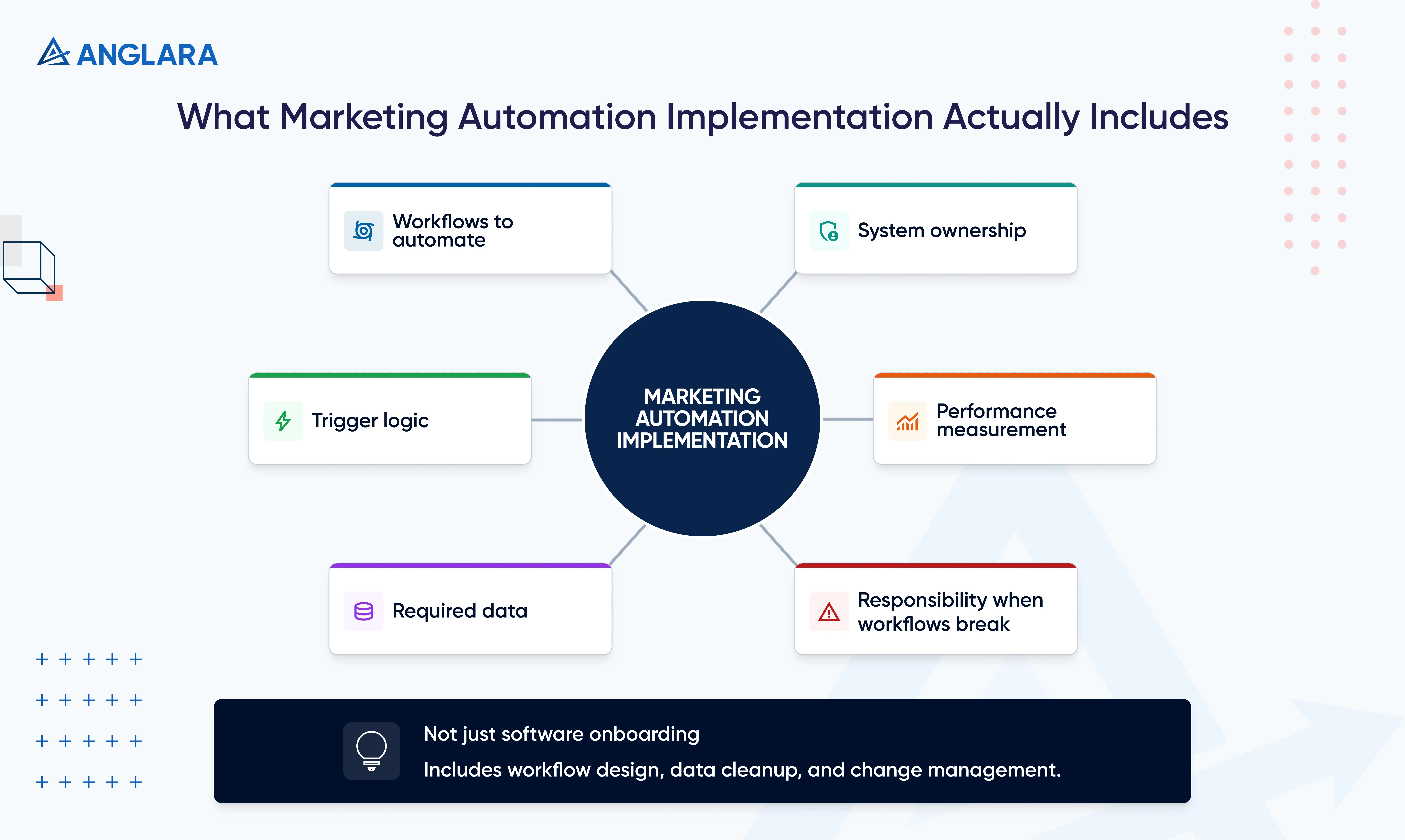
In practice, it means deciding:
- Which workflows should be automated first
- What should trigger them
- What data is required
- Which system owns each step
- How performance will be measured
- Who is responsible when something breaks
That definition matters because a lot of teams still treat implementation as a software onboarding exercise. It is closer to workflow design plus data cleanup plus change management.
If your leadership team is evaluating the wider efficiency case, it also helps to understand how AI reduces costs across operations, not just inside marketing.
Salesforce’s own practical guide leans in the same direction. It recommends defining goals first, collaborating across teams, visualizing processes, preparing segmentation, building the right content, rolling out slowly, and analyzing performance as you go.
The Problem In Plain Language
Many teams jump into software before they define how AI and automation should split the work.
Most marketing automation implementations fail for boring reasons, not exciting ones.
The workflow sounds good in theory, but the lifecycle stages are unclear. The CRM is full of duplicates. Sales does not trust lead scores. Follow-up logic exists in three different tools. No one agrees on when a lead becomes sales-ready. Then the team blames the platform.
That is why implementation gets misjudged so often. Buyers compare features and pricing, but they underestimate the operating work around them.
A useful practitioner signal from Reddit says a lot in a few lines: one practical recommendation was to start with just 2–3 follow-up sequences, connect forms and ads to the CRM, score leads using real intent signals, and keep one shared pipeline that both sales and marketing actually use. That advice is much closer to real implementation success than most feature checklists.
At Anglara, we see the same pattern in automation projects outside marketing too. The main value is not “building a bot” or “switching on workflows.” It is turning unstable manual work into something reliable, auditable, and easier to scale. (Anglara Digital Solutions)
When Marketing Automation Implementation Is A Good Fit And When It Is Not
Good Fit
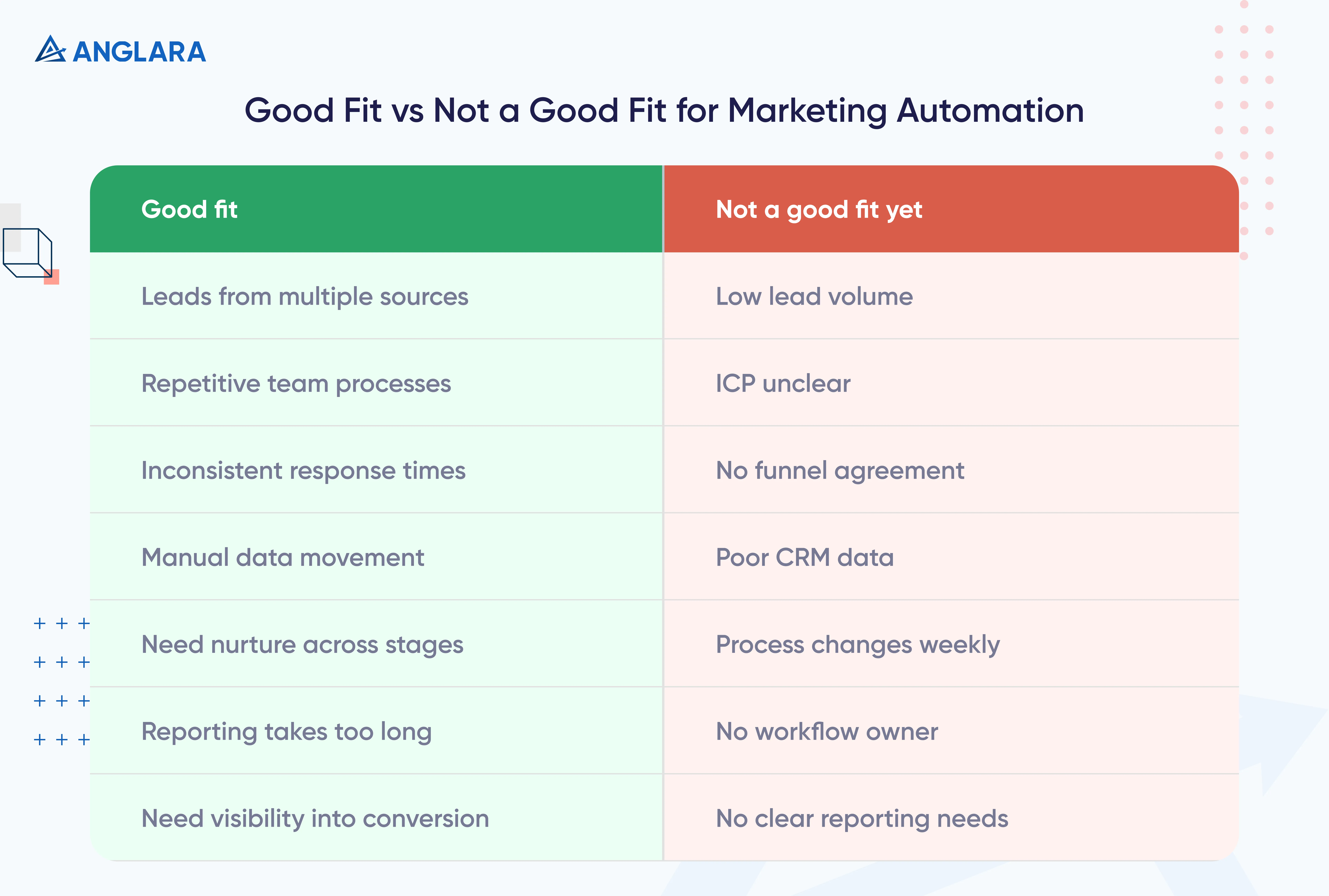
Marketing automation implementation is usually a good fit when:
- Leads come from multiple sources
- Your team follows similar steps repeatedly
- Response times are inconsistent
- Sales and marketing keep moving data manually
- Nurture logic is needed across multiple stages
- Reporting takes too long every week
- Leadership wants cleaner visibility into conversion bottlenecks
Not A Good Fit Yet
It is usually not a good fit yet when:
- Lead volume is still low
- Your ICP is still unclear
- There is no agreement on funnel stages
- CRM data quality is poor
- The underlying process changes every week
- Nobody is ready to own the workflows after launch
This is one place where Anglara’s view is slightly stricter than most software-led advice.
If your team is comparing orchestration layers rather than classic platform suites, our n8n vs Make guide is a useful next step.
If the process is still unstable, implementation should slow down first. Sometimes the right next step is not automation. It is a readiness review, basic funnel cleanup, or workflow mapping before you commit to a larger build. That is also how your AI readiness page positions implementation decisions: business goals, data readiness, governance, infrastructure, and internal ownership need to be checked before rollout. (Anglara Digital Solutions)
What A Successful Implementation Usually Includes
Goal And Workflow Mapping
Start with business outcomes, not features.
Examples:
- Reduce lead response time
- Increase demo-booking rate from high-intent forms
- Improve MQL-to-SQL conversion
- Cut manual reporting time
- Improve follow-up consistency after key conversion events
Then map what currently happens and what should happen instead. This is where a lot of value is won or lost.
Data And Lifecycle Cleanup
Automation does not fix unclear data. It amplifies it.
Before launch, review:
- Lifecycle stages
- Lead source naming
- Owner assignment rules
- Duplicate handling
- Consent and suppression logic
- Field mapping between CRM, forms, and campaigns
If your data model is weak, your automation will look smarter in the builder than it will in the real world.
Platform And Integration Setup
Once the workflow is clear, the tool choice becomes easier.
This may include:
- CRM sync
- Form and landing page connections
- Ad platform audiences
- Event tracking
- Alerting
- Internal notifications
- Dashboards
The right setup depends on how many systems need to stay aligned.
Content, Testing, And Ownership
No implementation is complete without:
- Nurture copy
- Branching rules
- QA checks
- Fallback conditions
- Reporting definitions
- A named owner
This is one of the biggest gaps in typical “implementation guides.” Content and ownership are often treated as a later step. They should be part of the first rollout.
This is also why teams looking beyond simple email sequences often start exploring AI workflow automation services once the first handoffs and repetitive tasks are clearly mapped.
Typical Timeline And Effort By Business Stage
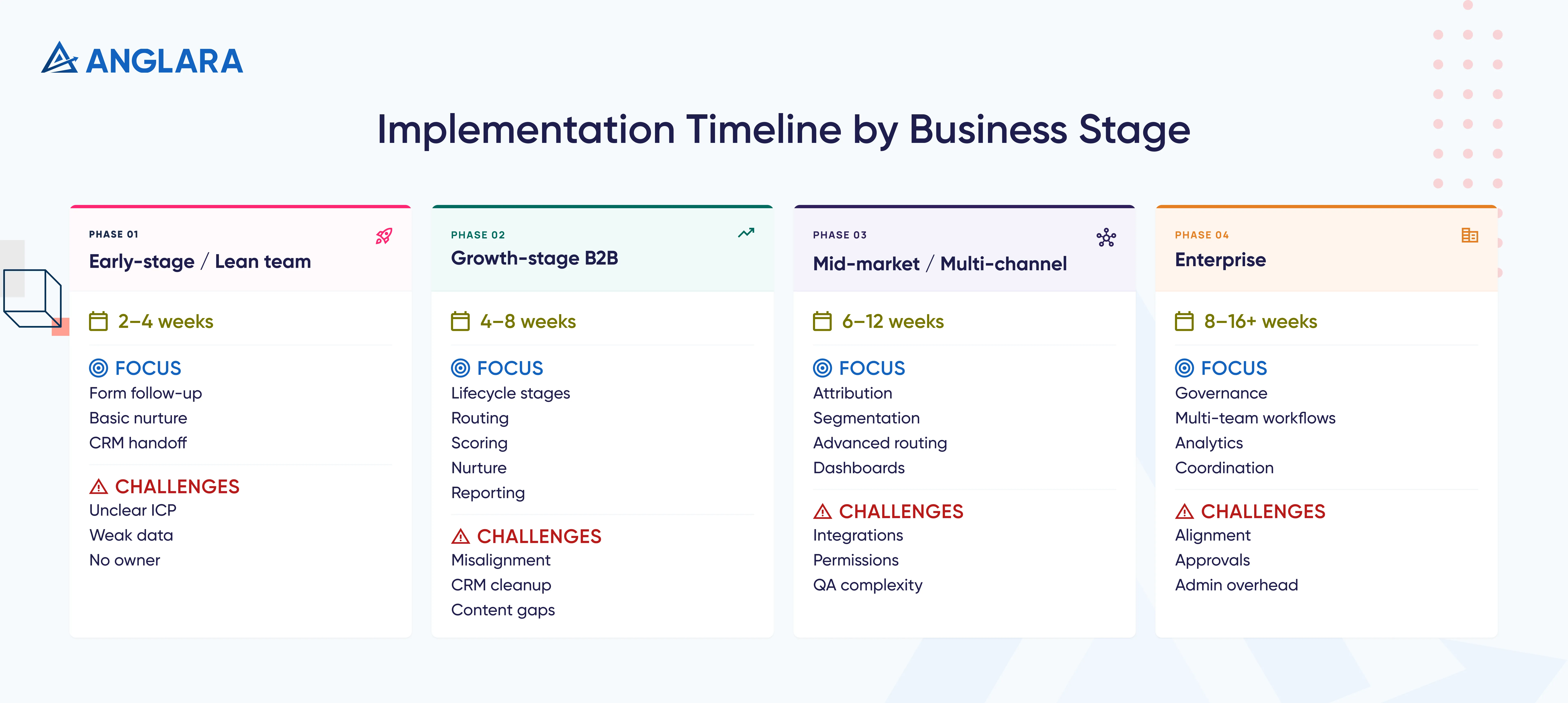
Here is the planning model most teams actually need:
This is not a vendor timeline. It is the more useful business view.
A platform can technically be “set up” quickly. A usable implementation takes longer because it includes workflow decisions, testing, data cleanup, training, and rollout pacing. Salesforce’s own best-practice guidance explicitly recommends a slow rollout and ongoing analysis rather than a big-bang launch.
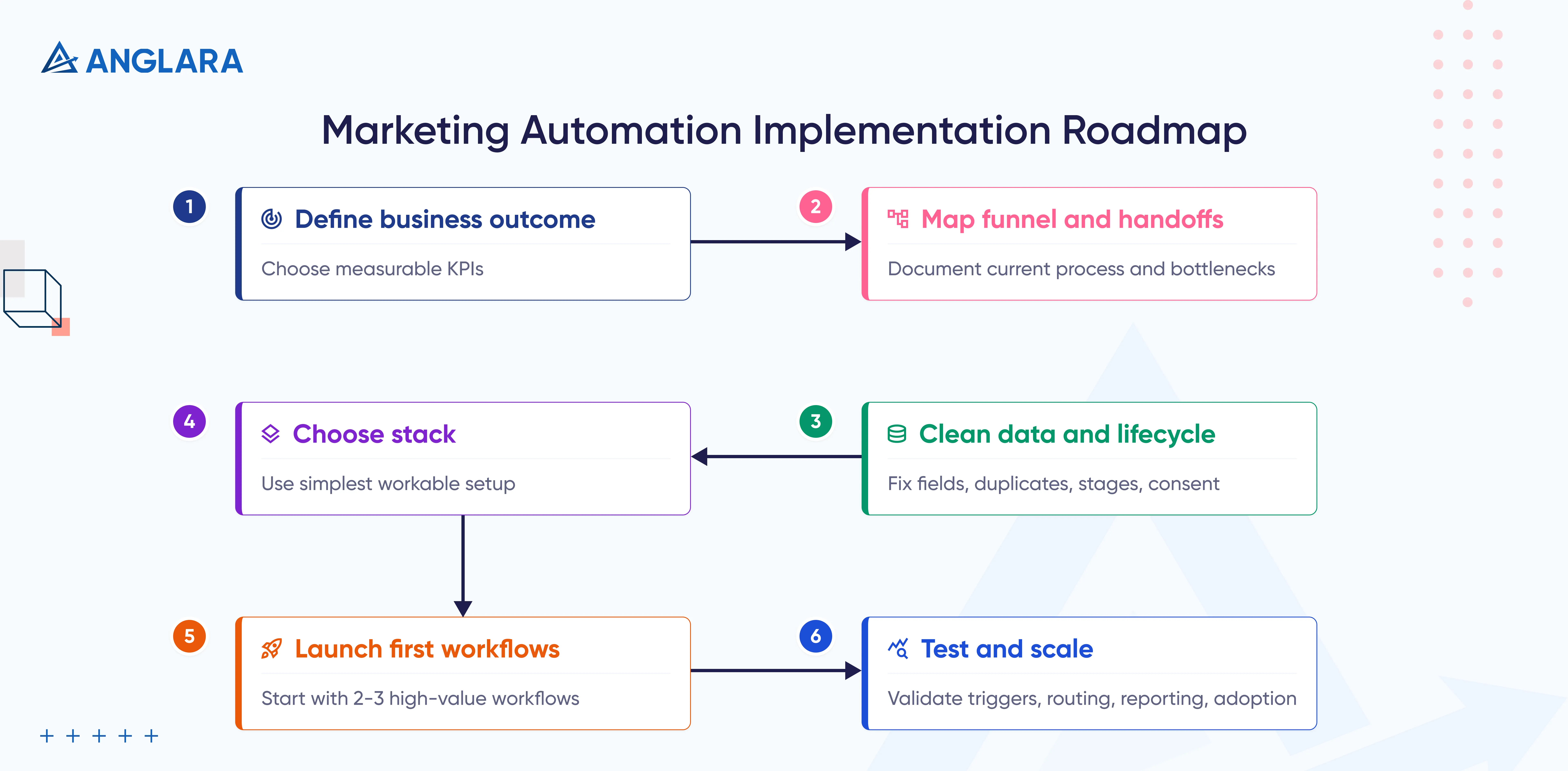
Marketing Automation Implementation Roadmap
1. Define The Business Outcome
Pick a measurable target before you pick more automations.
Good starting KPIs:
- Lead response time
- Meeting-booking rate
- MQL-to-SQL conversion
- Pipeline created from nurture
- Manual hours saved
- Reporting turnaround time
2. Map The Current Funnel And Handoffs
Write down what happens today.
You want visibility into:
- Lead sources
- Qualification logic
- Ownership changes
- Follow-up timing
- Common bottlenecks
- Where data gets lost
Salesforce’s implementation guidance is right on this point: create process visualizations so teams can see the workflow clearly before launch.
3. Clean The Data And Lifecycle Logic
This is the step most teams want to skip.
Do not.
Review:
- Fields
- Duplicates
- Lifecycle definitions
- Source naming
- Pipeline stages
- Contact consent logic
4. Choose The Stack With The Lightest Workable Complexity
Use the simplest setup that solves the real problem.
For teams that want more control over workflow logic and operating cost, n8n marketing automation can be a strong alternative to heavier all-in-one stacks.
Some teams need a classic marketing automation platform. Some need a CRM-centric setup. Some need a custom workflow layer on top of the tools they already have.
This is also where AI can fit, but selectively. Anglara’s n8n marketing automation positioning gets this right: workflows should support AI where it improves scoring, summarization, segmentation, approvals, and follow-up quality, not where it adds noise for the sake of novelty. (Anglara Digital Solutions)
5. Launch Only The First 2–3 High-Value Workflows
This is where Anglara would push back on over-implementation.
We would not start with 20 journeys.
We would start with:
- Lead capture and routing
- Lifecycle nurture for one high-intent segment
- Reporting automation for weekly visibility
That gives the team proof, not just activity.
6. Test, Train, Measure, And Expand
Before scaling, confirm:
- The workflows trigger correctly
- The CRM updates are accurate
- Leads route to the right people
- The copy feels right
- Sales knows what changed
- Reporting matches real pipeline behavior
Then expand in phases.
First Workflows To Launch
The best first workflows are usually the least glamorous ones.
Lead Capture And Routing
When someone fills out a form, downloads an asset, or books a demo, what happens next?
A good first workflow:
- Routes the lead
- Sets the right status
- Sends the right confirmation
- Triggers the first internal task
- Adds the lead to the right nurture path if sales does not act immediately
Lifecycle Nurture
Most teams need better follow-up long before they need complex AI journeys.
Start with one clear segment:
- High-intent inbound leads
- Demo no-shows
- Content-engaged leads
- Dormant but qualified contacts
Then build a simple sequence with useful, stage-appropriate messaging.
Reporting Automation
Do not leave reporting for later.
A weekly automation that shows:
- Lead volume by source
- Response time
- Meetings booked
- Conversion by stage
- Stuck leads
- Nurture performance
Will usually create more trust in the system than an extra workflow nobody notices.
Common Mistakes That Slow Implementation Down
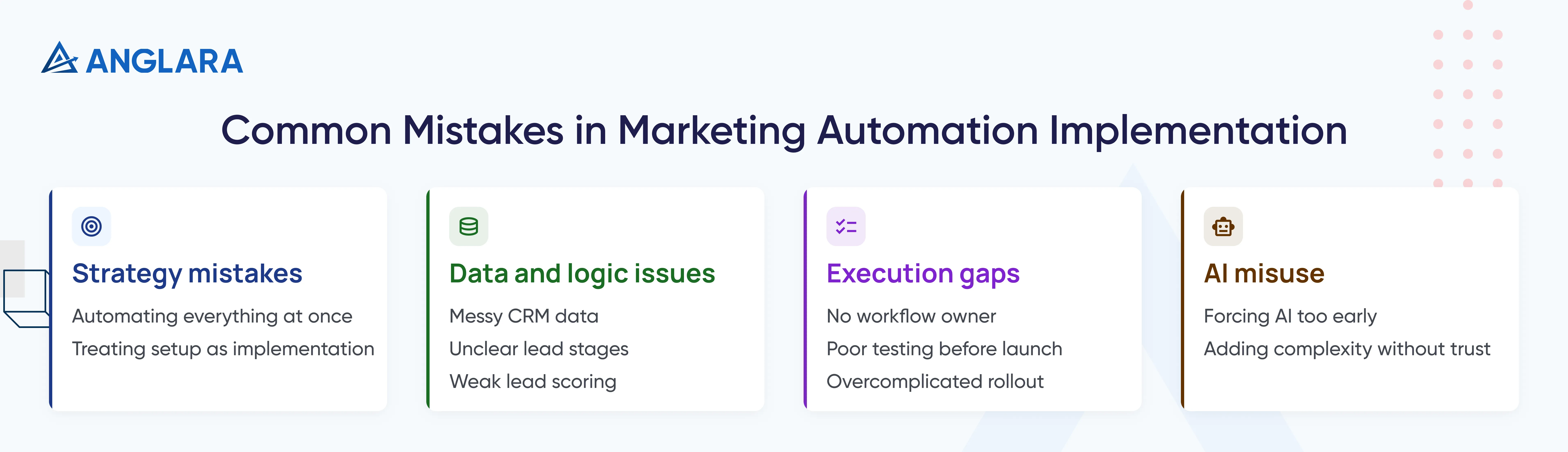
The first mistake is trying to automate everything at once.
The second is assuming the platform setup is the implementation. It is not. The implementation includes process decisions, content, permissions, data quality, and team adoption.
The third is ignoring ownership. A workflow without an owner becomes a silent liability.
The fourth is using lead scoring that sounds sophisticated but means nothing operationally. That Reddit guidance about using actual intent signals instead of random points is a good reality check.
The fifth is forcing AI into every step too early.
At Anglara, we are pro-AI, but we are not pro-noise. If AI improves scoring, summaries, or next-step recommendations, great. If it makes the workflow harder to trust, scale it back and earn the right to add more later.
The sixth is forgetting the human side. Sales and marketing still need a shared understanding of what happens after a lead becomes active. Implementation is part workflow design, part operations change.
If your team is already thinking beyond marketing and into broader workflow change, our AI implementation roadmap guide is a useful next read.
FAQs
What is marketing automation implementation?
Marketing automation implementation is the process of planning, configuring, testing, and launching automated marketing workflows that connect data, systems, content, and team actions. It is bigger than tool setup because it also includes handoffs, measurement, and ownership.
How long does marketing automation implementation take?
A basic rollout can move in a few weeks. A more serious B2B implementation can take several weeks or a few months depending on workflow depth, data quality, integrations, and stakeholder alignment.
What should be automated first?
Most teams should start with:
- Lead capture and routing
- One nurture workflow
- Basic reporting automation
These usually create the clearest business value fastest.
Is marketing automation implementation only about software?
No. Software is only one part. A usable implementation also needs goal clarity, data cleanup, workflow logic, integration setup, testing, training, and someone responsible for ongoing performance.
When should a business wait before implementing marketing automation?
If lead volume is low, the ICP is unclear, lifecycle stages are undefined, or no one is ready to own the system after launch, the business should slow down first and fix the foundation.
How does AI fit into marketing automation implementation?
AI fits best where it improves speed or quality without reducing trust. Good examples include lead summaries, smarter segmentation, scoring support, approval assistance, and reporting insights. It is less useful when added just to make a workflow sound advanced.
What are the biggest implementation risks?
The biggest risks are:
- Messy CRM data
- Unclear lead stages
- No workflow owner
- Overcomplicated rollout
- Poor sales-marketing alignment
- Weak testing before launch
What should teams measure after launch?
Track:
- Response time
- Meeting-booking rate
- Stage-to-stage conversion
- Nurture engagement
- Pipeline contribution
- Time saved
- Reporting turnaround time
Key Takeaways
- Marketing automation implementation is an operating change, not just a tool setup.
- The best first rollout is usually narrow and revenue-linked.
- Data cleanup and ownership matter more than most teams expect.
- A 30–60–90 day phased approach is safer than a full big-bang launch.
- AI can improve implementation, but only where it adds clarity and trust.
- The first workflows should support response time, nurture quality, and reporting visibility.
- A clean handoff between marketing and sales is one of the biggest wins.
Next Steps
If you need to justify spend to leadership, our guide on ROI of AI can help frame the business case more clearly.
If your team is exploring marketing automation this quarter, do not start with a feature list.
Start with:
- The business outcome
- The workflows worth automating first
- The systems that need to connect
- The data issues that will break trust if ignored
- The owner who will keep the system healthy after launch
If you want, Anglara can help you map the right first workflows, clean the operating logic, and design an implementation path that fits your current stage instead of forcing you into a bloated rollout.