


Downtime, broken forms, and slow pages cost more than most teams realise.
They’re not always as visible as an outage, but they manifest in lost leads, delayed campaigns, and fixes that never fully hold.
This is why mature teams don’t treat WordPress support as ad-hoc maintenance or a collection of one-off fixes. They rely on a structured WordPress support service designed to deliver stability, continuity, and fast response when it matters.
At its core, a professional WordPress support service follows a simple operating model — the retainer. It is not just a bundle of hours or a promise of “unlimited tasks,” but it is a system built on three pillars:
- A managed backlog: for ongoing changes
- Predictable delivery capacity: reserved for your website every month
- A clear SLA: that defines response and resolution when incidents occur
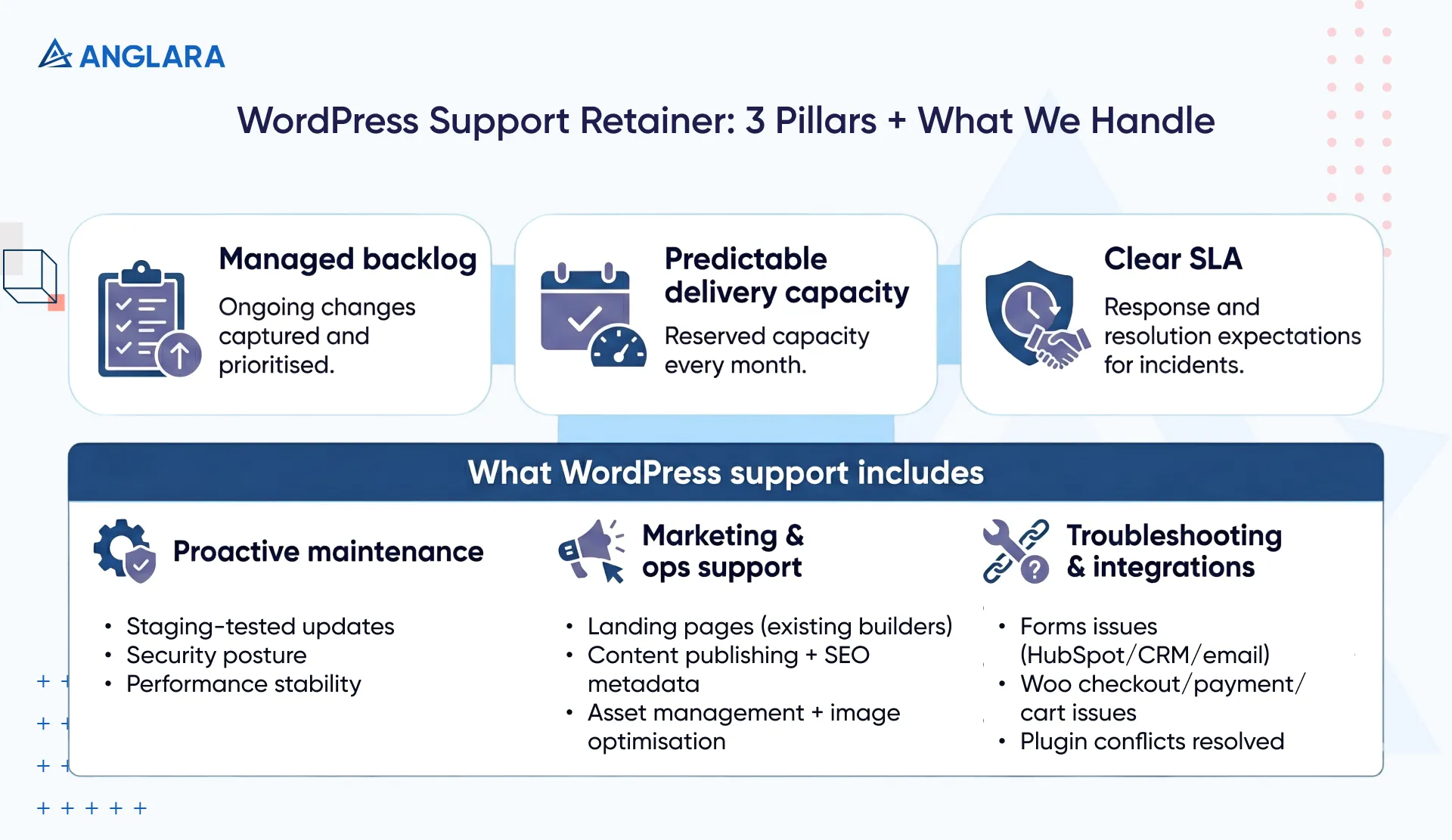
Together, this shifts WordPress support from reactive firefighting to a controlled, operational model, keeping your website stable, responsive, and ready to evolve.
What Do We Included In WordPress Website Support Services?
A professional WordPress support service covers far more than updates and backups. It acts as an extension of your marketing and operations teams, handling ongoing work while quietly reducing risk in the background.
Here’s what that looks like in practice.
Proactive maintenance (the invisible work)
- Update management with testing: We test Core, theme, and plugin updates in staging before going live to prevent layout breaks, conflicts, or downtime.
- Security posture, not just scans: Our plan includes firewall rules, access audits, malware monitoring, and rapid cleanup if something goes wrong.
- Performance stability over time: We offer database cleanups, asset optimisation, and ongoing fixes to prevent slowdowns as content and plugins grow.
Functional support for marketing and ops
You can also expect us to take care of providing you with:
- New campaign and landing pages built using existing page builders
- Content publishing and formatting services, including SEO metadata setup
- Asset management, image optimisation, and downloads
Troubleshooting and integrations
Our system is not a done-and-dusted job for us. If you’re having issues, we take care of them, like:
- Forms not submitting (HubSpot, CRM, email tools)
- WooCommerce checkout issues, payment failures, and cart bugs
- Plugin conflicts identified and resolved without guesswork
This combination keeps the site reliable day to day, while giving teams the confidence to move fast without breaking things.
How To Choose The Capacity of the WordPress Support Package?
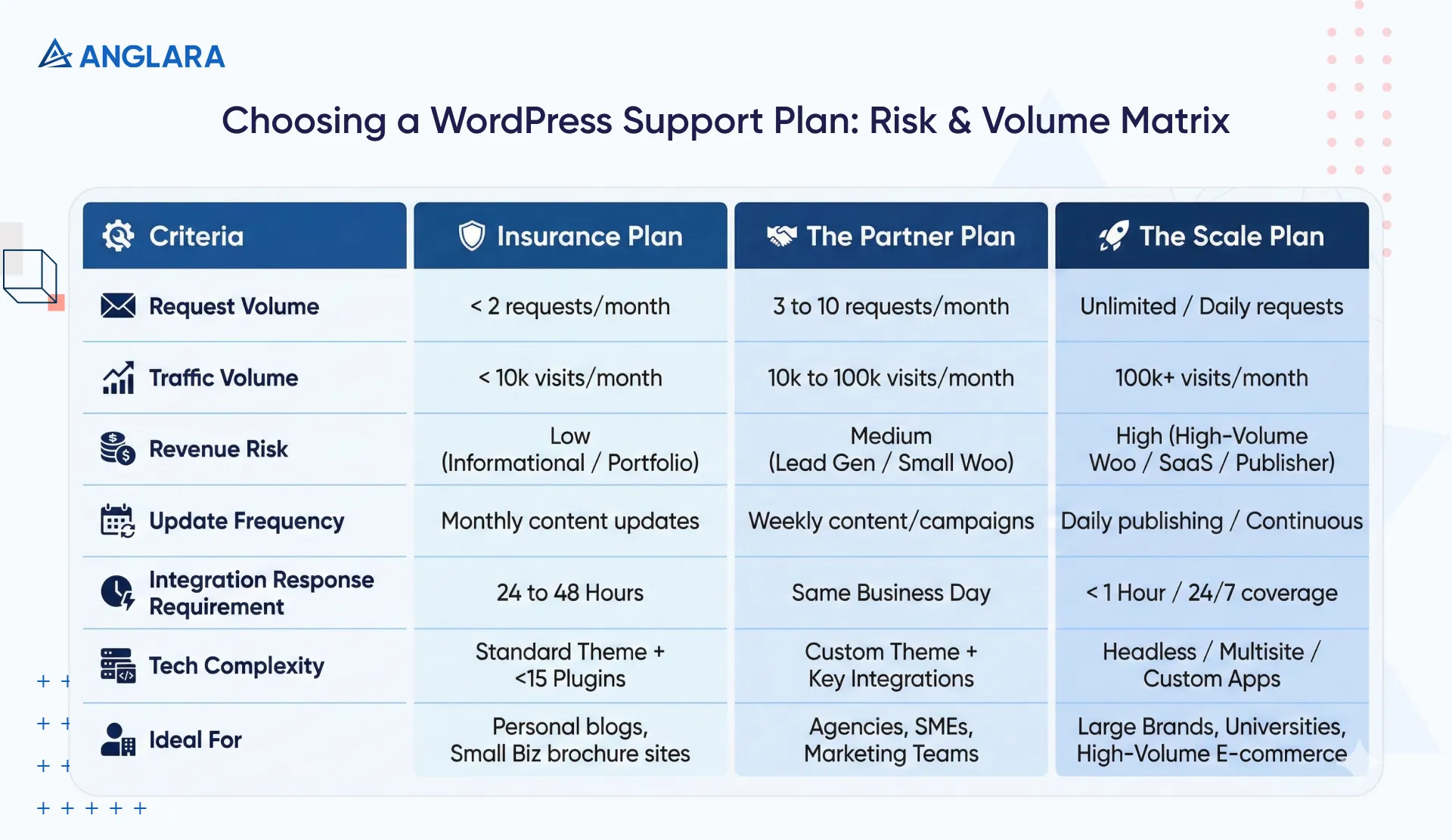
Choosing a WordPress support package comes down to two factors:
- How many requests do you raise each month?
- How much risk does your business carry if something breaks?
So, if you have:
- 1–2 requests per month + low risk: Informational or brochure websites where downtime has a limited impact.
- 3–10 requests per month + medium risk: Lead-generation sites with regular content updates, campaigns, and forms that must work reliably.
- Ongoing or daily requests + high risk: Revenue-driven websites such as WooCommerce stores, publishers, or high-traffic platforms where delays or outages directly affect business outcomes.
Teams often under-buy support when things feel “quiet.” The real cost emerges later, in missed leads, rushed fixes, and technical debt that compounds over time. So, if your website supports marketing, sales, or transactions, capacity should be chosen based on risk tolerance, not how quiet the site feels today.
Here’s a decision matrix for risk & volume assessment:
What is the SLA for WordPress Support Service?
An SLA removes ambiguity from WordPress support. It defines how quickly issues are acknowledged, handled, and resolved based on business impact. A clear SLA protects both teams, setting realistic expectations while ensuring fast action when it truly matters.
Below is a practical SLA structure we use for Anglara’s WordPress support services:
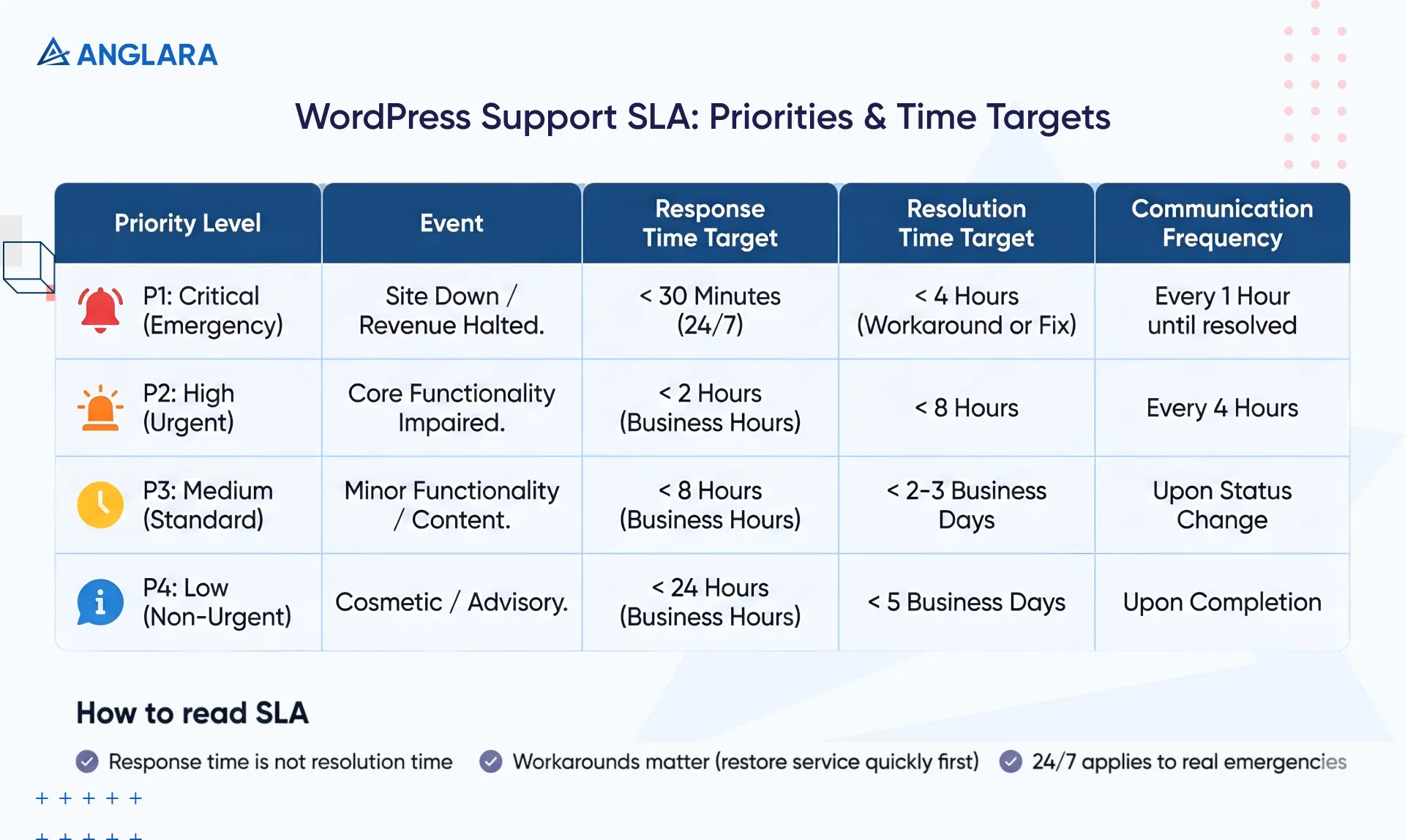
Here’s how to read an SLA correctly
- Response time is not resolution time: Response means a qualified engineer has begun work, not that the issue is already fixed.
- Workarounds matter: In complex cases, restoring service quickly is prioritized before permanent fixes.
- 24/7 applies to real emergencies: Critical issues trigger on-call support; everything else follows business hours.
Unlimited WordPress support — boundaries without frustration
Unlimited WordPress support often causes frustration when it’s treated as “everything, instantly.”
But without structure, large builds enter support queues, priorities keep shifting, and small but critical fixes get delayed.
The result is slow delivery, rushed work, and unclear expectations on both sides.
To avoid this, we design unlimited support around controlled execution, not unlimited concurrency.
What does unlimited mean in practice?
"Unlimited" typically refers to the volume of requests, not the concurrency of work. So, what it means is that our client is never penalized for having a busy month; they do not receive a bill for "overages."
However, the work is executed sequentially.
You can add as many tasks as you like to the backlog at any time. However, we follow the "One Active Task" rule. That means we work on one task (or a defined number, e.g., two for higher tiers) at a time.
Once a task is completed and approved, we move on to the next item in your backlog. This approach keeps work moving steadily and ensures consistent delivery throughout the month.
How do we keep delivery predictable?
- Requests are handled through a prioritised queue
- Each plan allows a defined number of active tasks at a time
- Once a task is completed, the next item is immediately picked up
This prevents constant context switching and ensures consistent output instead of stalled progress.
How do we set boundaries upfront?
To avoid frustration, it is essential to define what falls under "Support" (included) and what constitutes "New Development" (project-based).
Here’s a table to understand our scope of service boundaries:
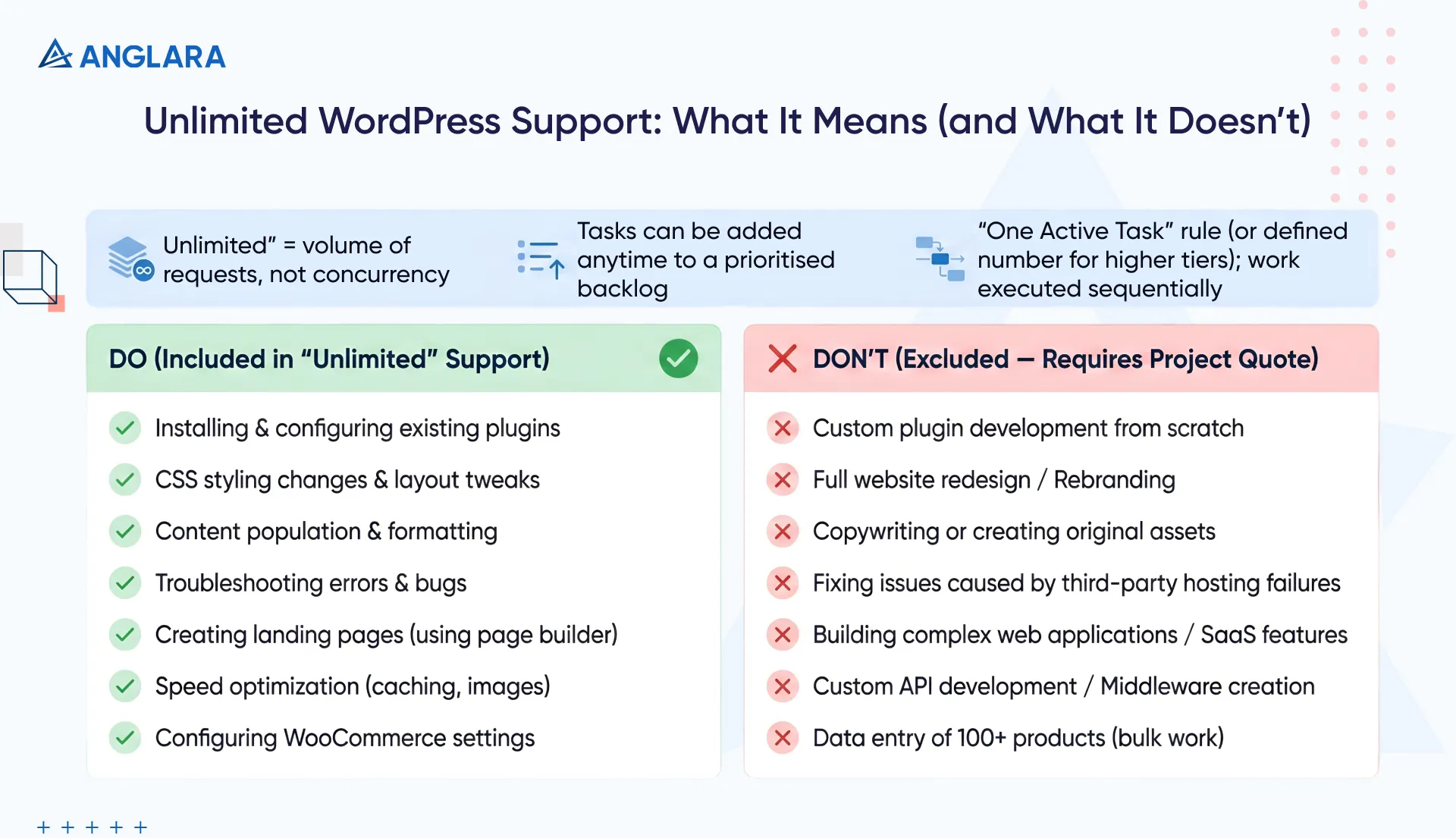
This structure keeps unlimited support fast, predictable, and genuinely useful, without friction for either team.
Conclusion
A WordPress support service is not a cost-saving shortcut or a safety net you hope you never use. It is an operating model for teams that need their website to stay reliable while continuing to evolve.
When support is structured around a managed backlog, predictable delivery, and a clear SLA, WordPress stops being reactive.
- Issues are handled before they escalate
- Changes ship without friction
- Teams work with confidence instead of urgency
Whether you manage a content-driven site, a lead-generation platform, or a revenue-critical WooCommerce store, the right support model removes uncertainty and protects momentum.
Anglara offers WordPress Support Services as part of a long-term operational partnership. We work with a structured backlog, reserve delivery capacity each month, and define clear SLAs to keep expectations aligned from day one.
If you’re evaluating getting WordPress monthly support or reassessing your current setup, we can help you define the right capacity, response times, and boundaries for your site. Book a free 30-minute consultation to discuss your requirements.
