


What if your AI-powered product takes off overnight and your infrastructure can’t keep up? Your API bill triples, and your legal team starts asking questions about data exposure?
That’s not a hypothetical. It’s happened.
And the difference between teams that scale AI successfully and those that scramble lies in the groundwork they lay.
In this guide to OpenAI API Integration Best Practices, we’re cutting through the fluff.
No vague “AI is the future” talk, just real, actionable strategies to help you optimize performance, control costs, protect user data, and scale with confidence.
Let’s get into it.
How to Save on OpenAI API Costs Without Killing Performance?
AI is powerful, but it can quietly drain your budget if you're not intentional. Because every prompt, every word, and every token generated by the OpenAI API incurs a cost.
If your prompts are bloated, your models overpowered for the task, or your responses uncached, you’re paying more than you need to (often without realizing it until the invoice lands).
But we come bearing good news: you can significantly reduce costs while improving output simply by being strategic about how you set things up. When we help clients optimize their OpenAI pipelines, these changes consistently lead to 30-50% savings without compromising quality.
It’s not about doing less; it’s about doing it smarter. Here are 5+ ways we optimize our clients’ API performance and costs:
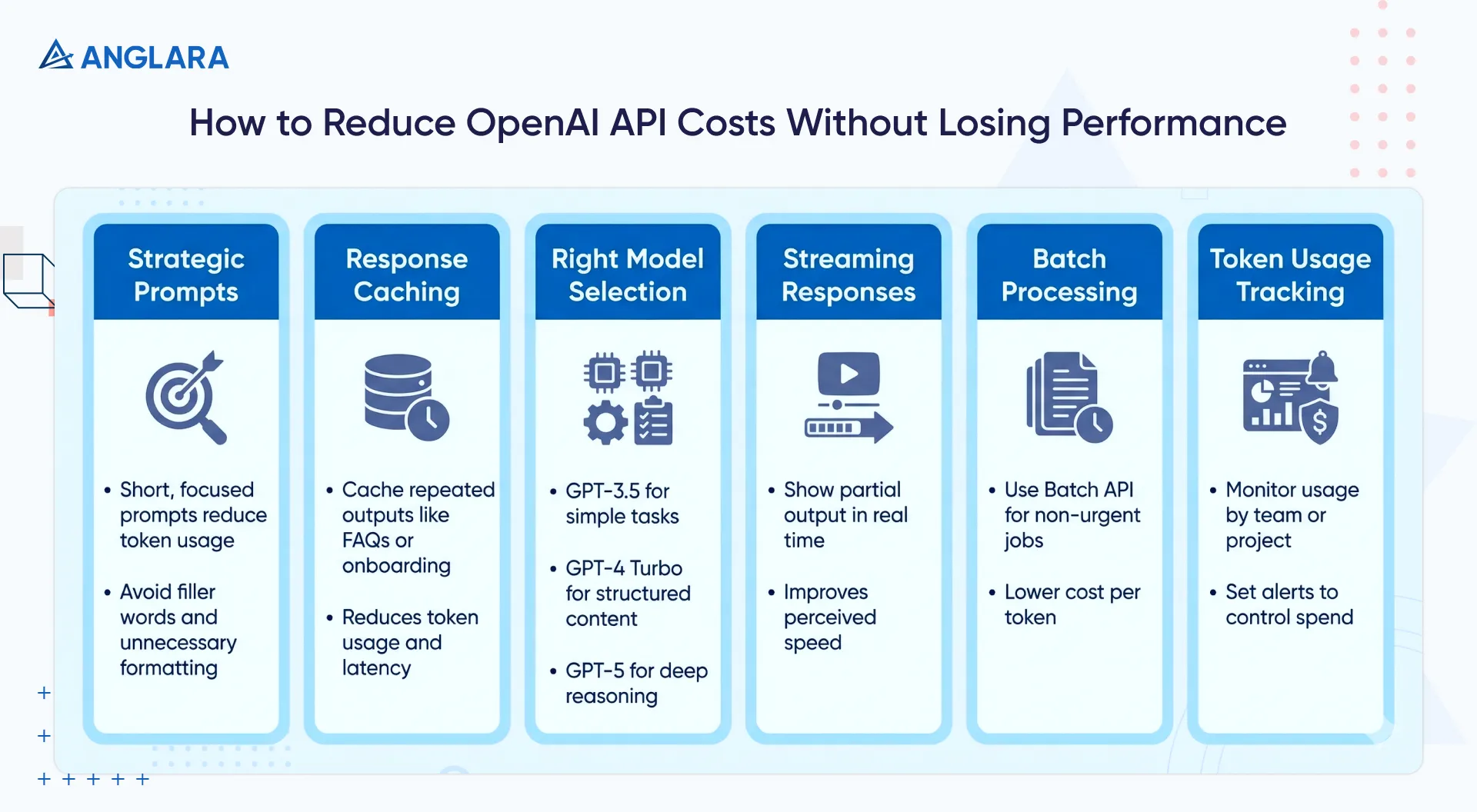
1. Be strategic with prompts
You don't need to over-explain to a language model. In fact, the more focused and structured your prompt, the better the result and the fewer tokens you use.
For example, remove filler words like “please” and unnecessary punctuation, and add instructions such as “be concise” to guide the model. Using compact formats like CSV rather than verbose JSON can also significantly reduce token counts.
Experiment with different phrasings and system instructions to achieve the needed accuracy with minimal tokens.
We've seen prompt tweaks alone cut token usage by over 50% in real-world deployments.
2. Cache repetitive responses
Not every call needs to hit the API.
If you're generating the same onboarding instructions or answering the same common questions, store them in a fast cache (e.g., Redis or Memcached). This can eliminate unnecessary token usage, saving money and reducing latency.
Even caching only static or frequently repeated outputs, like common FAQs, can dramatically reduce your token spend. Set appropriate cache TTLs and invalidate when underlying data changes.
OpenAPI notes:
“Prompt Caching can reduce latency by up to 80% and input token costs by up to 90%.”
3. Use the right model for the job
Every model OpenAI offers comes with a different price tag, speed profile, and capability ceiling. Choosing the wrong one isn’t just a technical misstep; it’s a cost sink or a performance liability.
Let’s start with cost: The gap between models like GPT‑3.5 and GPT‑5 can vary significantly per token. GPT‑5 offers phenomenal reasoning and context handling, but that power comes at a premium. GPT‑3.5, on the other hand, is lightweight, fast, and extremely cost-effective for routine tasks.
Bottom line: If you’re using GPT‑5 to generate order confirmations or summarize a two-line message, you're essentially burning budget on compute you don’t need.
There’s also the speed factor: Heavier models take longer to respond, especially in higher reasoning modes. GPT‑5’s “thinking” mode, for example, is designed to go deep, not fast. On the other hand, GPT‑3.5 is optimized for quick, transactional interactions.
Bottom line: For user-facing tools, the lag can affect engagement. So, the faster, less complex model actually delivers a better user experience.
TL;DR: Each model is suited to different jobs:
- GPT‑3.5 handles basic summarization, classification, and straightforward prompts with ease.
- GPT‑4 Turbo is a solid middle ground for content, structured output, and more nuanced language.
- GPT‑5 is where you go when you need deep logic, long-context memory, or high-stakes decision support.
4. Stream results to improve UX
If you’re building anything user-facing, turning on streaming responses will be a game-changer. It lets the system send partial output as it is generated, so users see text appear immediately instead of waiting for the full answer.
While streaming doesn’t save the total number of tokens used, the performance feels seamless to the users as they see the response unfold in real time. Everything feels faster, even if the backend is still processing.
5. Batch what can wait
Not all processing needs to happen immediately. Send requests in batches, for certain jobs that don’t need to return in real time, like:
- Survey analysis
- Internal reports
- Nightly document reviews
OpenAI’s Batch API lets you group asynchronous requests and cuts your cost per token nearly in half, and removes rate-limit constraints.
6. Track token usage aggressively
It's easy to lose track of where your API calls are going until the bill hits. Use OpenAI’s usage dashboards to monitor usage in real time to maintain control over spending. Here’s what you can do with it:
- Track token usage by day, team, or project.
- Set limits and alerts.
- Monitor daily trends to identify spikes and optimize prompts or calls in advance.
- Integrate with your own logging or finance tools to attribute token costs to features or customers.
This gives you clarity on what’s driving cost and where to rein things in.
How To Ensuring Security and Data Privacy With OpenAI Integration?
When integrating OpenAI into your product, most focus on what the model can do and forget the responsibilities that come with it.
You're sending data to an external system, and sometimes this data is sensitive. Given that you're doing this through an API that, if misused, could lead to serious reputational or legal blowback.
Here’s how we think about securing every AI integration as if it were going into a regulated environment (because increasingly, it is):
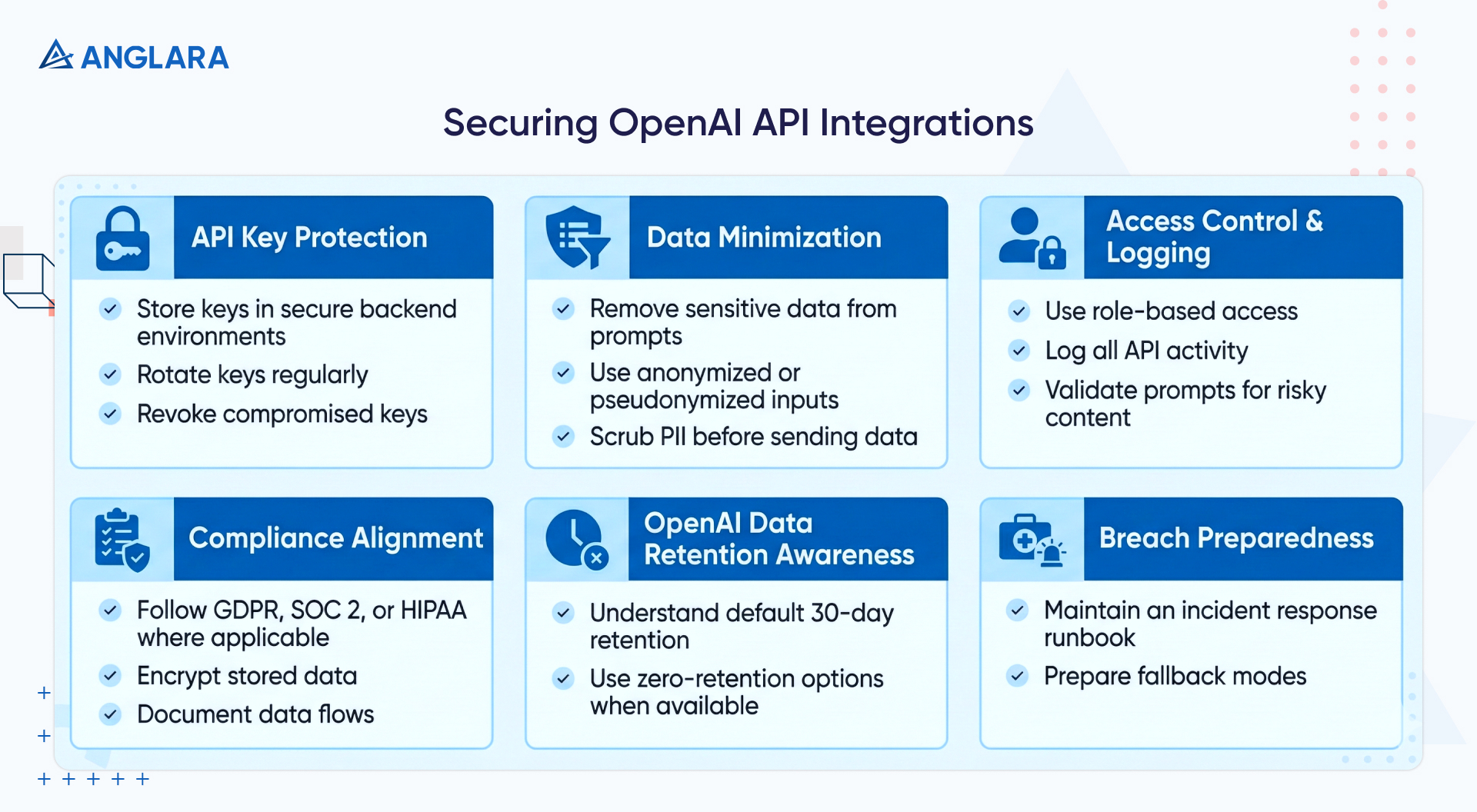
Keep your keys out of sight
API keys are like admin passwords. If they end up in frontend code (or worse, exposed in a GitHub repo), they’re easy pickings for attackers.
What to do:
- Always store them in secure backend environments, using tools like AWS Secrets Manager, HashiCorp Vault, or environment-level encryption.
- Rotate keys regularly
- Revoke them immediately if you spot suspicious behavior.
Strip out sensitive data before it leaves your system
You don’t need to send someone’s full name, email, or account number in a prompt to generate a good response.
What to do:
- Pseudonymize inputs
- Use anonymized IDs
- Redact anything that could identify a real person
- Add automated PII scrubbing steps (e.g., regex filters or open-source tools like Presidio) to your pipeline.
Control who can access what and log everything
Don’t give your entire team access to the same API keys or permissions. And if something does go wrong, logs should be your first line of investigation.
What to do:
- Implement role-based access
- Track who’s using what
- Store detailed logs of API activity
- Add validation layers that scan prompts for risky content, such as code injections or sensitive terms
Align with industry standards
If your product touches health, finance, or personal data, you’ll need to demonstrate compliance with frameworks such as GDPR, SOC 2, or HIPAA. For HIPAA, only customers with Business Associate Agreements can legally use OpenAI models for protected health information.
OpenAI provides tools to support this, like enterprise agreements and opt-out mechanisms.
What to do:
- Implement policies like data minimization
- Encrypt storage
- Documented data flows
Understand OpenAI’s defaults
By default, OpenAI may retain API data for up to 30 days for abuse monitoring, though it doesn’t use that data to train its models unless you opt in. However, if you’re using OpenAI’s Enterprise tier or GPT-5 Pro, you can enable zero-retention modes that disable data storage altogether.
What to do:
- Match your data governance policies with how your models are configured
Have a breach plan before you need it
If an API key is compromised or usage spikes unexpectedly, you need to act fast. That means preparing for a breach before it even occurs.
What to do:
- Draft internal runbook for revoking access, notifying affected stakeholders, and triaging logs
- Consider fallback modes in your app: if OpenAI becomes temporarily unavailable, cached answers or downgraded responses can help avoid user disruption
Our experts treat every integration with the same level of caution one would expect from a finance or healthcare platform. We implement enterprise-grade security by default on all integrations because security is non-negotiable.
We believe that when trust is compromised, nothing else matters.
How to Scale Your OpenAI Integration Without Breaking Things (or the Bank)?
The beauty of a successful AI feature is that people actually use it (a lot). But that’s also where things get tricky.
What worked great with 50 users can suddenly choke when you hit 5,000, leading to API timeouts, blown budgets, and very grumpy product teams. So, scaling with OpenAI isn’t just about more power; it’s about smarter architecture and proactive guardrails.
Here’s how we build for high volume from day one.
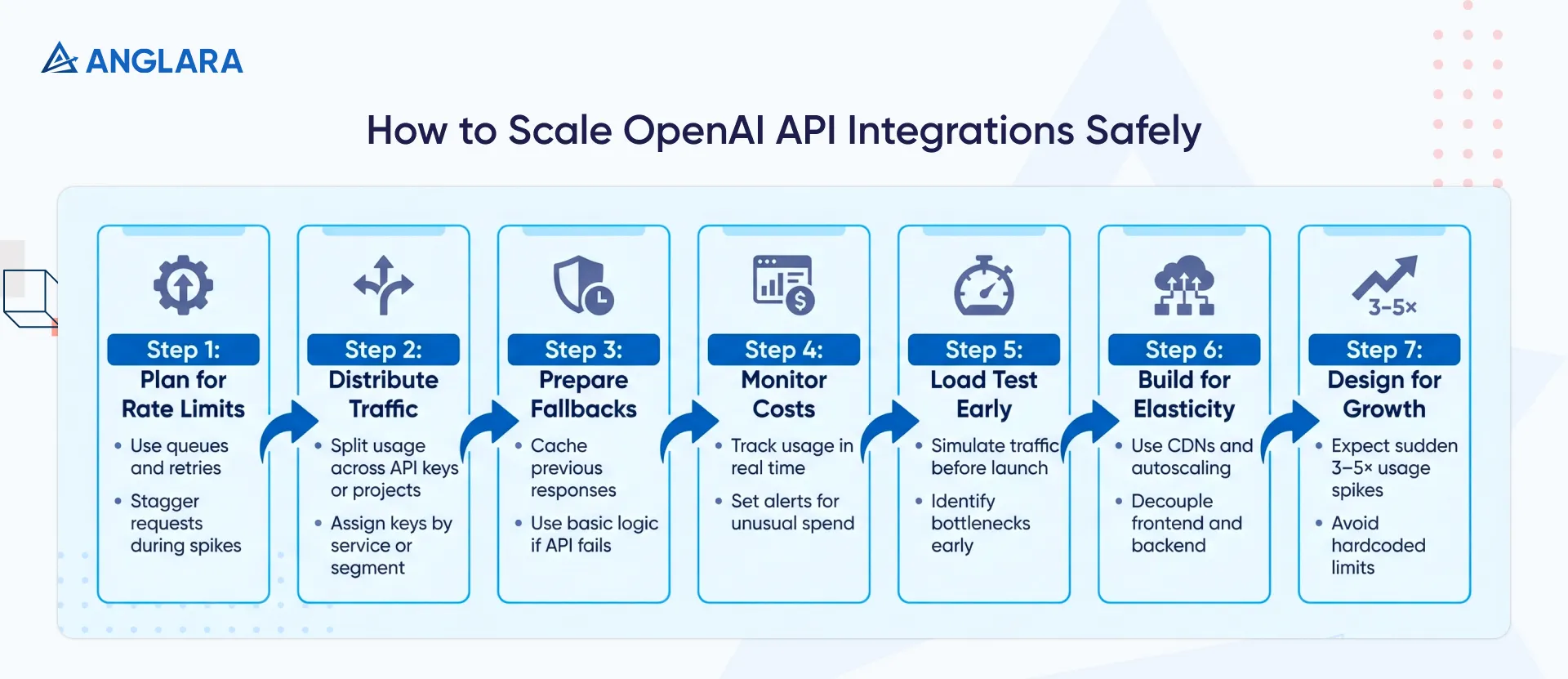
- Plan for rate limits: OpenAI enforces strict request caps, especially on GPT‑5. Use smart queuing and retries to avoid failures under load. Staggering requests keeps your app responsive, even during spikes.
- Distribute traffic smartly: Split usage across multiple API keys or projects to multiply throughput. Assign keys by service or user segment to stay within limits while scaling efficiently.
- Have fallbacks for downtime: When OpenAI hits a snag, your app shouldn’t. Cache previous responses, default to basic logic, or switch to a backup provider to maintain functionality.
- Monitor costs in real time: Usage spikes mean higher bills. Set alerts to flag unusual token spend before it becomes an expensive surprise.
- Load test early: Simulate traffic before launch. It’s the best way to surface bottlenecks, validate retries, and make sure your system holds up under pressure.
- Build for elasticity: Use CDNs, autoscaling databases, and caching layers like Redis. Decouple your frontend from backend calls so bursts don’t break things.
- Expect 3–5× growth: Scale isn’t gradual; it’s always sudden. Design for volume upfront: reserve quota, avoid hardcoded ceilings, and give your infra room to flex.
Get started with OpenAI API integration
Ready to leverage the OpenAI API with confidence?
Anglara specializes in building robust, cost-effective OpenAI API integrations tailored to your business. We can help implement all the best practices mentioned above and much more. With our AI business consulting services, you can accelerate development, avoid common pitfalls, and ensure your AI solution delivers maximum ROI.
Schedule a free consultation to learn how our OpenAI API integration services can power your next AI-driven project.
