

Think marketing automation is just a few email drips? Think again.
The best marketing automation examples are not random tool tricks. They are small, practical workflows that help your team respond faster, update your CRM properly, nurture leads, and understand what is actually working.
In this guide, we’ll break down 10 marketing automation examples your team can use across lead capture, CRM, sales follow-up, reporting, and AI-assisted workflows.
Who This Is For
This guide is for marketing, sales, and RevOps teams that already have some lead flow but still rely on too much manual work.
You may have forms on your website, a CRM, email campaigns, booking links, spreadsheets, and maybe a few automation tools. But if leads still get missed, follow-ups are inconsistent, or reporting feels incomplete, your automation is not doing enough yet.
This article is especially useful for:
- B2B service companies
- SaaS and software teams
- Agencies and consulting firms
- Healthcare, travel, finance, and logistics businesses
- SMB and mid-market teams with lean marketing resources
- Founders who want better follow-up without hiring a large sales ops team
It is not written for teams looking for flashy automation demos. The goal here is simple: build workflows that your team can actually use every week.
Direct Answer: What Are The Best Marketing Automation Examples?
The best marketing automation examples include lead capture and CRM routing, speed-to-lead follow-up, lead scoring, nurture emails, demo reminders, proposal follow-ups, event follow-ups, re-engagement campaigns, onboarding workflows, and reporting automation. These workflows help businesses reduce manual work, improve lead response time, and keep sales and marketing teams aligned.
A strong automation workflow usually has four parts: a trigger, a clear action, reliable data, and a human owner. The goal is not to automate everything. The goal is to automate the repetitive steps that slow your team down and create avoidable gaps.
What Marketing Automation Examples Really Mean
Marketing automation means using software, rules, triggers, and sometimes AI to handle repetitive marketing and sales tasks automatically.
In plain English, it means this:
When something happens, your system takes the next logical action.
For example:
- A visitor fills out a form.
- The CRM creates or updates the contact.
- The right sales owner gets notified.
- The lead receives a relevant email.
- A follow-up task is created.
- The source and campaign are tracked for reporting.
That is a marketing automation workflow.
It does not need to be complicated. In fact, the best workflows are often simple. They remove one repeated manual step, make ownership clear, and help your team act faster.
Salesforce summarizes Nucleus Research findings that marketing automation can drive a 14.5% increase in sales productivity and a 12.2% reduction in marketing overhead, which shows why many teams start with practical workflow improvements before investing in complex automation programs. (Salesforce)
Which Marketing Automation Workflow Should You Build First?
Before copying examples, choose the workflow that solves your most expensive bottleneck.
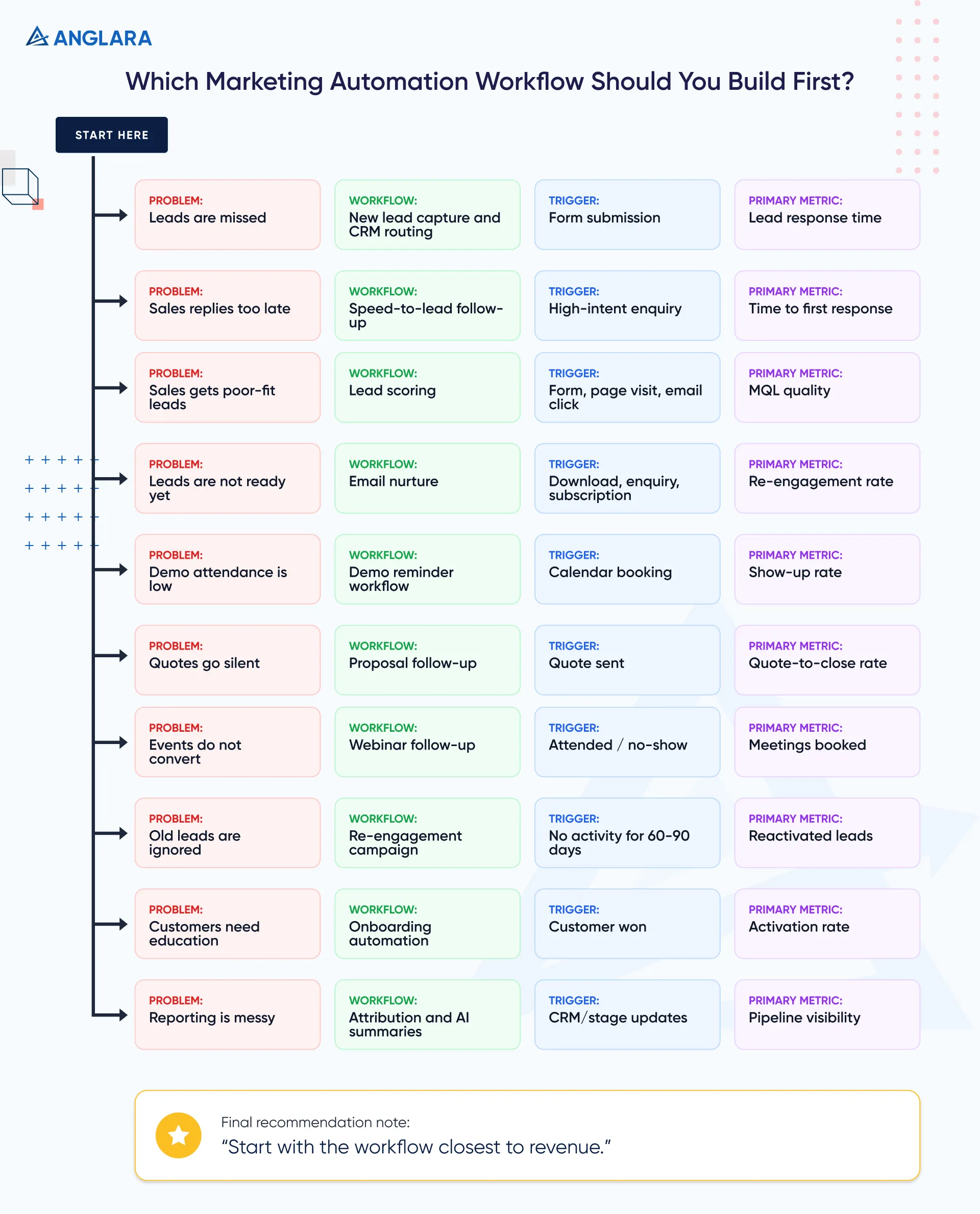
What Anglara usually recommends: start with the workflow closest to revenue. For most SMB and mid-market teams, that is either lead capture to CRM routing or speed-to-lead follow-up.
10 Marketing Automation Examples Your Team Can Use
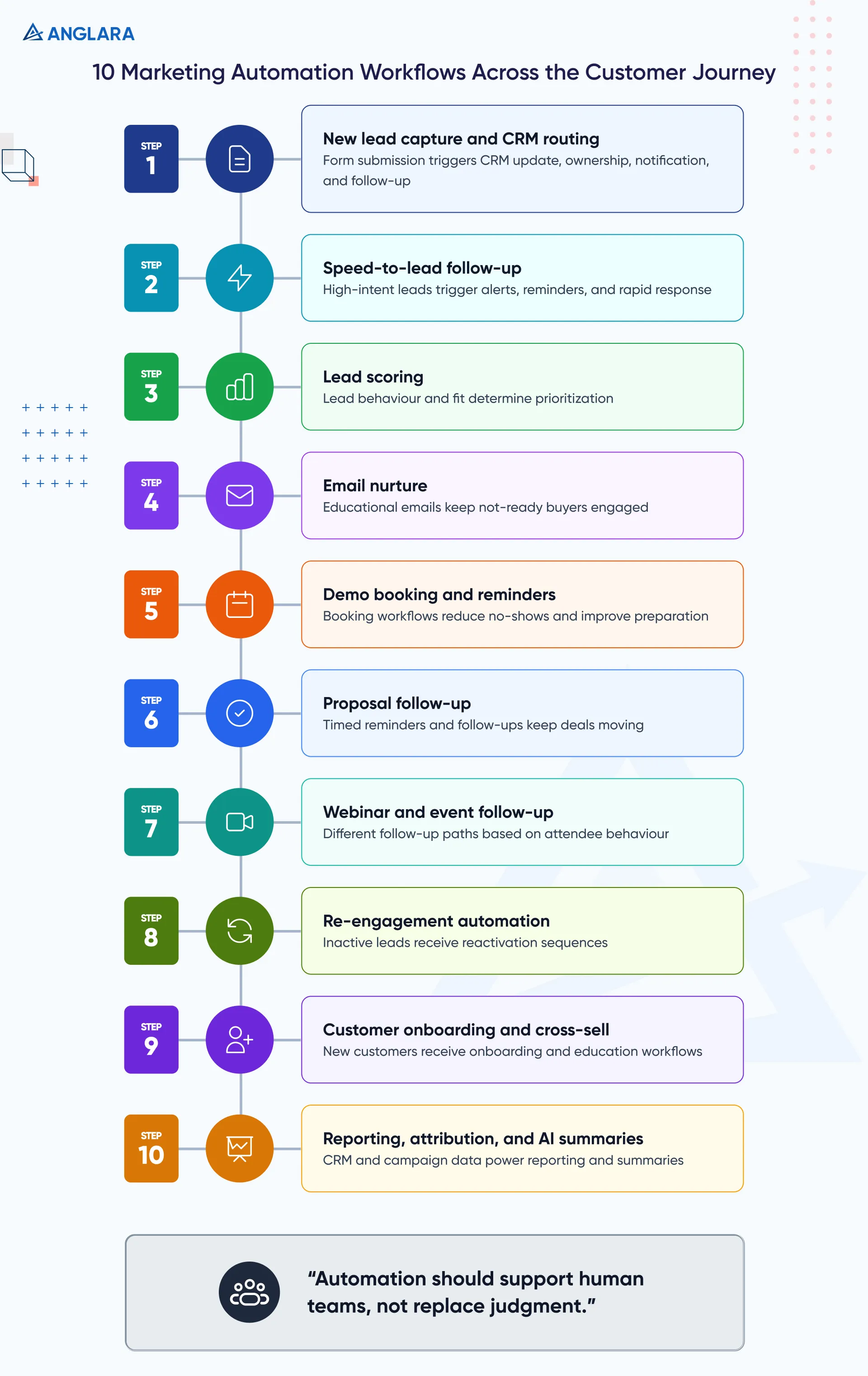
1. New Lead Capture And CRM Routing
This is one of the most important marketing automation examples because it protects your lead flow from day one.
When someone submits a website form, landing page form, chatbot enquiry, or demo request, the system should automatically create or update the contact in your CRM.
A simple workflow can include:
- Add lead to CRM
- Capture source, campaign, page URL, and form type
- Assign lead owner
- Send internal sales notification
- Send confirmation email to the prospect
- Create a follow-up task
- Add lifecycle stage or lead status
This sounds basic, but many teams still lose attribution because forms are not mapped properly. Others create duplicate contacts because email matching is not configured correctly.
What to watch:
- Required fields should not block good leads.
- Hidden UTM fields should be tested.
- Duplicate rules should be clear.
- Sales owner assignment should be based on logic, not guesswork.
- Lead source should not be overwritten accidentally.
A good lead routing workflow makes your CRM more trustworthy. Without it, every later automation becomes weaker.
2. Speed-To-Lead Follow-Up
Speed-to-lead automation helps your team respond quickly when a prospect shows intent.
The trigger could be:
- Contact form submission
- Pricing page enquiry
- Demo request
- “Book a call” click
- Chatbot qualification
- Lead score crossing a threshold
The automation can:
- Notify the right person instantly
- Create a call task
- Send a short confirmation email
- Add a Slack or email alert
- Trigger a reminder if nobody responds within a set time
This is especially useful for service companies, SaaS businesses, healthcare providers, local businesses, and B2B teams where a delayed reply can lose the lead.
Example workflow:
- Trigger: User submits “Request consultation” form.
- Action 1: Contact is created in CRM.
- Action 2: Sales owner receives alert with lead details.
- Action 3: Prospect receives a confirmation email.
- Action 4: If no sales activity happens within 2 hours, reminder is sent to the owner.
- Action 5: If still no action after 24 hours, manager gets notified.
Anglara implementation note: this workflow only works if ownership is clear. If five people receive the same alert but nobody owns the lead, automation will only make the confusion faster.
3. Lead Scoring Based On Buying Intent
Lead scoring helps your team prioritize leads based on fit and behaviour.
A simple lead scoring system may add points when someone:
- Visits the pricing page
- Views a service page multiple times
- Downloads a guide
- Opens or clicks important emails
- Books a demo
- Selects a high-intent form option
- Comes from a target company or industry
It may subtract points when someone:
- Uses a personal email for enterprise enquiry
- Is outside your target region
- Has no engagement after several emails
- Selects a low-fit service category
This does not need to be complex in the beginning. A basic score can help sales focus on better opportunities and help marketing understand which campaigns create stronger leads.
Example workflow:
- Trigger: Lead score reaches 50.
- Action 1: Change lifecycle stage to MQL.
- Action 2: Notify sales owner.
- Action 3: Create follow-up task.
- Action 4: Add lead to high-intent nurture sequence.
- Action 5: Track source campaign.
What to watch:
- Do not over-score vanity actions.
- Do not assume every email click means buying intent.
- Review scoring rules monthly.
- Let sales give feedback on lead quality.
Lead scoring should help humans make better decisions. It should not replace judgment.
4. Email Nurture For Not-Ready Buyers
Not every lead is ready to book a call today. Email nurture automation helps you stay visible without manually following up every week.
This workflow is useful for:
- Guide downloads
- Newsletter subscribers
- Webinar signups
- Old enquiries
- Demo no-shows
- Leads who asked for pricing but did not move forward
A nurture sequence can include:
- Educational email
- Problem-awareness email
- Case study or proof email
- Comparison email
- Soft CTA email
- Final check-in email
For example, if someone downloads a guide about marketing automation cost, they may receive a sequence that explains budget drivers, implementation steps, common mistakes, and when to speak with a consultant.
The key is to avoid generic “just checking in” emails. Each email should answer a real question the buyer may have.
What Anglara would do: keep the first nurture simple. Start with 4–5 emails over 2–3 weeks. Track replies, CTA clicks, unsubscribes, and booked calls. Improve the content before adding more branches.
5. Demo Booking And No-Show Reminders
If your business depends on consultations, demos, or sales calls, booking automation is a quick win.
The workflow starts when someone books a meeting through Calendly or another scheduling tool.
The automation can:
- Add or update contact in CRM
- Create deal or opportunity
- Add meeting date and time
- Send confirmation email
- Send reminder emails
- Notify sales owner
- Send pre-call questionnaire
- Send no-show follow-up if the person does not attend
Example workflow:
- Trigger: Consultation booked.
- Action 1: CRM contact is updated.
- Action 2: Deal is created in “Consultation booked” stage.
- Action 3: Prospect receives confirmation.
- Action 4: Reminder sent 24 hours before the call.
- Action 5: Reminder sent 1 hour before the call.
- Action 6: After call, sales owner receives follow-up task.
This workflow reduces missed meetings and improves call preparation.
For B2B teams, the pre-call email can ask for goals, current tools, team size, and biggest bottleneck. This gives sales better context before the conversation starts.
6. Proposal Or Quote Follow-Up
Many businesses lose deals after sending proposals because follow-up depends on memory.
Proposal follow-up automation keeps the deal moving without making your team sound robotic.
A simple workflow can include:
- Proposal sent
- Follow-up after 2 days
- Reminder after 5 days
- Internal task after 7 days
- Manager alert after 10–14 days
- Move to nurture if no response
Example workflow:
- Trigger: Deal stage changes to “Proposal sent.”
- Action 1: Create follow-up task for sales owner.
- Action 2: Send helpful follow-up email after 2 days.
- Action 3: If no reply, send reminder after 5 days.
- Action 4: If still no activity, notify owner to call.
- Action 5: If deal is marked lost, add reason and move contact to re-engagement sequence.
What to watch:
- Do not send too many automated emails.
- Give sales control to pause automation.
- Exclude deals where the prospect already replied.
- Personalize based on proposal type or service interest.
This workflow works well for agencies, consultants, software vendors, local service providers, and B2B companies with quote-based selling.
7. Webinar And Event Follow-Up
Many teams run webinars, workshops, or live events but fail to follow up properly.
Marketing automation can separate people based on behaviour:
- Registered but did not attend
- Attended live
- Attended and asked a question
- Watched replay
- Clicked offer link
- Requested consultation
Each group should receive a different follow-up.
Example workflow:
- Trigger: Webinar ends.
- Action 1: Attendees receive recording and next-step email.
- Action 2: No-shows receive replay email.
- Action 3: High-engagement attendees are sent to sales.
- Action 4: Questions are added to CRM notes.
- Action 5: Follow-up sequence starts based on topic interest.
This is powerful for B2B education, SaaS demos, professional services, healthcare education, and community-led marketing.
The mistake to avoid: sending the same replay email to everyone. Someone who attended and asked a pricing question should not receive the same message as someone who registered but never joined.
8. Re-Engagement For Inactive Leads
Every CRM has old leads that went quiet.
A re-engagement workflow helps you revive those contacts without manually reviewing hundreds or thousands of records.
The trigger can be:
- No activity for 60 days
- No email engagement for 90 days
- Deal closed lost
- Old consultation request
- Old quote with no decision
A simple re-engagement sequence can include:
- Helpful resource
- “Still exploring?” email
- New offer or updated service note
- Soft consultation CTA
- Final cleanup email
Example workflow:
- Trigger: Contact inactive for 90 days.
- Action 1: Send helpful update.
- Action 2: If clicked, notify sales.
- Action 3: If replied, create task.
- Action 4: If no engagement after sequence, reduce lead score or move to long-term nurture.
This keeps your CRM cleaner and gives old opportunities a second chance.
Anglara implementation note: before launching re-engagement, clean your CRM. Remove bad contacts, unsubscribed users, invalid emails, and contacts with unclear consent. Automation should not create compliance or deliverability problems.
9. Customer Onboarding And Cross-Sell Automation
Marketing automation is not only for new leads. It can also help after someone becomes a customer.
A customer onboarding workflow can:
- Send welcome email
- Share next steps
- Introduce support channels
- Collect missing information
- Share product or service education
- Trigger internal onboarding tasks
- Ask for feedback at the right time
For SaaS teams, onboarding automation may include activation prompts and feature education.
For agencies or service teams, it may include project kickoff reminders, document collection, meeting booking, and internal handoff tasks.
Later, cross-sell automation can identify when a customer may benefit from another service.
Example workflow:
- Trigger: Deal marked won.
- Action 1: Welcome email is sent.
- Action 2: Onboarding task created for internal team.
- Action 3: Client receives checklist.
- Action 4: After 30 days, satisfaction check is sent.
- Action 5: After 60–90 days, relevant cross-sell email is triggered based on service usage.
The key is timing. Cross-sell too early and it feels pushy. Wait too long and the customer may not know what else you can help with.
10. Reporting, Attribution, and AI Summaries
This is one of the most underrated marketing automation examples.
Many teams automate emails but still manually prepare reports every week. Reporting automation connects website actions, CRM stages, campaigns, and revenue signals so your team can understand what is working.
This workflow can include:
- Form submissions tracked in GA4
- UTM data stored in CRM
- CRM stages synced with reporting dashboard
- Weekly lead report sent to team
- AI-generated summary of top changes
- Alerts when a campaign creates high-intent leads
- Alerts when lead response time increases
HubSpot reports that about 92% of marketers use automation for data analysis and reporting, while 47% use automation to make marketing processes more efficient. That makes reporting automation a practical place to start, especially for teams that waste hours preparing status updates manually. (HubSpot)
Example workflow:
- Trigger: New lead enters CRM.
- Action 1: Source, campaign, and landing page are captured.
- Action 2: Lead is assigned to owner.
- Action 3: CRM stage changes are tracked.
- Action 4: Weekly summary is sent to marketing and sales.
- Action 5: AI summarizes changes, risks, and follow-up gaps.
This is where AI can help, but only if the data is clean. If the CRM is messy, AI summaries will only summarize messy information faster.
Where AI Fits In Marketing Automation Examples
AI can make marketing automation more useful, but it should not be added everywhere.
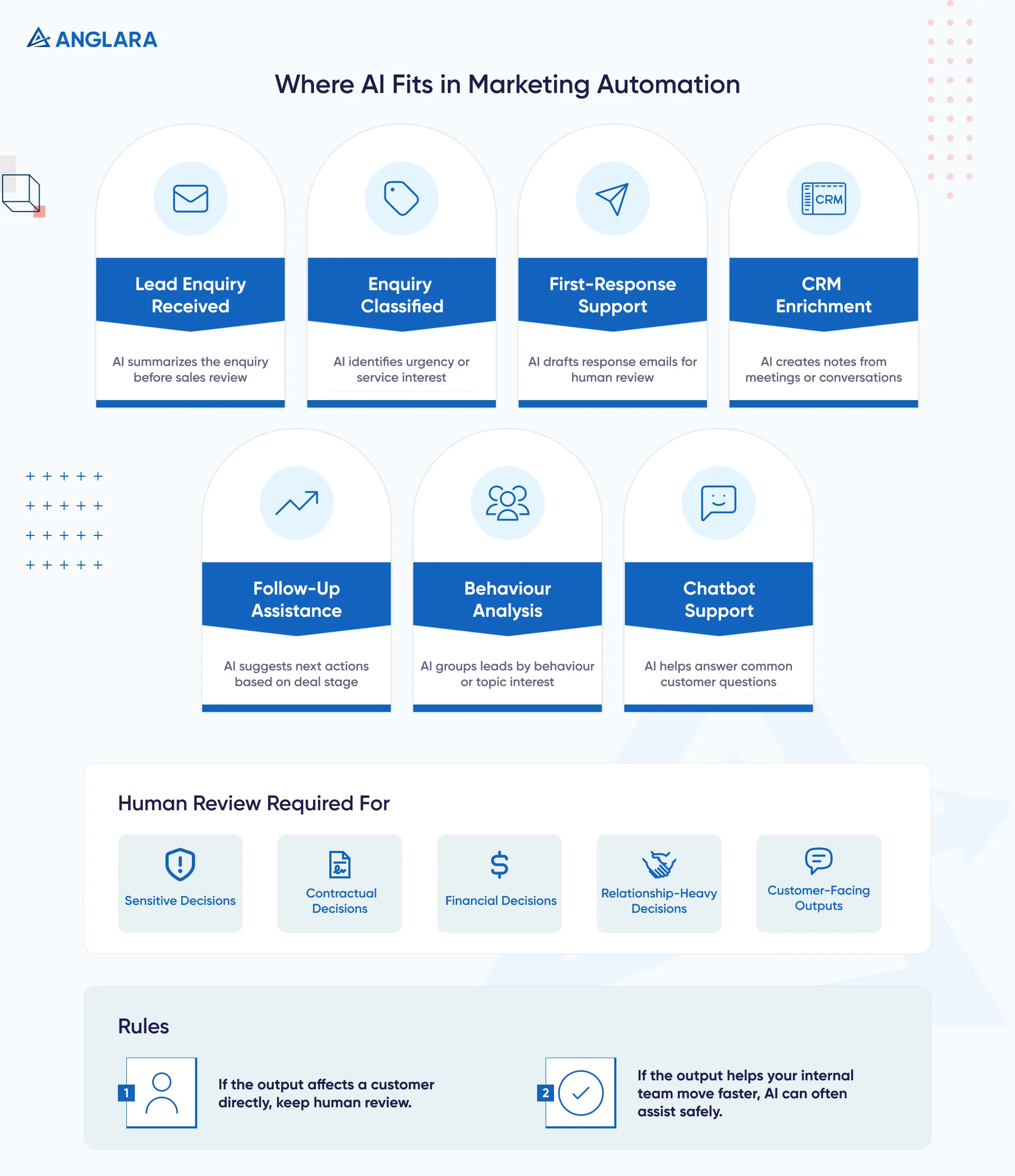
Good AI use cases include:
- Summarizing lead enquiries before sales calls
- Classifying enquiries by urgency or service interest
- Drafting first-response emails for human review
- Creating CRM notes from meeting transcripts
- Suggesting follow-up actions based on deal stage
- Grouping leads by behaviour or topic interest
- Helping support chatbots answer common questions
AI is especially useful when the task involves reading, summarizing, classifying, or drafting.
It is less suitable when the decision is sensitive, contractual, financial, or relationship-heavy. In those cases, AI should assist the human, not replace the human.
A practical rule:
- If the output affects a customer directly, keep human review.
- If the output helps your internal team move faster, AI can often assist safely.
Common Mistakes To Avoid
Marketing automation fails when teams automate a messy process instead of fixing it first.
A common practitioner complaint in CRM and automation forums is that poor CRM data, unclear stages, and complicated processes often create more pain than the tool itself. The repeated theme is clear: automation layered on top of messy workflows can amplify the chaos instead of solving it.
Avoid these mistakes:
- Automating before mapping the workflow
- Adding too many tools too early
- Ignoring CRM data quality
- Not defining workflow ownership
- Sending too many automated emails
- Forgetting exit conditions
- Not testing edge cases
- Tracking clicks but not pipeline impact
- Using AI without human review
- Building workflows nobody maintains
The most dangerous mistake is assuming automation is a one-time setup. Good workflows need monitoring, cleanup, and improvement.
How To Build Your First Automation Workflow
Start small. One useful workflow is better than ten half-working automations.
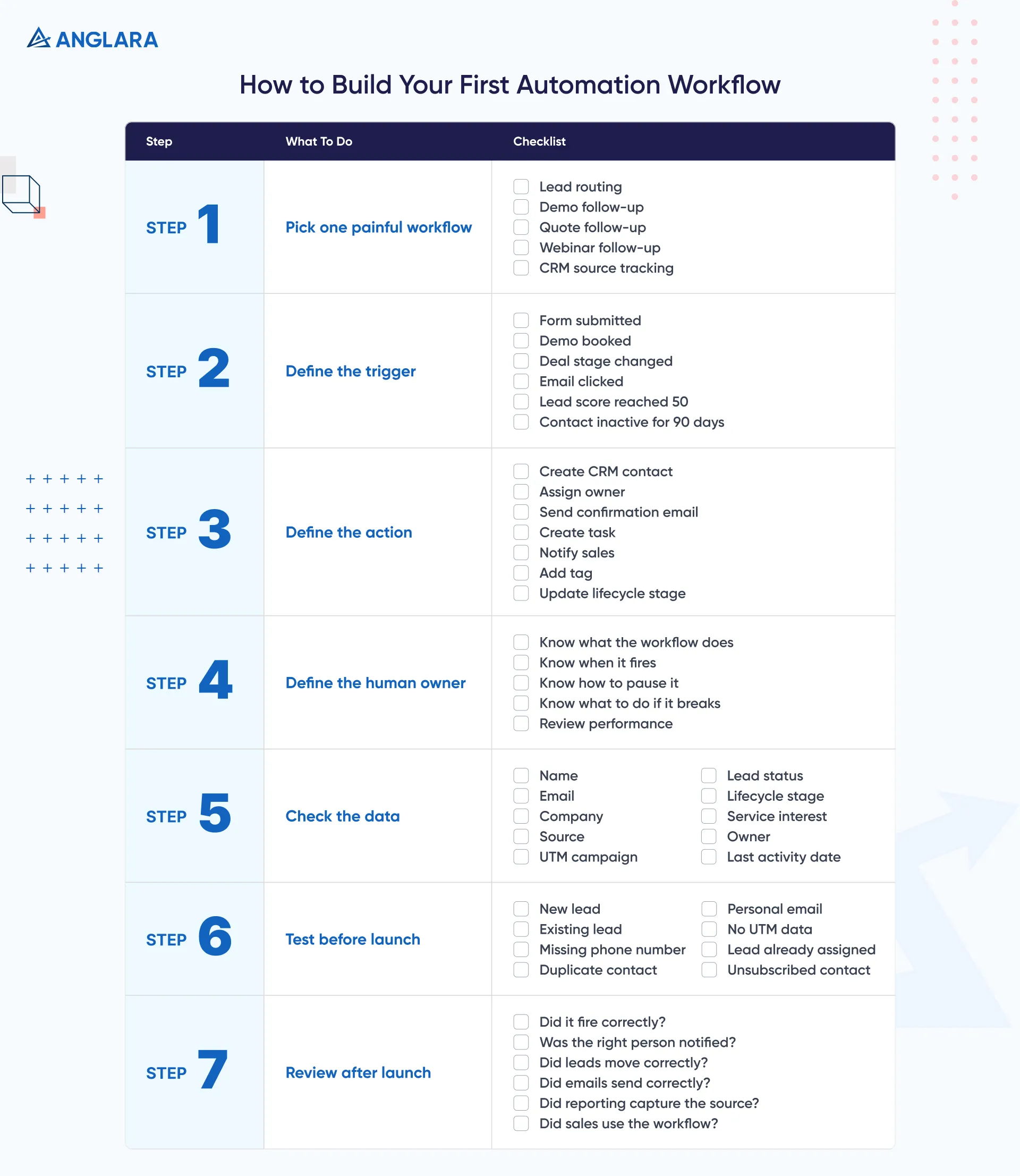
Step 1: Pick One Painful Workflow
Choose a workflow that is repeated often and creates visible business impact.
Good starting points:
- New lead routing
- Demo booking follow-up
- Quote follow-up
- Webinar follow-up
- CRM source tracking
Step 2: Define The Trigger
Be specific.
Examples:
- Form submitted
- Demo booked
- Deal stage changed
- Email link clicked
- Lead score reached 50
- Contact inactive for 90 days
Step 3: Define The Action
Write what should happen next.
Examples:
- Create CRM contact
- Assign owner
- Send confirmation email
- Create task
- Notify sales
- Add tag
- Update lifecycle stage
Step 4: Define The Human Owner
Every workflow needs an owner.
This person should know:
- What the workflow does
- When it fires
- How to pause it
- What to do if it breaks
- How to review performance
Step 5: Check The Data
Before building automation, check if the required fields exist.
Common fields:
- Name
- Company
- Source
- UTM campaign
- Lead status
- Lifecycle stage
- Service interest
- Owner
- Last activity date
Step 6: Test Before Launch
Test with different scenarios.
Examples:
- New lead
- Existing lead
- Missing phone number
- Duplicate contact
- Personal email
- No UTM data
- Lead already assigned
- Unsubscribed contact
Step 7: Review After Launch
Do not assume the workflow is perfect.
Review:
- Did it fire correctly?
- Did the right person get notified?
- Did leads move to the right stage?
- Did emails send correctly?
- Did reporting capture the source?
- Did sales actually use the workflow?
What Anglara Would Do First
If a team came to Anglara asking for marketing automation help, we would not start by recommending a tool.
We would start with three questions:
- Where are leads coming from?
- Where do leads get delayed or lost?
- Which workflow is closest to revenue?
Then we would map one priority workflow, check the CRM/data readiness, and build a version that can be tested quickly.
For many teams, the best starting point is:
- Lead capture
- CRM routing
- Sales notification
- Follow-up task
- Basic reporting
Once that works, we can add nurture, scoring, AI summaries, dashboards, and more advanced workflows.
Need help choosing what to automate first? Anglara’s marketing automation consulting team can review your current workflow and help you identify the highest-impact starting point.
Key Takeaways
- The best marketing automation examples are practical workflows, not tool demos.
- Start with one revenue-adjacent workflow before building complex automation.
- Lead routing, speed-to-lead, quote follow-up, and reporting are strong first choices.
- AI works best for summarizing, classifying, drafting, and internal support.
- CRM data quality matters more than the automation tool.
- Every workflow needs an owner, test plan, and review process.
- Blogs, forms, CRM, email, calendars, and analytics should work together.
- Automation should support human teams, not remove judgment from important decisions.
FAQs
What are some common marketing automation examples?
Common marketing automation examples include welcome emails, lead routing, lead scoring, email nurture, abandoned cart reminders, demo reminders, proposal follow-ups, event follow-ups, re-engagement campaigns, onboarding emails, and reporting automation.
What is a marketing automation workflow?
A marketing automation workflow is a set of automated steps triggered by a user action, CRM change, time delay, or business rule. For example, when a lead submits a form, the system can create a CRM record, notify sales, send a confirmation email, and create a follow-up task.
Which marketing automation example should we start with?
Most businesses should start with the workflow closest to revenue. For B2B and service businesses, that is often lead capture and CRM routing, speed-to-lead follow-up, or proposal follow-up. For ecommerce, abandoned cart, post-purchase, and re-engagement workflows are common starting points.
Can small businesses use marketing automation?
Yes. Small businesses can use simple marketing automation for form follow-ups, appointment reminders, quote follow-ups, review requests, email nurture, and CRM updates. The key is to start with a small workflow that saves time or prevents missed leads.
How does AI improve marketing automation?
AI can improve marketing automation by summarizing enquiries, classifying leads, drafting emails, supporting chatbot workflows, creating CRM notes, and helping teams understand campaign performance faster. AI should be used with human review when outputs affect customers directly.
What tools are used for marketing automation?
Common marketing automation tools include CRM platforms, email marketing software, form tools, calendar tools, analytics platforms, workflow automation tools, and AI assistants. The right tool depends on your workflow, budget, CRM setup, and integration needs.
What is the biggest mistake in marketing automation?
The biggest mistake is automating a messy process. If your CRM stages, ownership rules, data fields, and follow-up process are unclear, automation will usually make the problem faster instead of better.
How do I know if my marketing automation is working?
Track metrics like lead response time, form-to-CRM success rate, MQL quality, email engagement, booked calls, proposal follow-ups, reactivated leads, and pipeline created. Do not measure automation only by email opens or workflow activity.