

Think marketing automation cost is just a monthly software fee? Think again.
The platform price is only one part of the bill. In many teams, the real spend shows up later through onboarding, data cleanup, integrations, contact growth, training, reporting fixes, and the human effort needed to keep campaigns running well.
This guide breaks down what marketing automation usually costs, what pushes that number up or down, and how to budget based on your business stage instead of guessing from a vendor pricing page.
Marketing automation software can look inexpensive at first, but software is rarely the full answer. If you want a system that is properly planned, mapped to your funnel, connected to your CRM, tested, and ready for real use, the starting budget is usually much higher than the tool price alone. In many cases, businesses should expect an initial discovery and planning phase from around $1,000, followed by roughly $4,000 for a focused first month of implementation for a smaller automation setup. The real cost depends on workflow complexity, data quality, integrations, and how much ongoing optimization your team needs.
Who This Is For
This article is for CMOs, RevOps leaders, founders, demand gen teams, and marketing ops managers trying to build a realistic budget before buying or expanding a marketing automation stack.
It is especially useful if your team is moving beyond basic newsletters and now needs lead capture, routing, nurturing, CRM sync, reporting, or lifecycle automation that sales and marketing can actually trust.
If your team is still asking, “What should we automate first?” this is the right place to start.
The Problem In Plain Language
Many teams jump into software before they define how AI and automation should split the work.
Most teams budget for marketing automation the wrong way.
They compare entry plans, pick the lowest monthly price that looks acceptable, and assume they have solved the budget question. Then implementation starts. Fields do not map cleanly. CRM stages are inconsistent. Duplicate contacts inflate costs. Reporting is unreliable. Nobody fully owns the workflows after launch.
That is why “from $X/month” is rarely the real answer.
The smarter question is not, “What does the platform cost?”
It is, “What will it cost us to launch, run, improve, and justify this system over the next 12 months?”
What Marketing Automation Cost Actually Includes
If your leadership team is evaluating the wider efficiency case, it also helps to understand how AI reduces costs across operations, not just inside marketing.
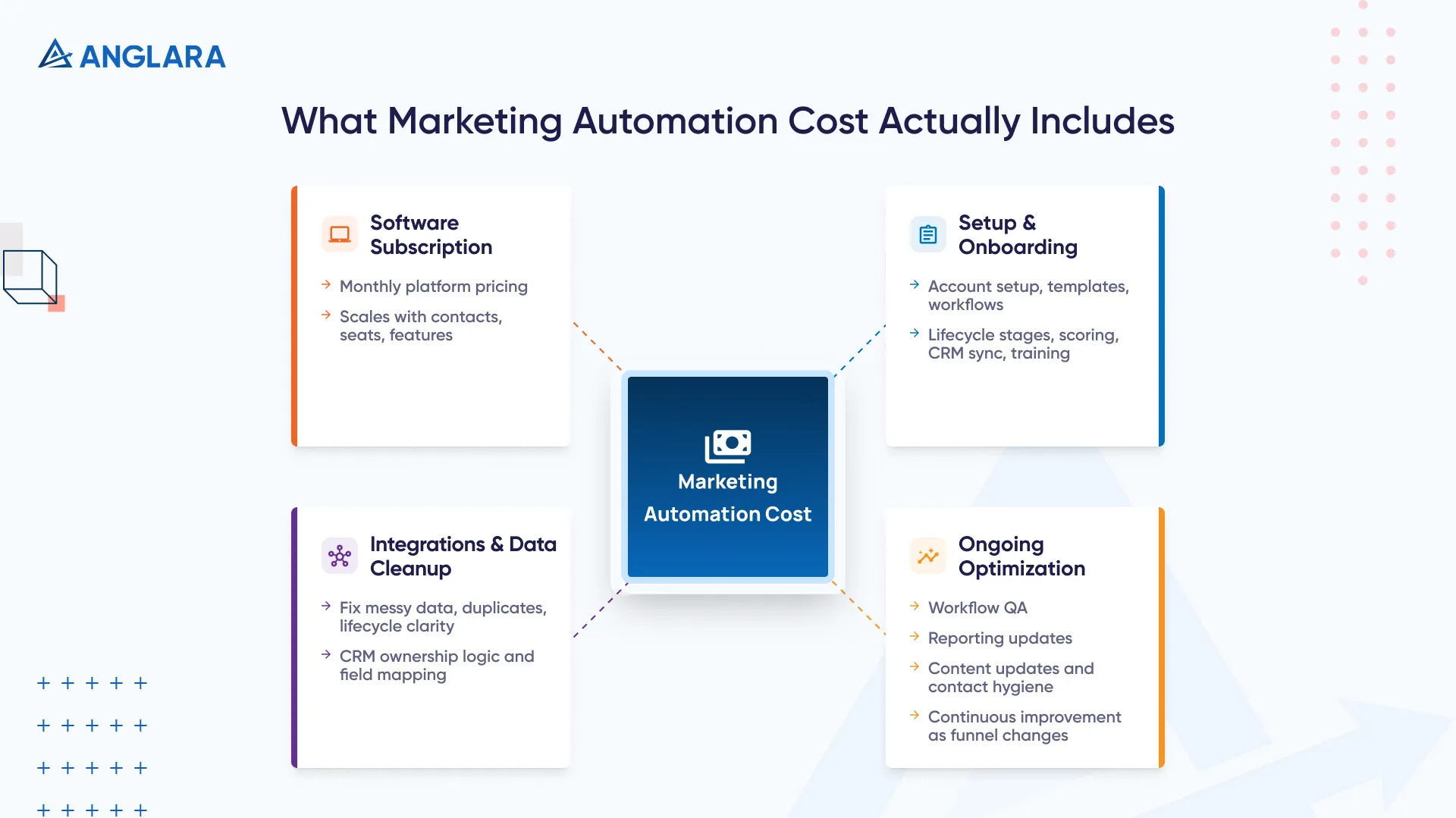
Software Subscription
This is the visible part of the budget.
Brevo’s Starter plan begins at $9/month and Standard begins at $18/month. ActiveCampaign says packages start at $15/month. HubSpot Marketing Hub shows Starter from $15/month per seat, Professional from $890/month, and Enterprise from $3,600/month. Salesforce Marketing Cloud Account Engagement currently shows Growth+ at $1,250/org/month, Plus+ at $2,750/org/month, and Advanced+ at $4,400/org/month, all billed annually. Adobe Marketo Engage uses custom pricing and packages rather than a simple public flat rate. (Brevo Help)
What matters is not just the starting number. Pricing can scale based on contacts, seats, channels, feature tiers, usage credits, or database size. That means a platform that looks affordable at the beginning can become much more expensive as your list grows or your team needs deeper automation.
Setup And Onboarding
This is where many budgets start drifting.
A basic rollout might only involve account setup, domain configuration, templates, and a few simple workflows. A more serious B2B setup usually means lifecycle stages, lead scoring, CRM sync, routing logic, reporting design, permissions, and training.
That turns setup into a project, not a checkbox.
Integrations And Data Cleanup
Automation only works as well as the data underneath it.
If your source fields are messy, your contact records are duplicated, your lifecycle stages are unclear, or your CRM ownership logic is weak, automation will make those problems bigger, not smaller.
At Anglara, this is one of the most underestimated cost drivers. What usually breaks first is not the workflow builder. It is the process behind it.
Ongoing Optimization
Marketing automation is not a one-time setup.
You still need workflow QA, suppression rules, reporting adjustments, content updates, contact hygiene, and periodic reviews as your funnel changes. That ongoing effort should be part of the budget from day one.
Typical Marketing Automation Budget Ranges By Business Stage
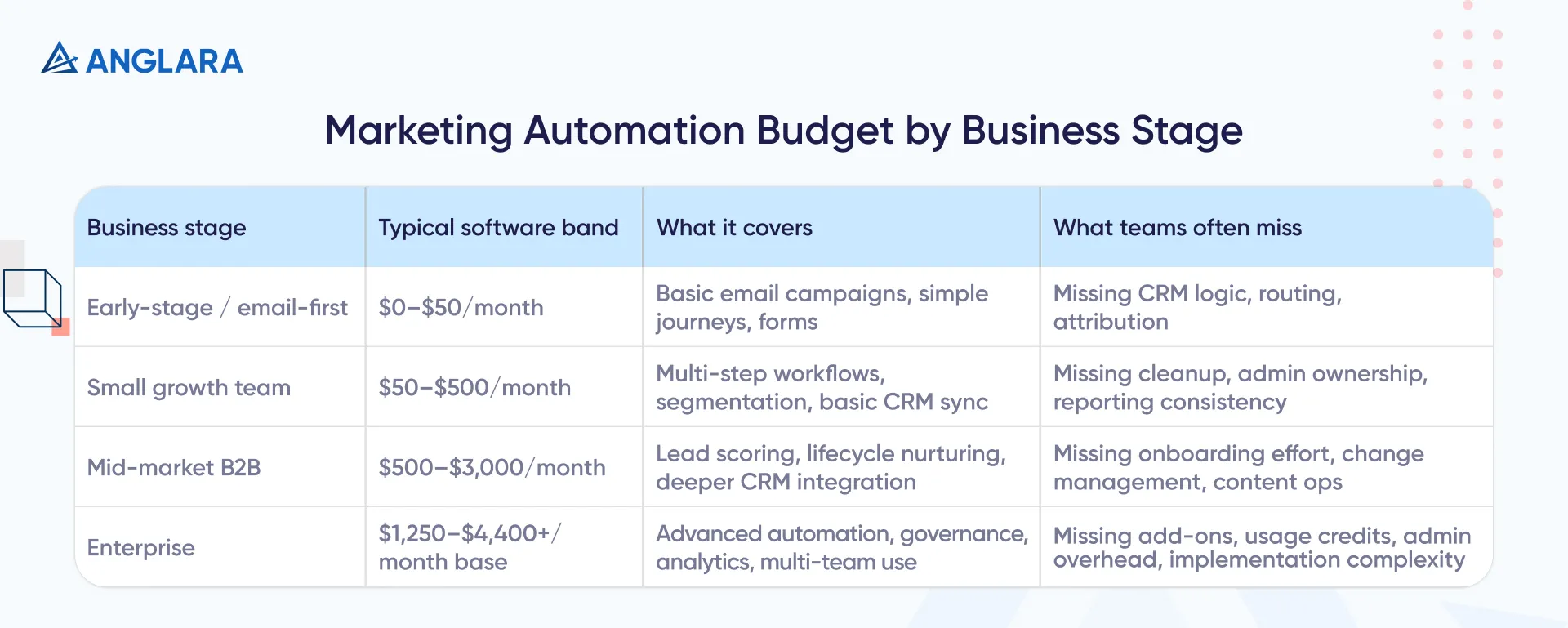
Use this as a planning model, not as a vendor quote sheet.
Business stage | Typical software band | What it usually covers | What teams often miss |
Early-stage / email-first | $0–$50/month | Basic email campaigns, simple journeys, forms | CRM logic, routing, attribution |
Small growth team | $50–$500/month | Multi-step workflows, segmentation, basic CRM sync | Cleanup, admin ownership, reporting consistency |
Mid-market B2B | $500–$3,000/month | Lead scoring, lifecycle nurturing, deeper CRM integration | Onboarding effort, change management, content ops |
Enterprise | $1,250–$4,400+/month base | Advanced automation, governance, analytics, multi-team use | Add-ons, usage credits, admin overhead, implementation complexity |
The low end of this range is anchored by current Brevo, ActiveCampaign, and HubSpot entry pricing. The enterprise anchor is supported by current Salesforce Account Engagement pricing, while Adobe Marketo Engage remains contact-based and custom-priced.
When Marketing Automation Is A Good Fit And When It Is Not
If your team is comparing orchestration layers rather than classic platform suites, our n8n vs Make guide is a useful next step.
Good Fit:
- You have a repeatable funnel
- Leads come from multiple sources
- Follow-up is delayed or inconsistent
- Your team manually moves data between tools
- You need lifecycle nurturing, routing, or reporting visibility
- Sales and marketing are losing time on repetitive handoffs
Not A Good Fit Yet:
- Lead volume is still very low
- Your ICP is still unclear
- CRM data is unreliable
- You do not know which workflows matter first
- Nobody internally owns the system after launch
Automation multiplies clarity. It also multiplies confusion when the process is weak.
What Pushes Marketing Automation Cost Up Or Down
For teams that want more control over workflow logic and operating cost, n8n marketing automation can be a strong alternative to heavier all-in-one stacks.
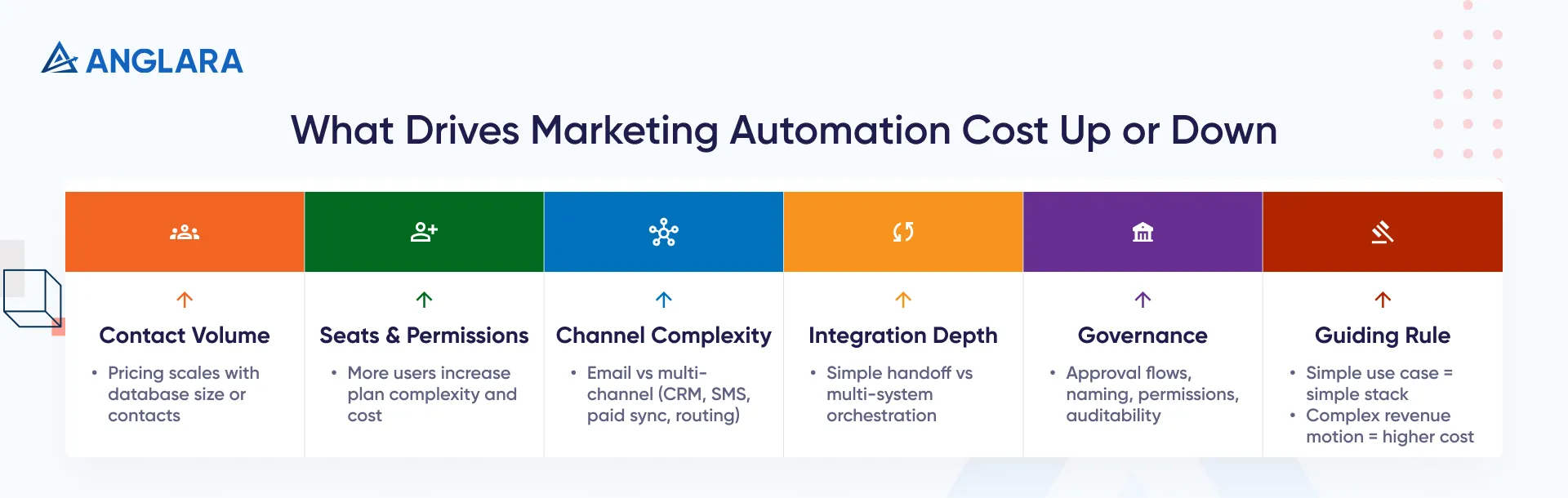
The biggest cost drivers are usually the ones teams underestimate.
Contact volume matters because many tools scale pricing as your database or marketing contact count grows. That is especially important with platforms tied to contact or database size.
Seats and permissions matter because more users, admin roles, and stakeholder access often push you into higher plans or more complex governance.
Channel complexity matters because email-only automation is cheaper than email plus CRM sync plus SMS plus paid audience syncing plus sales routing.
Integration depth matters because a simple form-to-CRM handoff is very different from multi-system lifecycle orchestration.
Governance matters because approval flows, naming conventions, auditability, and permission design all take time.
The practical rule is simple: if your use case is simple, keep the stack simple. If your revenue motion is more complex, your automation budget will rise whether you buy software, build workflows, or do both.
Real Budget Scenarios
Lean Startup Stack
A lean startup with one marketer, one founder, and a basic CRM usually does not need a heavyweight automation platform.
This team often gets better value from a lower-cost tool, a clean contact structure, and one or two useful workflows such as lead capture follow-up and basic nurture.
The biggest mistake here is buying for future complexity instead of current need.
Growth-Stage B2B Team
This is usually where the real pain starts.
The team now needs:
- Lead scoring
- Lifecycle stages
- CRM sync
- Routing rules
- Nurture paths
- Weekly reporting that leadership trusts
This is where software cost often moves into the high hundreds or low thousands per month, but the larger risk is still implementation quality, not just platform choice.
Enterprise Rollout
Enterprise budgets rise because complexity rises.
At that level, platform price is only one line item. Salesforce Account Engagement pricing alone now starts at $1,250/org/month and reaches $4,400/org/month on Advanced+, before related add-ons or usage-based credits. Adobe Marketo Engage also uses packaged, contact-based licensing rather than a simple public flat fee. (Salesforce)
The real enterprise costs usually come from alignment, governance, training, analytics design, admin ownership, and integration sprawl.
What Anglara Would Do
We would not start with 20 workflows.
We would start with 3 revenue-critical automations:
- Lead capture and routing
- Lifecycle nurture
- Reporting automation for weekly visibility
That usually creates a cleaner ROI story much faster than trying to automate everything at once.
Implementation Roadmap
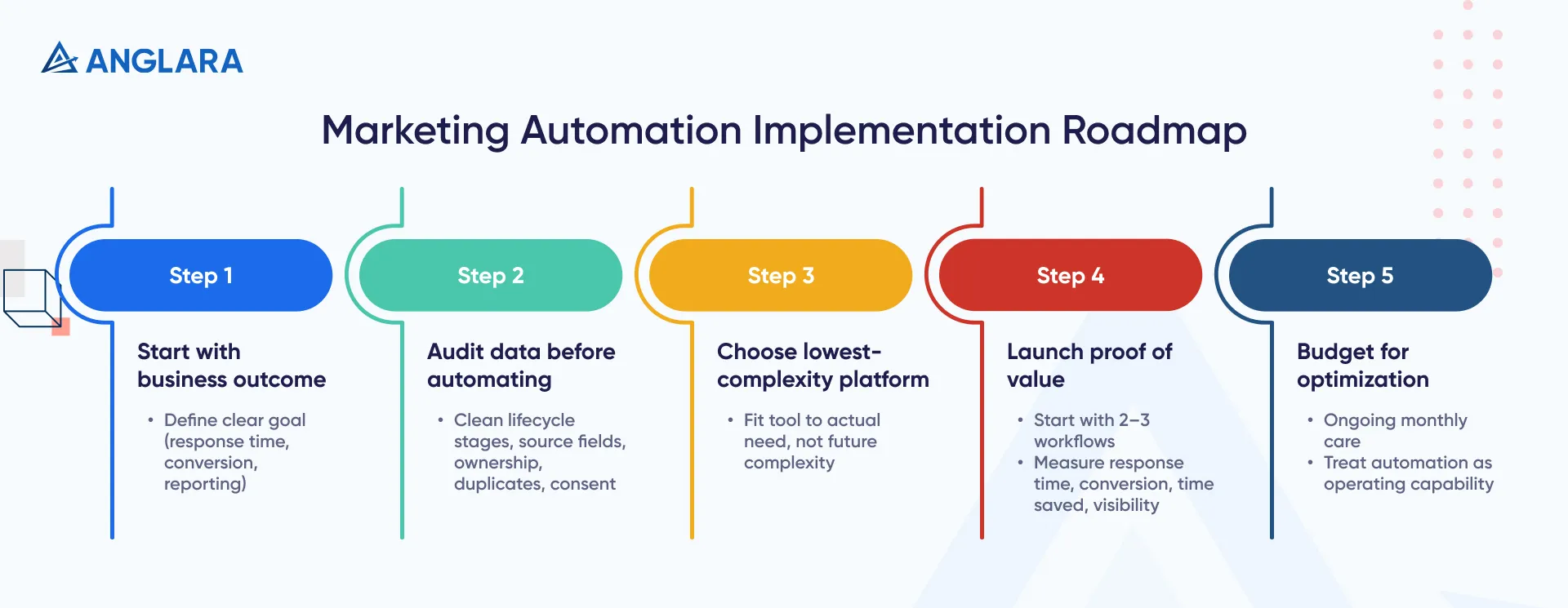
1. Start With The Business Outcome
Pick a clear goal first.
Examples:
- Reduce lead response time
- Improve MQL-to-SQL conversion
- Cut manual reporting time
- Improve meeting rate from high-intent leads
2. Audit Data Before Automating It
Do not automate bad data.
Clean:
- Lifecycle stages
- Source fields
- Lead owner rules
- Duplicate logic
- Consent and suppression status
This step is boring. It also saves money.
3. Pick The Lowest-Complexity Platform That Still Solves The Problem
Not every team needs an enterprise-grade MAP.
Some teams need a lean email-first tool. Some need a CRM-centric automation platform. Some need a custom orchestration layer on top of tools they already use.
4. Launch A Narrow Proof Of Value
Start with 2 or 3 workflows.
Measure:
- Lead response time
- Conversion movement
- Time saved
- Reporting visibility
Expand only after the first set works.
5. Budget For Optimization, Not Just Launch
The system will need monthly care.
That is normal. The best-performing teams treat automation as an operating capability, not a one-time setup.
Common Mistakes That Make Marketing Automation Expensive
The first mistake is buying too much software too early.
The second is automating messy data and then blaming the platform when routing, segmentation, or reporting breaks.
The third is budgeting only for the tool. The subscription is visible. Cleanup, integration work, content updates, admin time, and training are where costs often hide.
The fourth is treating automation like a side project. If nobody owns the workflows, quality drops quietly over time.
The fifth is trying to automate every edge case at launch. That usually creates workflow sprawl, unclear logic, and a system nobody wants to maintain.
FAQs
How much does marketing automation cost per month?
It depends on maturity and complexity. Lightweight tools can start around $9 to $15/month. Serious mid-market automation often lands in the high hundreds or low thousands per month. Enterprise B2B platforms can start around $1,250 to $4,400/month before add-ons, credits, contacts, or partner support. (Brevo Help)
What is included in marketing automation cost?
Usually three buckets:
- Software subscription
- Setup and integration work
- Ongoing optimization and operations
That is why the first-year cost is often much higher than the monthly sticker price.
Why does the cost go up so quickly as a team grows?
Because pricing often scales with contacts, seats, channels, advanced features, and governance requirements. On top of that, larger teams usually need cleaner reporting, better permissions, and deeper integration logic.
Is marketing automation worth it for a small business?
Yes, when the business already has repeatable demand and clear follow-up pain. Not yet, if lead volume is still very low, the ICP is unclear, or CRM data is weak.
What are the biggest hidden costs?
The usual hidden costs are:
- Onboarding
- Training
- Data cleanup
- Custom integrations
- Reporting setup
- Ongoing admin time
These can change the real first-year budget more than many teams expect.
Should I buy a platform or build custom automation?
Buy when your workflows are common and speed matters most.
Build or extend when your logic is unusual, your systems are fragmented, or you want tighter control over workflow behavior and long-term operating cost.
What should teams automate first?
Usually:
- Lead capture and routing
- Lifecycle nurture
- Reporting automation
These tend to create the fastest path to measurable value.
How long does implementation usually take?
A narrow rollout can move quickly. A more serious B2B implementation can take weeks or months depending on cleanup, integrations, workflow depth, training, and stakeholder alignment.
Key Takeaways
- Marketing automation cost is not just software pricing.
- Small teams can start lean, but growth-stage and enterprise teams need a fuller budget model.
- Contacts, seats, integrations, and governance move the number faster than many teams expect.
- A narrow rollout usually beats a big-bang implementation.
- Data cleanup is one of the highest-leverage cost-control moves.
- The best budget starts with business outcome, not feature count.
- Live workflows need ownership after launch.
Next Steps
If you need to justify spend to leadership, our guide on ROI of AI can help frame the business case more clearly.
If you are planning marketing automation this quarter, do not start with vendor demos.
Start with:
- The business problem
- The first workflows worth automating
- The systems that must connect
- The cost model you can actually defend
If you want Anglara to help you scope the right-fit route, we can help you decide whether you need a lightweight platform, a growth-stage automation stack, or a custom workflow layer before you overspend on the wrong setup.