


Most enterprise AI projects don't fail during the demo phase. They fail when they hit the complex reality of production.
A prototype running on a laptop is fundamentally different from a system that must handle sensitive customer data, integrate with legacy ERPs, and withstand security audits.
This guide moves beyond the "happy path" of testing to cover the critical infrastructure often overlooked:
- Secure identity propagation
- Role-based access control (RBAC)
- Real-time observability
- Seamless human escalation
Below is the complete enterprise chatbot deployment checklist for a conversational AI that is not only intelligent but also reliable, secure, and compliant.
What makes or breaks enterprise chatbot deployment?
Industry data suggests that up to 80% of AI projects fail to graduate from pilot to production, and that’s not because the AI is weak. It’s because the system was never designed to survive production.
A chatbot that works in a PoC behaves very differently once it meets real users, live data, and enterprise constraints. This transition is where most deployments break.
Here’s what essentially breaks the deployment:
1. Post-PoC failures are usually operational, not technical
Post-PoC failure is rarely about model quality. It usually comes down to non-functional gaps that were ignored during experimentation.
In demos, slow responses or partial answers feel acceptable, but in production, even small delays frustrate users and reduce trust. Additionally, you may tolerate occasional hallucinations, but in HR, finance, or compliance workflows, they become immediate blockers.
2. Data readiness is frequently underestimated
PoCs often rely on clean, curated documents. However, the production systems must work with fragmented, constantly changing enterprise data. When knowledge sources are duplicated or outdated, retrieval pipelines surface conflicting information.
The chatbot doesn’t fix this chaos; it exposes it. Inconsistent answers are often the first signal that deployment foundations are weak.
3. A demo mindset is fundamentally different from a production mindset
A demo mindset optimises for visible capability. It prioritises how impressive the chatbot looks over its dependability. A production mindset does the opposite. It focuses on reliability, security, cost control, and long-term maintainability.
- Instead of hardcoded API keys, production systems require secret management and rotation.
- Instead of vague error handling, they need graceful degradation and escalation paths.
- Instead of manual “vibe checks,” they demand automated testing and monitoring to catch regressions early.
4. Lack of ownership quietly kills deployments
Many chatbot projects start inside innovation or experimentation teams. Once deployed, the chatbot touches multiple functions like IT, security, compliance, customer support, and operations.
Without clear ownership, the system becomes an orphan.
- No one is responsible for updating the knowledge base when policies change.
- No one owns prompt changes or approves model upgrades.
- No one is accountable when the chatbot behaves unexpectedly in production.
5. Successful enterprises treat chatbots as operational systems, not experiments.
Enterprises that succeed treat chatbots as operational systems, not experiments. The shift, from experimentation to operational discipline, is often the deciding factor between chatbots that remain stuck in pilot mode and those that become reliable, trusted enterprise assets.
Here’s what makes a successful deployment possible:
- Ownership is defined early, not after launch.
- Responsibilities for maintenance, monitoring, and incident response are clearly assigned.
- The chatbot is governed like any other enterprise system, with controls, audits, and ongoing optimisation.
What does an enterprise chatbot deployment architecture look like?
An enterprise chatbot is not a single system or model call. It is a layered architecture that coordinates user interaction, model reasoning, enterprise data access, and governance controls.
When teams treat chatbot deployment like a simple UI widget or API integration, reliability issues surface quickly. Production-ready chatbots require the same architectural discipline as any mission-critical system.
Deployment environments: dev, staging, and production
Separate deployment environments for development, staging, and production are essential for enterprise chatbot reliability.
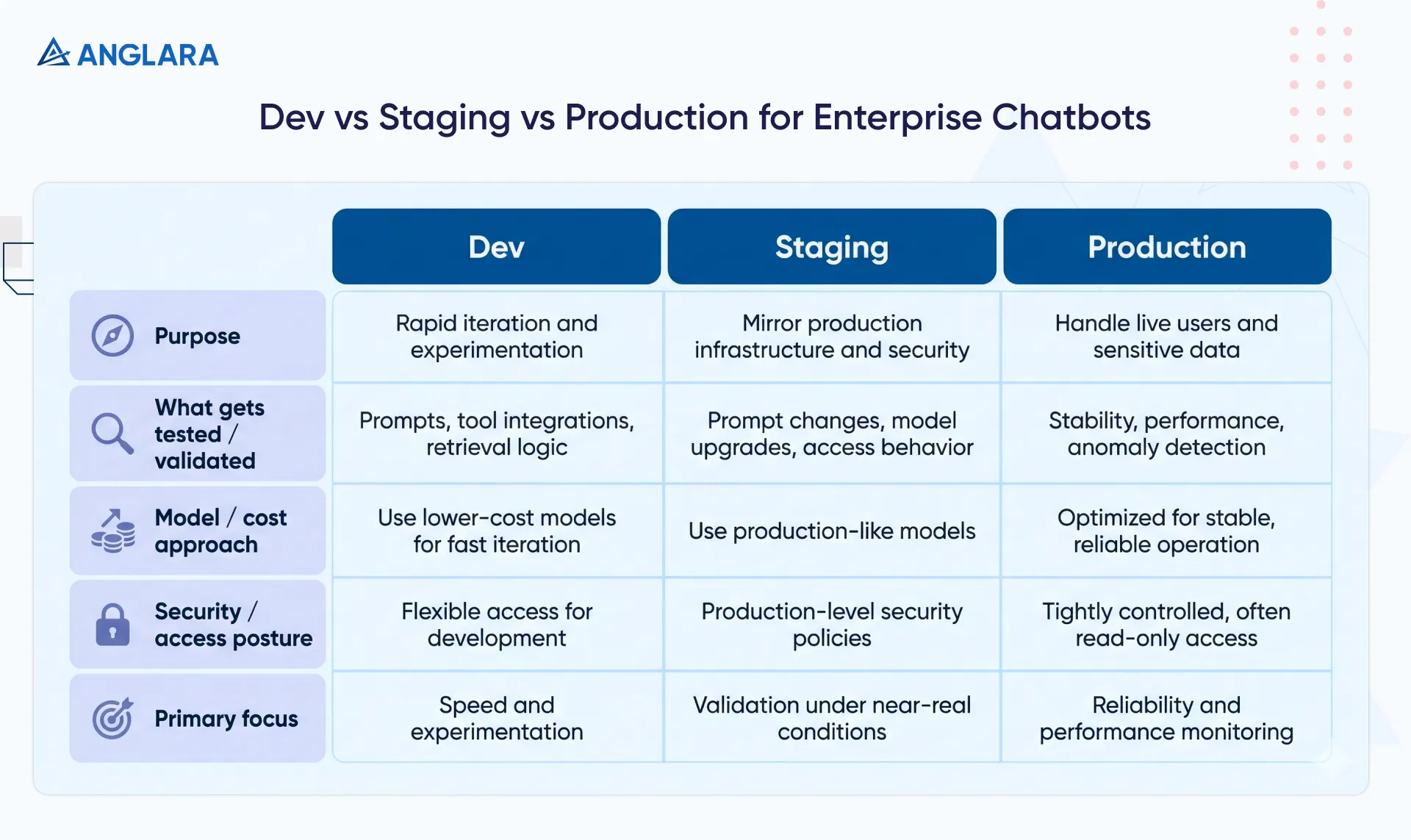
Each environment serves a distinct purpose and should not be blurred, as it introduces risk that only becomes visible after users are affected.
1. Dev Environment
This is where teams iterate quickly and test prompt experimentation, tool integrations, and retrieval logic.
They often use lower-cost models to optimise iteration speed without inflating costs.
2. Staging environment (UAT / QA)
Staging environments must closely mirror production infrastructure and security policies. This is where teams validate:
- Prompt and retrieval changes against benchmark datasets
- Model upgrades and configuration changes
- Identity, access, and integration behaviour under near-real conditions
3. Production (prod) environment
Production environments handle live users and sensitive data. Engineering access must be tightly controlled, often read-only by default.
The focus here shifts entirely to stability, performance monitoring, and anomaly detection.
Model hosting vs API-based LLM usage
Enterprises must decide how and where to execute language models.
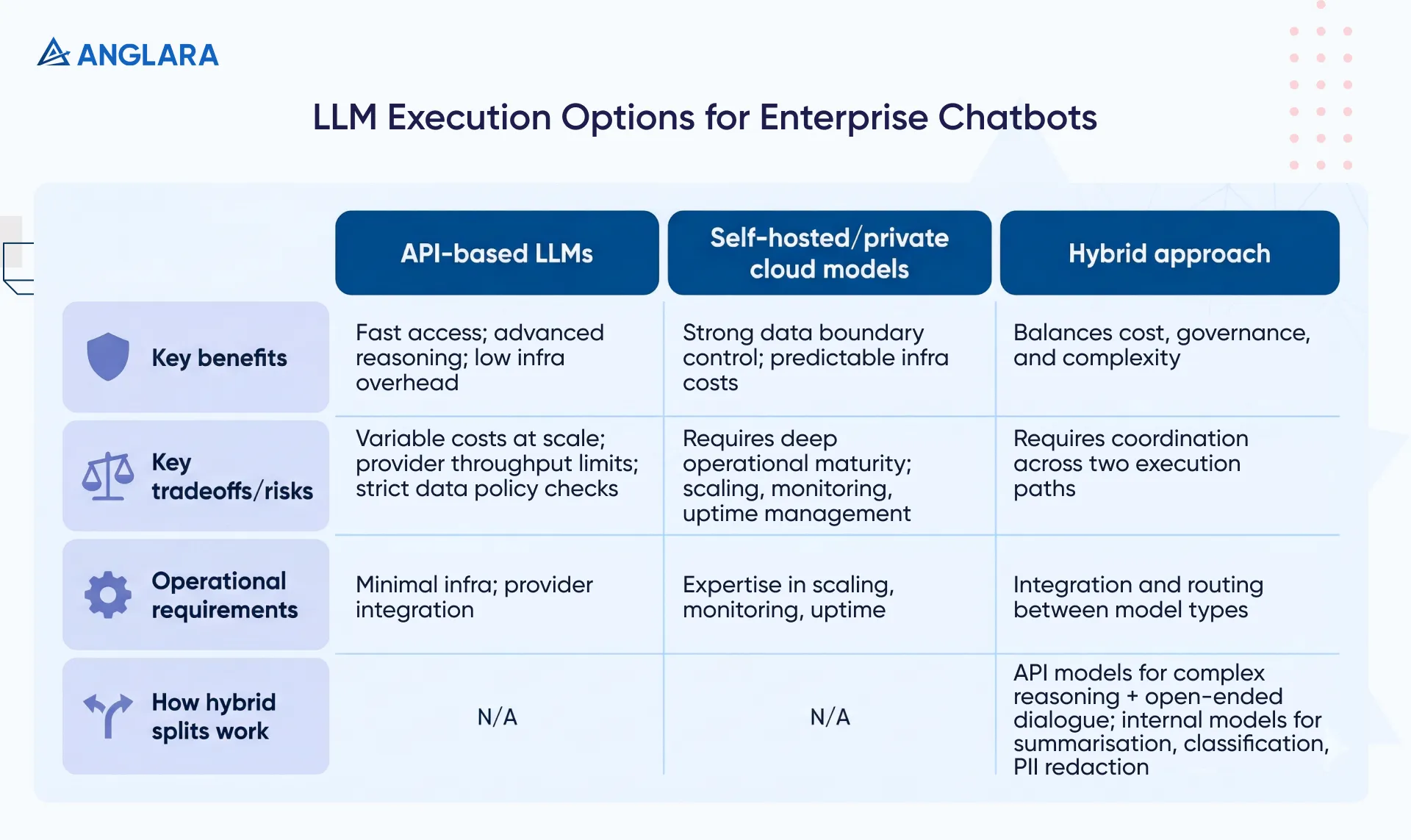
API-based LLMs like those from OpenAI and Anthropic provide fast access to advanced reasoning capabilities and significantly reduce infrastructure overhead. They allow teams to move quickly but introduce:
- Variable operating costs at scale
- Dependency on provider throughput limits
- The need for strict verification of data handling and retention policies
Self-hosted or private cloud models, such as Llama via AWS/Azure, provide stronger control over data boundaries and more predictable infrastructure costs. However, they require deeper operational maturity, including expertise in scaling, monitoring, and uptime management.
In practice, most mature deployments use a hybrid approach where:
- API-based models handle complex reasoning and open-ended conversations
- Smaller, internally hosted models handle targeted tasks such as summarisation, classification, or PII redaction
This balance avoids over-engineering while keeping costs and governance under control.
Logging, monitoring, and observability layers
In enterprise chatbot systems, observability is not optional; it is foundational. Traditional metrics like uptime and latency still matter, but they are only the baseline. Teams also need visibility into how the system behaves end-to-end.
Key observability layers typically include:
- Distributed tracing to track latency across retrieval, model inference, and response generation
- Token usage monitoring to understand cost drivers and detect inefficient prompts
- Retrieval quality tracking to ensure the chatbot is pulling relevant and up-to-date information
- Guardrail and policy activity to detect prompt injection attempts or shifts in user behaviour
Without these signals, chatbot failures appear unpredictable. With them, teams can identify drift early, diagnose issues quickly, and improve performance without guesswork.
How is access governed in enterprise chatbots?
Enterprises must treat identity as the foundation of chatbot security. A chatbot cannot make correct decisions if it does not know who the user is and what the user can access.
When teams skip identity design and rely on shared credentials or broad permissions, they create silent security risks that surface (not so silently) after deployment.
Single sign-on integration
Enterprise chatbots must integrate directly with the organization’s existing identity provider. The chatbot should never manage usernames or passwords on its own. Most enterprises connect chatbots to providers such as Okta, Azure Active Directory, or Google Workspace using standard protocols such as OIDC or SAML.
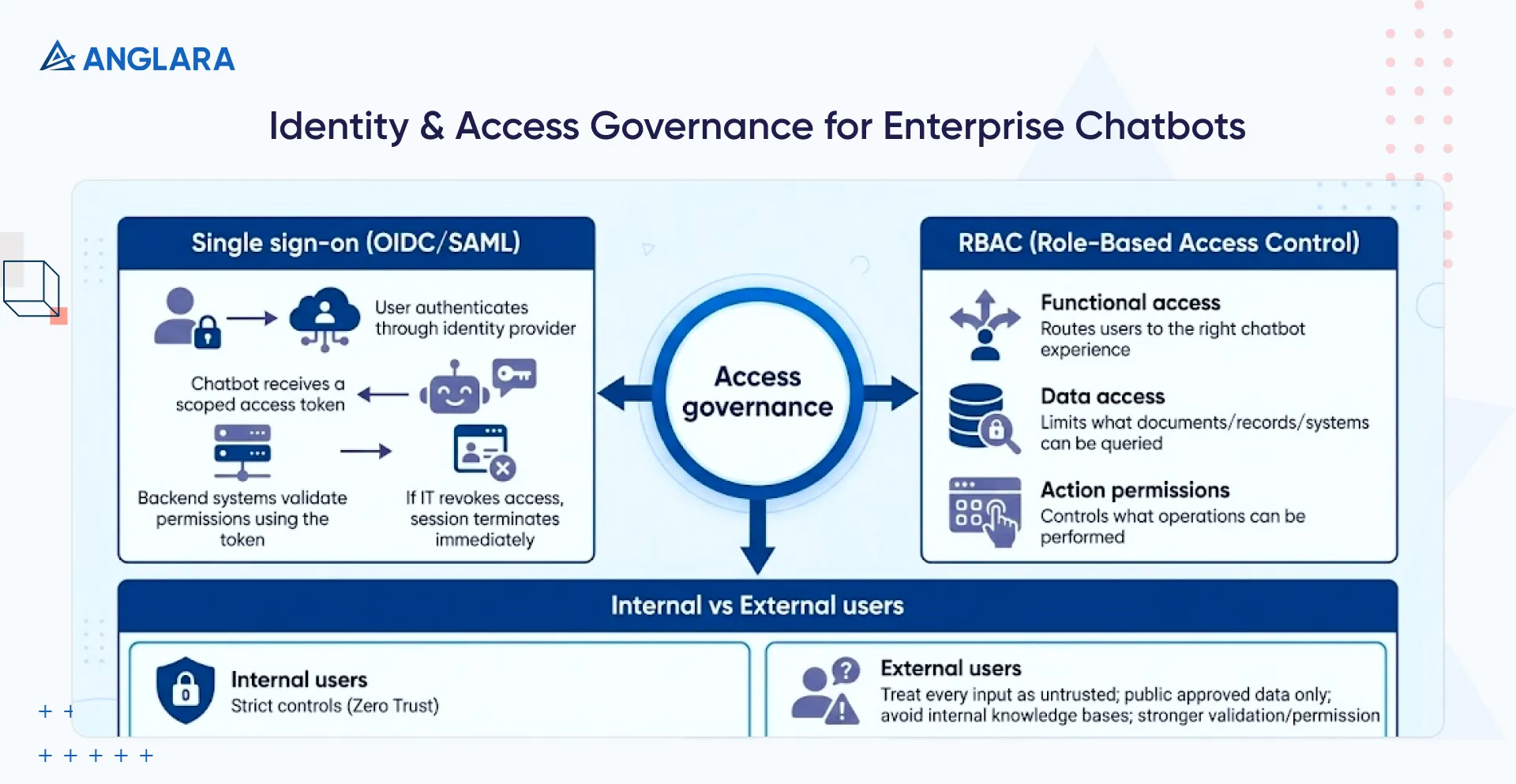
This flow keeps identity centralized:
- The user authenticates through the identity provider
- The chatbot receives a scoped access token
- Backend systems validate permissions using that token
If IT revokes a user’s access in the identity provider, the chatbot session must terminate immediately. This approach prevents the chatbot from acting with more authority than the user who interacts with it.
Role-based access control and permission scopes
After authentication, role-based access control defines what the chatbot can show, retrieve, or execute. Enterprises typically structure permissions across three layers:
- Functional access: Routes users to the right chatbot experience based on department or role (e.g., 'Sales Bot' vs 'HR Bot').
- Data access: Limits documents, records, or systems that the chatbot can query. A "Finance Bot" might be accessible to all finance employees, but only those with specific admin roles should be able to query payroll details.
- Action permissions: Controls which operations the chatbot can perform on the user’s behalf. So, for example, a user might be allowed to view a cloud resource via the bot but not delete it.
Internal versus external chatbot users
Enterprises must design access control differently for employees and customers. Internal chatbots support trusted users but still require strict controls, as Zero Trust principles remain in effect.
The system must prevent accidental exposure of sensitive data and enforce role-based filtering during retrieval.
External chatbots operate in a hostile environment by default. Every input should be treated as untrusted. The chatbot must:
- Access only explicitly approved public data sources
- Avoid internal knowledge bases entirely
- Enforce stronger input validation and permission checks
Many enterprises separate internal and external retrieval systems to prevent cross-contamination. This isolation protects internal data even if attackers manipulate user inputs.
How do enterprises secure an AI chatbot solution and meet compliance requirements?
Enterprise chatbot security depends on clear boundaries, controlled data flow, and full traceability. Teams must design the following controls into the system from the start.
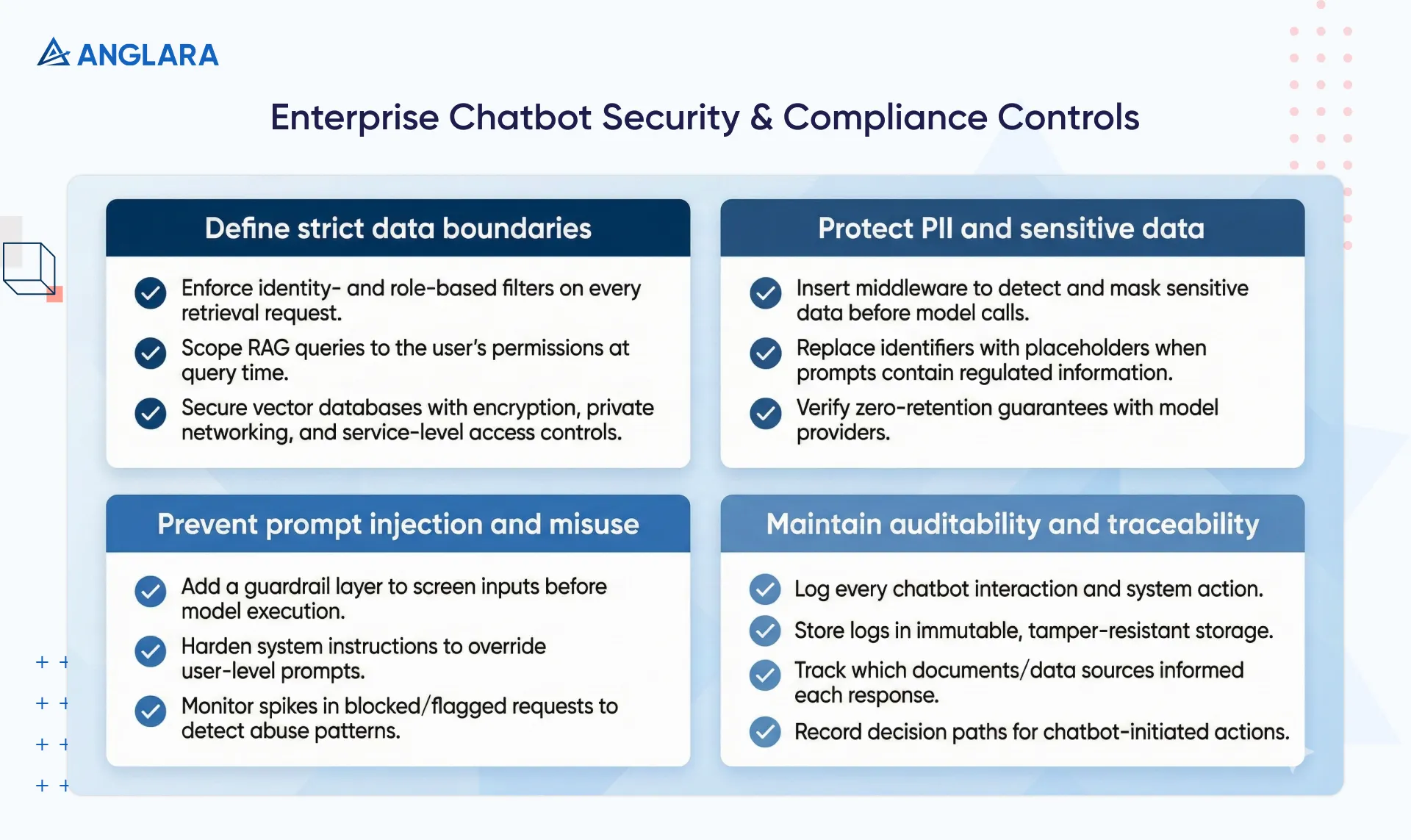
Define strict data boundaries
- Enforce identity- and role-based filters on every retrieval request
- Scope RAG queries to the user’s permissions at query time
- Secure vector databases with encryption, private networking, and service-level access controls
Protect PII and sensitive data
- Insert a middleware layer to detect and mask sensitive data before model calls
- Replace identifiers with placeholders when prompts contain regulated information
- Verify zero-retention guarantees with model providers
Prevent prompt injection and misuse
- Add a dedicated guardrail layer to screen inputs before model execution
- Harden system instructions to override user-level prompts
- Monitor spikes in blocked or flagged requests to detect abuse patterns
Maintain auditability and traceability
- Log every chatbot interaction and system action
- Store logs in immutable, tamper-resistant storage
- Track which documents and data sources informed each response
- Record decision paths for chatbot-initiated actions
Enterprises that implement these controls reduce risk without limiting capability. Security enables scale when teams design it into the architecture instead of layering it on later.
What analytics and reporting matter for conversational AI in enterprise chatbots?
Enterprises cannot manage chatbot performance without visibility. Strong analytics turn conversational AI from an experiment into a measurable business system.
Here are some metrics that you must consider as you track the performance of your enterprise chatbots:
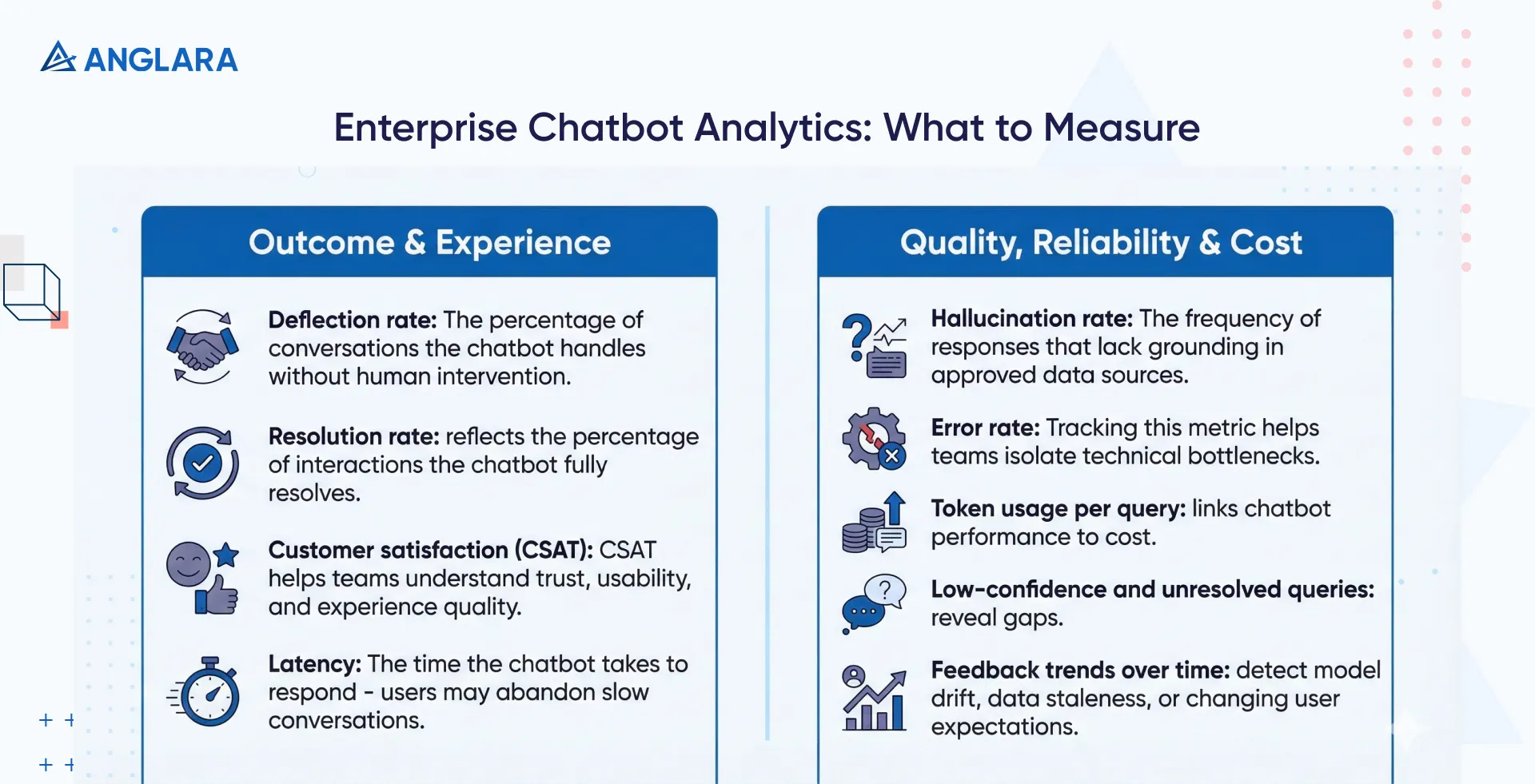
- Deflection rate: The percentage of conversations the chatbot handles without human intervention indicates automation coverage. However, it requires context, since high deflection without satisfaction often signals user drop-off rather than successful resolution.
- Resolution rate: This metric matters more than deflection because it reflects the percentage of interactions the chatbot fully resolves. This is a real outcome rather than just containment.
- Customer satisfaction (CSAT): CSAT helps teams understand trust, usability, and experience quality, especially when compared against human-assisted interactions.
- Latency: The time the chatbot takes to respond strongly influences completion rates, as users abandon slow conversations even when answers are correct.
- Hallucination rate: The frequency of responses that lack grounding in approved data sources can determine the trust in regulated or high-stakes environments.
- Error rate: Tracking this metric helps teams isolate technical bottlenecks before they affect large user segments.
- Token usage per query: This metric directly links chatbot performance to cost and enables teams to optimize prompts, routing, and model selection.
- Low-confidence and unresolved queries: These queries reveal gaps in prompts, retrieval logic, or documentation and provide a clear roadmap for improvement.
- Feedback trends over time: These trends help teams detect model drift, data staleness, or changing user expectations.
Enterprises that consistently measure these signals turn conversational AI into a managed system rather than a black box.
When should enterprise chatbot solutions escalate to human handoff?
Analytics show when a chatbot adds value and when it starts to fail. Enterprise chatbots should escalate when automation stops adding value. The goal is resolution, not containment.
Here are a few common escalation triggers that you should program in your enterprise AI chatbot solutions:
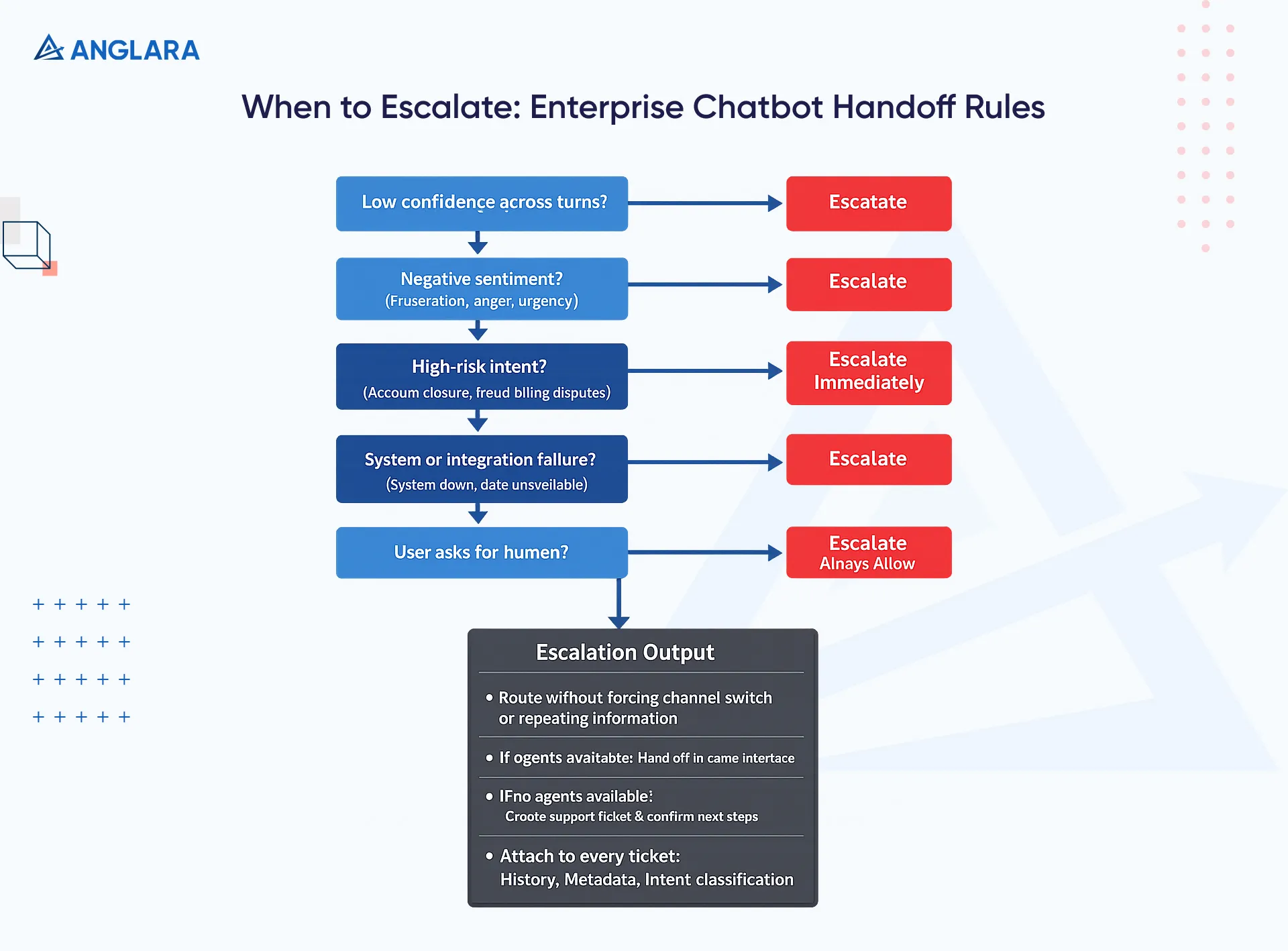
- Low confidence responses: Escalate when the chatbot fails to understand intent across multiple turns or returns low-confidence classifications.
- Negative sentiment: When the chatbot detects frustration, anger, or urgency, it should escalate the matter to protect trust and prevent complaints or churn.
- High-risk or high-stakes requests: Escalate immediately for intents such as account closure, fraud reporting, billing disputes, or compliance-sensitive actions. Human judgment reduces risk in these scenarios.
- System or integration failures: Escalate when backend systems fail, APIs time out, or required data becomes unavailable.
- User-initiated handoff: Always allow users to request a human agent. Forced automation erodes confidence faster than a slow handoff.
When escalation occurs, the chatbot should route the conversation without forcing the user to switch channels or repeat information. If live agents are available, the chatbot should hand off the conversation within the same interface and clearly signal the transition. If no agents are available, the chatbot should automatically create a support ticket and confirm the next steps with the user.
Effective escalation relies on deep integration with ticketing and support systems. Ensure that your chatbot can attach the full conversation history, user metadata, and intent classification to every ticket. This approach reduces manual triage and shortens resolution time.
Well-designed handoffs turn the chatbot into a frontline assistant rather than a dead end. When escalation feels seamless, users judge the experience as helpful even when the chatbot cannot complete the task.
What should an enterprise chatbot integrate with for business automation?
An enterprise chatbot delivers real value only when it connects to the systems where work actually happens, like:
- CRM systems: Enable personalization, surface customer context, log interactions, qualify leads, and update records without manual entry.
- Helpdesk and support platforms:Create and update tickets, check status, retrieve approved knowledge, and automate high-volume support requests.
- Internal enterprise systems:Support employee workflows, including HR queries, operational lookups, approvals, and internal requests, using existing tools.
- APIs and workflow automation layers: Trigger actions across modern and legacy systems using APIs, webhooks, or middleware to keep workflows flexible and scalable.
What should enterprises verify before launching chatbot solutions?
The "Pre-Flight" checklist is the final barrier against reputational disaster.
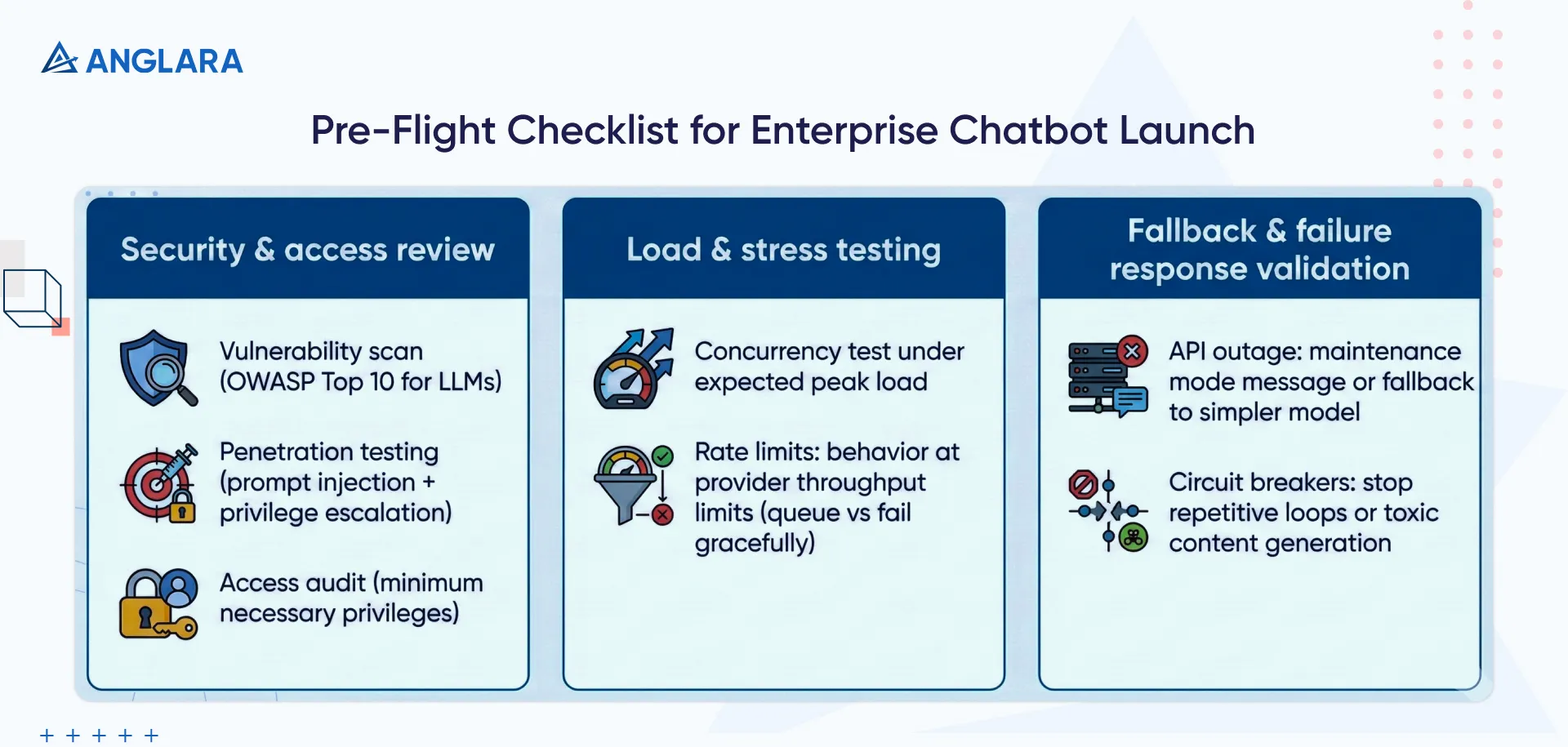
Here’s what you must have checked off before the launch:
Security and access review
- Vulnerability Scan: Run automated scans for common vulnerabilities (OWASP Top 10 for LLMs).
- Penetration Testing: Engage ethical hackers to attempt prompt injection and privilege escalation.
- Access Audit: Verify that the bot's service account has only the minimum necessary privileges. It should not have Admin access to the CRM just to read contact names.
Load and stress testing
- Concurrency: Test the system under the expected peak load. Vector database query latency often degrades rapidly under load, becoming a bottleneck.
- Rate Limits: Verify behavior when hitting LLM provider throughput limits. Does the system queue requests or fail gracefully?
Fallback and failure response validation
- API Outage: What happens if the LLM provider goes down? Is there a "maintenance mode" message or a fallback to a simpler model?
- Circuit Breakers: Implement patterns to stop the bot if it enters a repetitive loop or starts generating toxic content.
How should enterprises optimise chatbot solutions after launch?
Now that you have a pre-flight checklist, let’s look at the post-launch checklist, too.
- Prompt tuning and refinement: Review real user interactions to identify confusion, ambiguity, or failure patterns. Iterate prompts regularly and test changes against known scenarios to prevent regressions.
- Knowledge base refresh cycles: Sync source documents frequently to keep responses up to date. Remove outdated content and resolve duplicates to avoid conflicting answers.
- Model upgrades and validation: Test new model versions in staging before rollout. Compare outputs against baseline responses to ensure quality, latency, and cost remain within acceptable limits.
- Performance and cost optimisation: Review trends in token usage, latency, and resolution. Adjust routing, prompts, or model selection to control cost without reducing experience quality.
- Feedback-driven improvement: Use unresolved queries and negative feedback to guide content updates, retrieval tuning, and escalation rules.
Enterprises should treat launch as the starting point, not the finish line. Enterprises that continuously optimise keep chatbots reliable, cost-efficient, and aligned with changing business needs, rather than letting performance degrade over time.
Experts at Anglara help enterprises move beyond pilots and demos. Our teams focus on governance, observability, and long-term optimisation from day one. If you’re evaluating an enterprise chatbot initiative or planning to move an existing system into production, book a free consultation with us. We will help you assess readiness, identify risks, and define a deployment strategy that fits your business and compliance needs.
