


Most chatbots don’t fail because of AI. They fail because they were never built for how real businesses operate.
When companies search for custom chatbot development services, they’re rarely looking for another website widget that answers FAQs. They are looking for a system that can:
- handle real workflow
- connect with internal tools
- respect security boundaries
- scale without breaking under pressure
Chatbots are no longer experimental add-ons; they’ve become part of the operational backbone across customer support, sales, and internal teams. This guide breaks down what custom chatbot development actually entails, when it makes sense to go custom, how timelines and pricing work, and what enterprises should realistically expect from a production-ready AI chatbot.
Let's dig in.
What are custom chatbot development services?
Custom chatbot development services involve designing and engineering chatbots tailored to your company. Rather than relying on pre-built templates or off-the-shelf chatbot tools, it operates as per your business workflows, data, and rules.
So a custom chatbot is not limited to answering a fixed set of questions from the information you already lay out on your website. It understands context, retrieves information from internal systems, and supports real operational tasks such as customer support, sales qualification, or internal knowledge access.
Custom chatbot behaves like an extension of the business, not a generic interface layered on top of it.
Most organizations do not start with custom chatbot development. They grow into it. They have already used a SaaS or no-code chatbot, which is useful for simple scenarios, such as answering FAQs or routing basic queries. But as conversations become more complex, their limitations become apparent quickly:
- Teams begin to notice friction points.
- The bot cannot pull accurate answers because data lives across multiple systems.
- Simple changes require workarounds.
- Costs rise as conversation volumes scale.
- Security teams raise concerns about where data is processed and stored.
At that point, the chatbot stops feeling like a helpful assistant and becomes a constraint.
That is usually when internal conversations shift from “Which tool should we use?” to “Should we build something that actually fits us?”
What’s included in custom chatbot development?
Custom chatbot development is not a single build task. It is a structured process that moves from understanding the business problem to deploying a system that can operate reliably in production.
Here are the core components typically included when we do custom chatbot development for our clients:
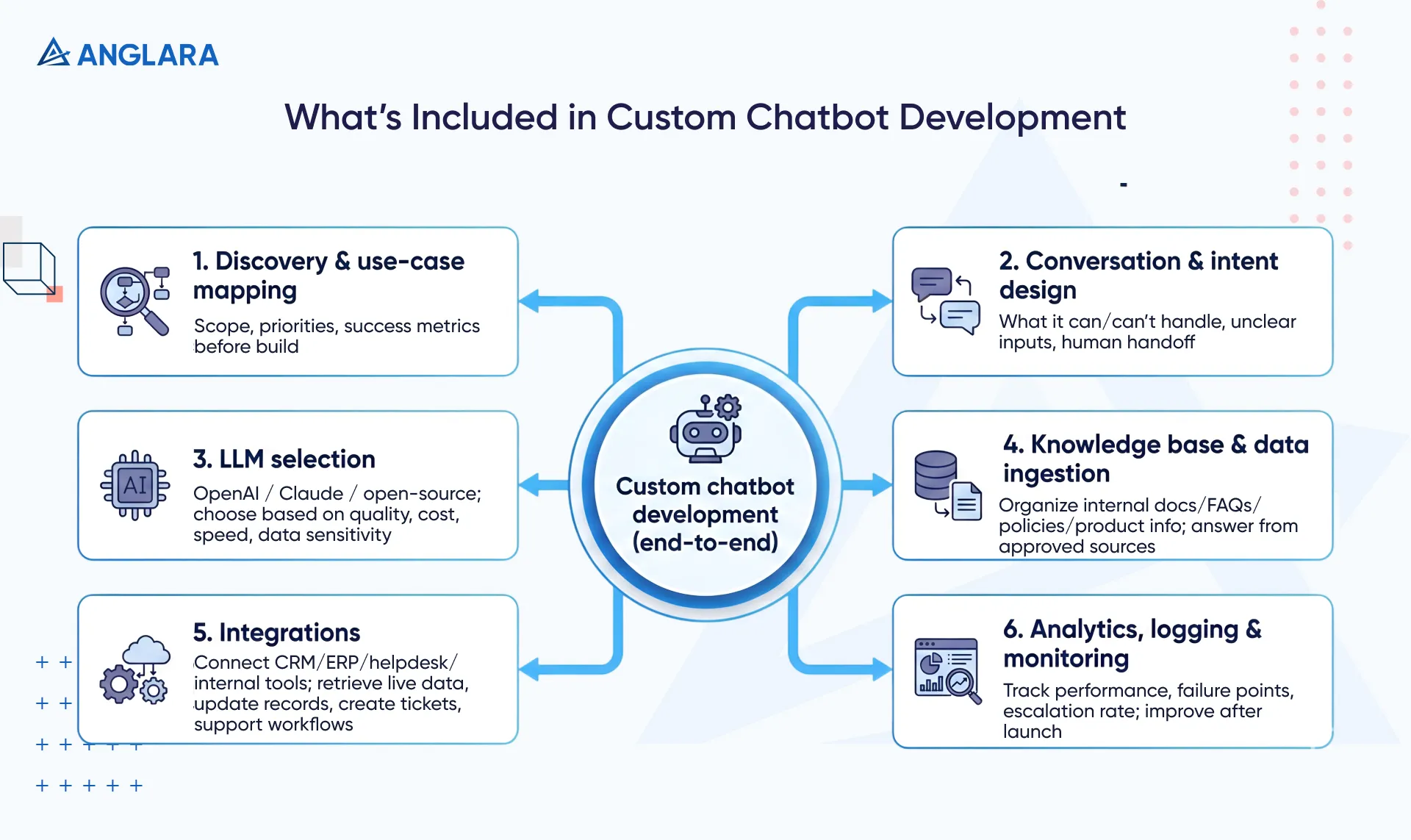
- Discovery and use-case mapping: Identify where a chatbot will actually create value, which workflows it should support, and where automation should stop. This step defines scope, priorities, and success metrics before any build begins.
- Conversation and intent design: Define how users interact with the chatbot, what it can and cannot handle, how it responds to unclear inputs, and when it hands off to a human. This ensures conversations stay useful, controlled, and on-brand.
- LLM selection (OpenAI, Claude, open-source models): Choose the AI model based on response quality, cost, speed, and data sensitivity. The goal is to match the model to the business use case, not default to the most popular option.
- Knowledge base and data ingestion: Organize internal documents, FAQs, policies, and product information so the chatbot answers from company-approved sources instead of generic web knowledge.
- Integration with CRM, ERP, helpdesk, and internal tools: Connect the chatbot to existing systems so it can retrieve live data, update records, create tickets, or support internal workflows in real time.
- Analytics, logging, and monitoring setup: Track how the chatbot performs in production, where conversations fail, and how often human escalation is required. This data drives continuous improvement after launch.
At Anglara, we believe there’s no one solution fit for all. Therefore, we aim for thorough counseling in our AI business consulting to help our clients choose the right AI solution for their business.
How are enterprise chatbot development services different from SaaS chatbot tools?
The decision between an enterprise chatbot development service and a SaaS chatbot tool is less about features and more about control.
SaaS tools are designed to work for many businesses at once, whereas enterprise chatbot development is for organizations that need a chatbot tailored to their needs.
As we mentioned earlier, most teams start with SaaS chatbots because they are easy to deploy and require minimal setup. They are useful for testing demand and covering basic use cases. However, as chatbots become more embedded in day-to-day operations, the trade-offs of SaaS tools become harder to ignore. For example:
Control and data ownership are often the first breaking point
With SaaS tools, conversational data, logic, and training behavior live inside a vendor-managed platform. This limits visibility into how responses are generated and restricts how data can be used long-term.
Enterprise chatbot development shifts ownership back to the organization. The chatbot, its logic, and its data become internal assets rather than rented capabilities.
Customisation and extensibility limit the surface next
SaaS chatbots are built around predefined workflows and integrations. They work well until a business process falls outside those boundaries.
Enterprise chatbot development removes these limits by designing the chatbot to integrate with existing systems, policies, and edge cases. The chatbot adapts to the business instead of forcing the business to adapt to the tool.
Long-term cost and scaling implications are usually the final deciding factor
SaaS chatbots appear cost-effective early on, but pricing models tied to users, conversations, or resolutions often scale linearly with usage. As adoption grows, costs rise in ways that are difficult to predict.
Custom-built chatbots shift costs toward infrastructure and usage, offering greater control and more predictable scaling at higher volumes.
Here’s a table of key differences between an enterprise chatbot and a SaaS chatbot tool:
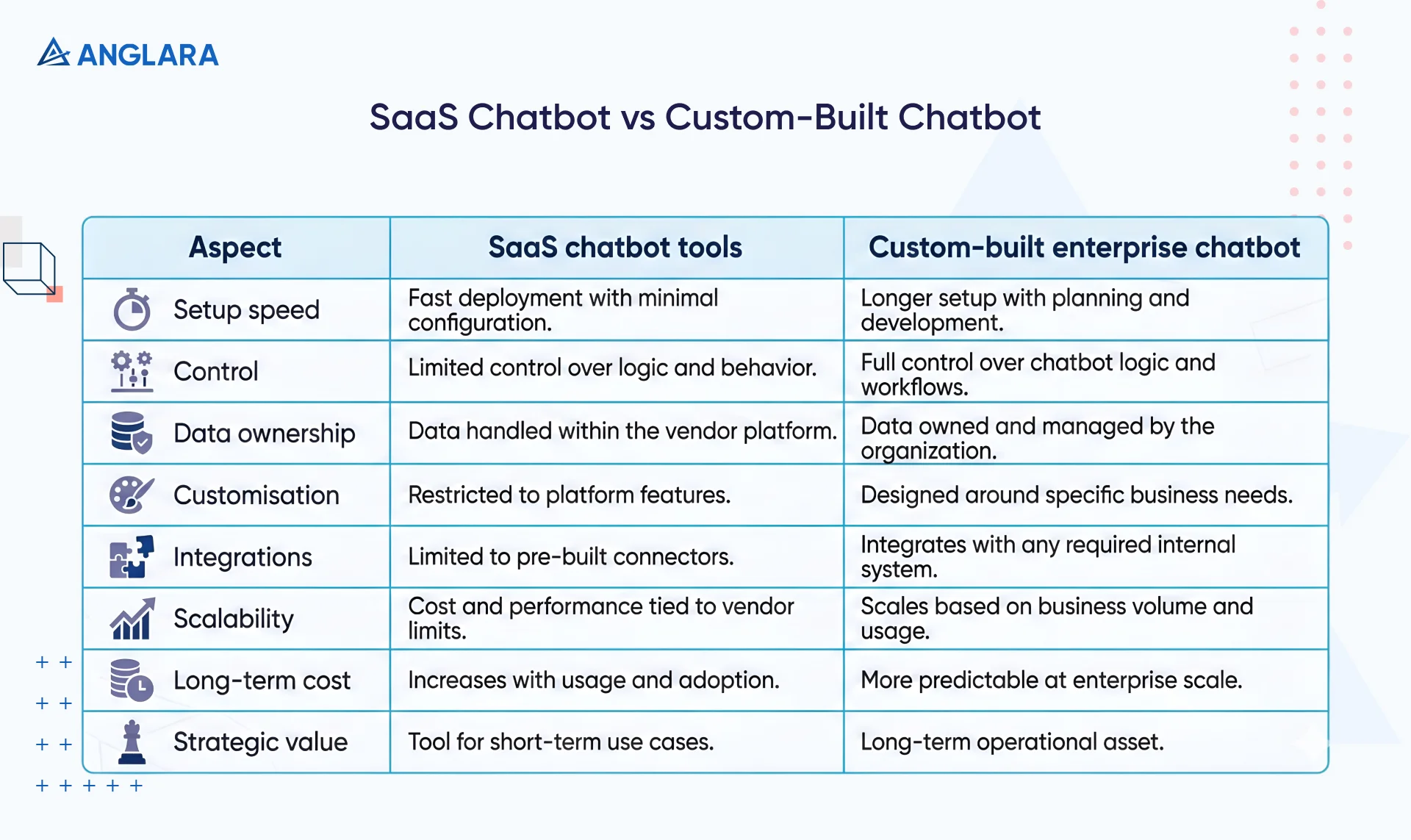
This comparison is not about which option is universally better. It is about fit. SaaS chatbots work well for simple, standardized needs. Enterprise chatbot development makes sense when the chatbot becomes part of core operations and long-term strategy.
Why choose Generative AI chatbots for real business workflows?
Real business workflows are rarely linear, perfectly phrased, or predictable, so rule-based and templated chatbots can only go so far. For implementing chatbots at scale, generative AI becomes a practical choice.
We’re not saying this because they sound more human, but because they can thrive even in environments filled with variation, incomplete information, and changing context.
One of the biggest advantages of custom AI chatbot development is its ability to respond with company-specific knowledge rather than generic internet data. Through retrieval-augmented generation (RAG), the chatbot pulls information from approved internal sources such as policies, product documentation, or knowledge bases before generating a response.
For example, a support chatbot can reference the latest policy document or product update when resolving an issue. An internal knowledge assistant can answer employee questions based on current HR or operations guidelines rather than outdated manuals.
What’s The Advantage?
This keeps answers grounded in what the business actually knows, reducing the risk of outdated or incorrect information.
Now, accuracy alone is not enough in enterprise settings. Generative AI chatbots are designed with guardrails that control what the chatbot can discuss, how it responds, and the actions it is allowed to take. These safeguards prevent the chatbot from straying into sensitive topics, exposing private data, or making unsupported claims.
Take a customer support chatbot, for example. It can handle all sales conversations without straying into areas that require legal, financial, or compliance oversight.
What’s The Advantage?
Instead of blindly trusting the AI, guardrails ensure responses stay within defined business and compliance boundaries.
For workflows that carry a higher risk, generative AI chatbots do not operate in isolation. Human-in-the-loop approval allows the chatbot to prepare actions, summarize context, or draft responses, while leaving the final decision to a human.
In sales operations, the chatbot can draft outreach materials or surface key account insights, while leaving final communication decisions to the sales team. This balance allows organizations to move faster without giving up accountability.
Advantage: This approach combines automation with oversight, enabling operations to scale without sacrificing control or accountability.
Such an approach becomes especially valuable in high-stakes environments. In one Anglara deployment within healthcare, a generative AI chatbot supported patient scheduling and initial triage.
Patients described their symptoms in their own words, often without a clear clinical structure or complete information. The chatbot gathered context, identified urgency, and routed cases appropriately, while ensuring that a human always reviewed sensitive or high-risk scenarios.
Result: Fewer missed appointments, faster response times, and a reduced administrative burden for care teams, without compromising safety or oversight.
Read the complete case study here.
Architectural overview of enterprise chatbots
An enterprise chatbot is not a single system; it is a set of connected components that work together to:
- Understand requests
- Retrieve the right information
- Respond in a controlled and measurable way
Below is a simplified view of four components of an enterprise-level conversational chatbot architecture. All these components play together to let the chatbot operate reliably at scale, support complex workflows, and improve over time, without becoming rigid or difficult to manage.
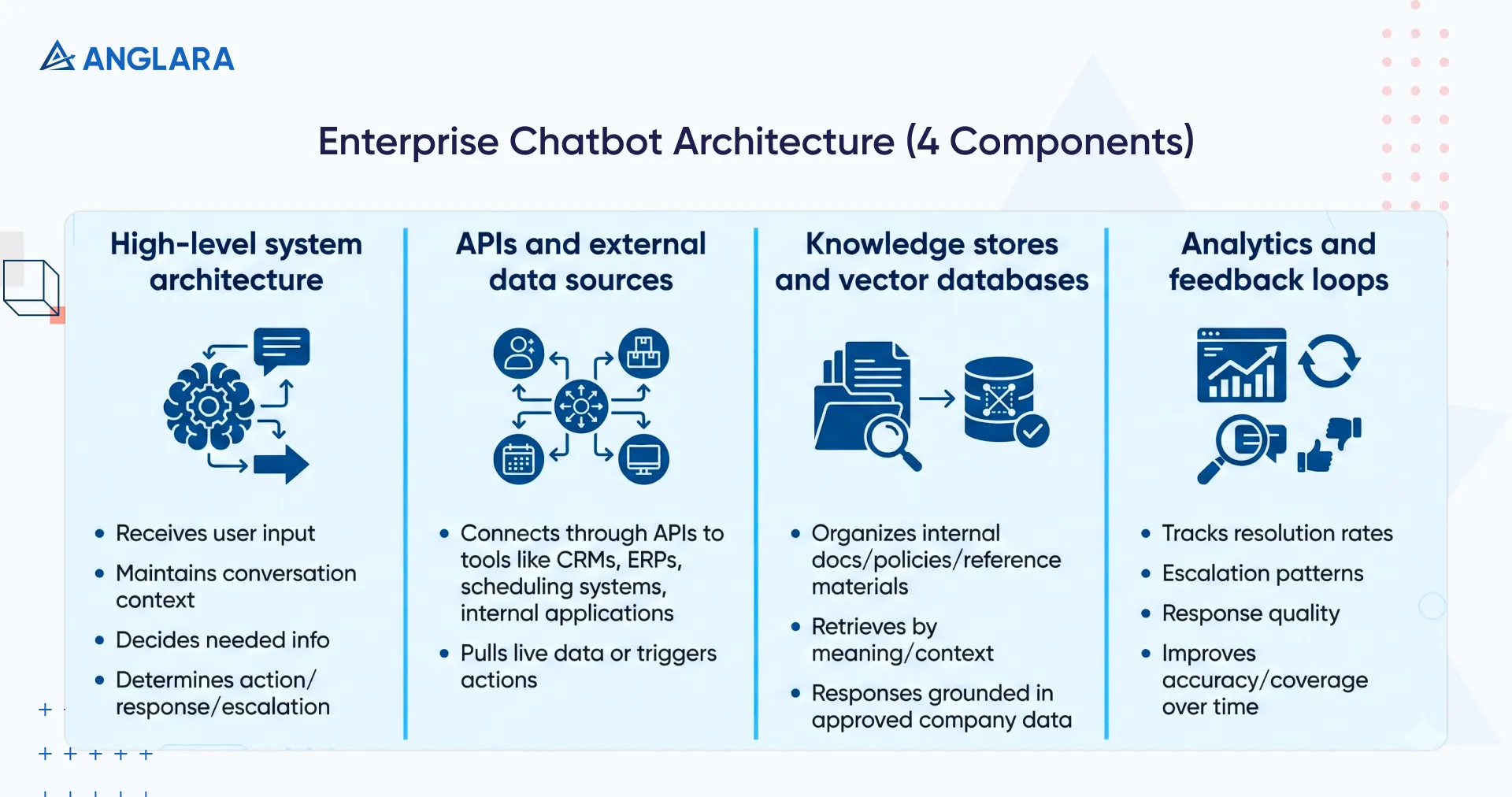
The high-level system architecture
The chatbot acts as a central coordinator.
- It receives user input
- Maintains conversation context
- Decides what information is needed
- Determines whether an action, response, or escalation is required
This orchestration ensures the chatbot responds consistently across channels while following business rules and permissions.
APIs and external data sources
To be useful in real workflows, the chatbot connects to external systems through APIs. These connections enable it to pull live data or trigger actions across tools such as CRMs, ERPs, scheduling systems, and internal applications.
This is what enables the chatbot to move beyond static answers and support operational tasks.
Knowledge stores and vector databases
Internal documents, policies, and reference materials are organized into knowledge stores that the chatbot can search intelligently. Instead of relying on keyword matching, the chatbot retrieves relevant information based on meaning and context, ensuring responses are grounded in approved company data rather than assumptions.
Analytics and feedback loops
Every interaction generates insight.
Analytics track resolution rates, escalation patterns, and response quality. Feedback loops, on the other hand, capture where the chatbot succeeds or fails.
This data is used to continuously improve accuracy, expand coverage, and adapt the chatbot as business needs evolve.
How long does it take to build an enterprise chatbot solution?
At Anglara, enterprise chatbot development follows a phased approach to reduce risk and ensure the chatbot is ready for real-world use.
While timelines vary by complexity, a typical engagement progresses as follows:
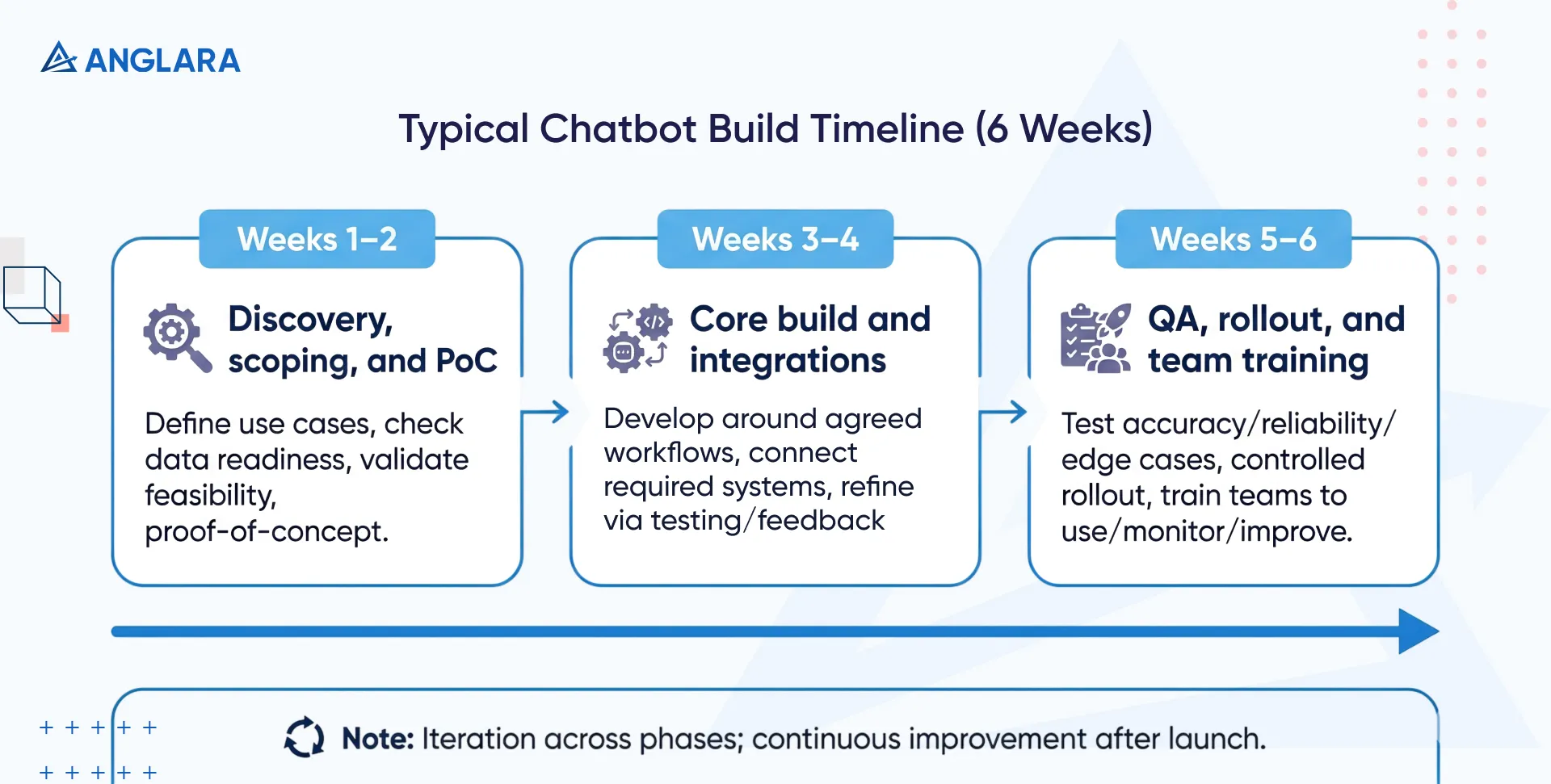
Week 1–2: Discovery, scoping, and PoC: The focus is on defining clear use cases, understanding data readiness, and validating feasibility. Buyers should expect detailed questions about workflows, systems, and success metrics, along with a small proof-of-concept to confirm the approach before the full build.
Week 3–4: Core build and integrations: The chatbot is developed around agreed workflows and connected to required systems. At this stage, buyers will see early versions handling core scenarios, with refinement based on testing and feedback.
Week 5–6: QA, rollout, and team training: The chatbot is tested for accuracy, reliability, and edge cases before controlled rollout. Teams are trained on how to use, monitor, and improve the chatbot after launch.
We let our clients anticipate iteration across all phases as enterprise chatbots are refined through real usage. The goal is a stable launch, but it is often followed by continuous improvement rather than a one-time handoff.
How much does enterprise AI chatbot development cost?
Pricing for enterprise AI chatbots depends on scope, complexity, and long-term usage. Rather than a single flat fee, most projects fall into clear tiers. Typical pricing tiers are:
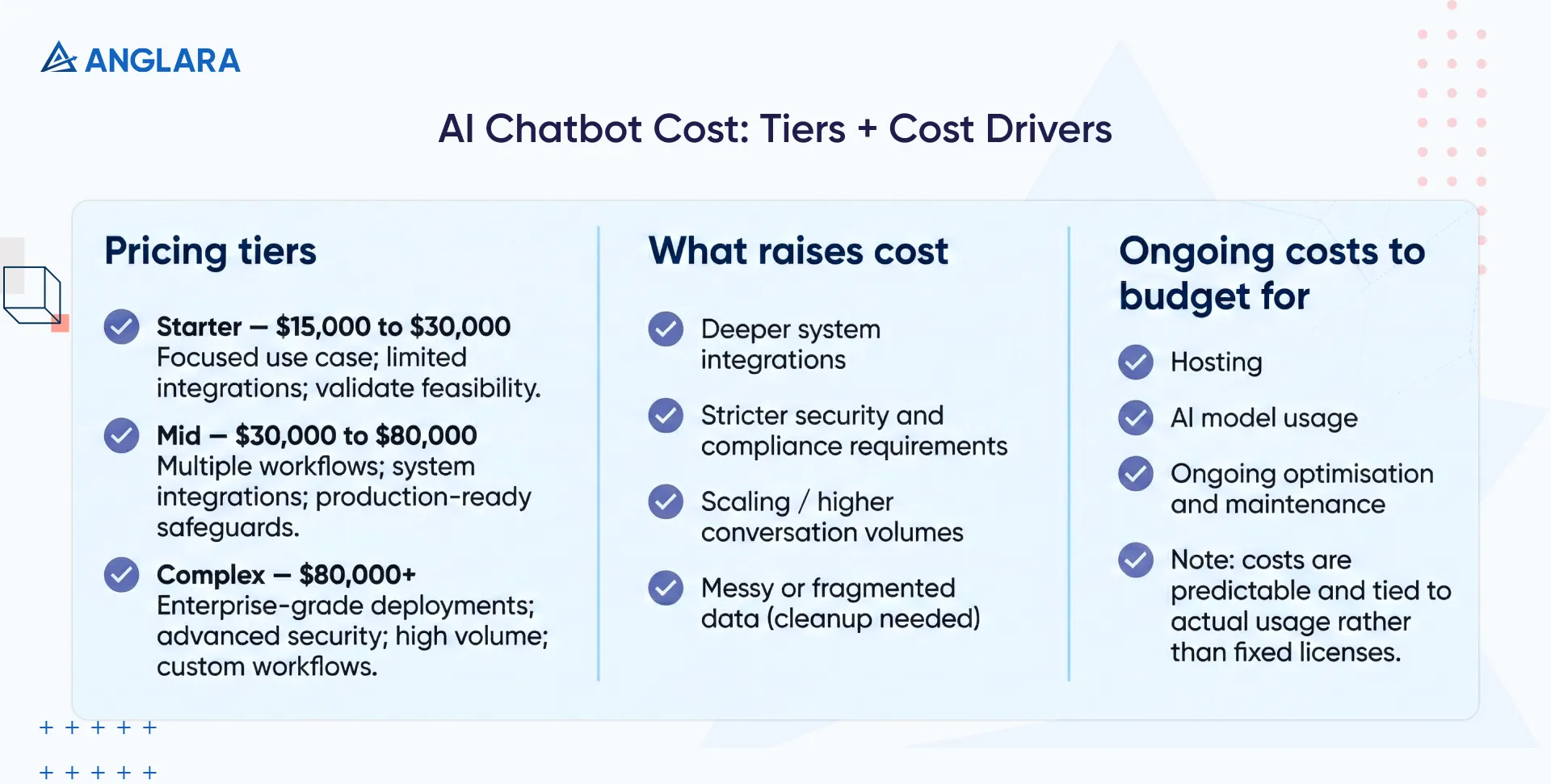
- Starter: ranging between $5,000 to $10,000 for a focused use case with limited integrations, often used to validate feasibility.
- Mid: Costs between $20,000 and $40,000 for multiple workflows, system integrations, and production-ready safeguards.
- Complex: Costs $40,000+ for enterprise-grade deployments with advanced security, high volume, and custom workflows.
What factors raise the cost of AI chatbot development?
The costs of an AI chatbot often increase with deeper system integrations, stricter security, and compliance requirements. So, an AI chatbot for healthcare and financial institutions is likely to cost more than one implemented on a small business website.
Additionally, scaling also increases costs as the conversation volumes rise.
Lastly, if your data is messy or fragmented, the cost increases due to the need for cleanup before it can be used reliably.
Special considerations
We believe in providing our clients with complete transparency into costs and budgets. So, we often ask our clients to budget for ongoing costs like hosting, AI model usage, and ongoing optimisation and maintenance.
These costs are typically predictable and tied to actual usage rather than fixed licenses.
Final word
The key to chatbot development is not finding the cheapest chatbot, but building one that delivers sustainable value as usage scales. Low-cost builds often rely on templates, weak safeguards, and minimal testing. They may work in demos but break under real-world use, leading to poor accuracy, security risks, and eventually costly rebuilds.
While custom AI chatbots for enterprise are often on the costlier end, we advise you to see them as an investment rather than a cost. A well-built enterprise chatbot becomes part of the operational infrastructure, reducing manual workload, improving response quality, and scaling without proportional increases in cost.
Over time, it replaces repeated human effort with consistent, reliable automation and delivers returns through efficiency, accuracy, and better use of internal data. The value compounds as usage grows, making the initial investment far more economical than repeatedly patching or rebuilding underperforming solutions.
Anglara’s enterprise AI chatbot solution for websites
Our enterprise AI chatbot solution for websites is built for conversion, not just conversation. Unlike internal enterprise chatbots that focus on operational workflows and internal knowledge, website chatbots engage unknown visitors, handle mixed intent, and respond instantly at critical decision points.
Here’s what we offer:
- Chatbots that integrate directly with the website’s CMS and CRM: Allow conversations to adapt to on-page content and route high-intent leads to the right sales or support teams in real time. They reduce response delays and improve lead quality without manual intervention.
- Built-in analytics and attribution: Track how chatbot interactions influence conversions to help your teams understand which conversations drive pipeline and where users drop off. Over time, this insight improves the qualification logic and messaging.
- Improve SEO and CRO efforts: These chatbots promote interactions and increase time spent on site, reducing bounce rates and removing friction from the buying journey through immediate, contextual responses.
Anglara’s approach ensures website chatbots are not standalone tools, but integrated growth assets that align with marketing, sales, and customer experience objectives from the start.
Common mistakes when hiring a chatbot development partner
Hiring a chatbot development partner is a long-term decision that directly impacts performance, reliability, and ROI. Many chatbot projects fail not because of AI limitations, but because of choices made during vendor selection.
Below are some common pitfalls enterprises should watch for when evaluating chatbot development partners.
- Over-optimising for demos - Some vendors focus heavily on polished demos that perform well in controlled environments. These demos rarely reflect how a chatbot behaves under real traffic, unpredictable user input, or edge cases in production.
- Ignoring analytics and escalation paths - Partners that do not prioritise analytics and clear escalation workflows leave teams blind once the chatbot goes live. Without visibility into failures or handoff mechanisms, user experience and trust degrade quickly.
- No post-launch optimisation plan - Chatbots require continuous tuning as data, user behaviour, and business needs evolve. Vendors who treat launch as the finish line often deliver systems that stagnate or decline in performance over time.
- Choosing vendors without AI production experience - Building for production requires more than basic chatbot knowledge. Vendors without real-world deployment experience often underestimate security, scaling, and maintenance challenges, resulting in fragile systems.
Avoiding these pitfalls starts with choosing a partner that understands both AI and enterprise realities. Working with experienced teams like Anglara helps ensure your chatbot is built to perform reliably in production, not just in presentations. We follow a discovery-first approach to help our teams assess feasibility, define the right use cases, and avoid costly missteps for you early on.
If you’re evaluating custom chatbot development and want clarity on scope, timelines, and realistic outcomes, speak with our experts. Book a free consultation to discuss your requirements and explore what a production-ready chatbot could look like for your business.
FAQs
How long does custom chatbot development take?
Timelines depend largely on data readiness and integration complexity. A focused custom chatbot can typically be built in 4 to 6 weeks. More advanced enterprise chatbots that involve multiple workflows, system integrations, and security requirements usually take 2 to 4 months.
Is custom chatbot development better than SaaS tools?
Custom chatbot development is not always the better option. It is the right option only when workflows, data, or scale exceed what SaaS tools can handle. SaaS chatbots work well for simple, standard use cases, while custom chatbots make sense when you need deeper integrations, stronger control, and long-term scalability.
Can chatbots integrate with internal systems?
Yes. Our custom chatbots can integrate with internal systems such as CRMs, ERPs, helpdesks, databases, and proprietary tools. This allows them to retrieve live information, update records, and support real business workflows, rather than just offer static responses.
How secure are enterprise chatbots?
Anglara builds all its enterprise chatbots with strong security controls, including restricted data access, controlled permissions, and secure deployment environments. They follow enterprise security standards and ensure sensitive data remains protected throughout conversations.
