


Think AI workflow automation services are just about plugging ChatGPT into a few tasks and calling it innovation? Think again.
The real value usually comes from redesigning how work moves across your tools, teams, approvals, and handoffs, then adding AI only where it genuinely improves speed, accuracy, or scale.
AI workflow automation services help businesses redesign and automate repetitive, cross-tool processes using a mix of integrations, business logic, AI models, approvals, and monitoring. In practice, that can mean triaging tickets, extracting data from documents, routing requests, summarizing conversations, drafting first-pass responses, or moving data between systems without manual copy-paste.
The best providers do more than “add AI.” They map the workflow, identify where human review is still needed, connect the right systems, test edge cases, and measure outcomes after launch. If your team is losing time in inboxes, spreadsheets, approvals, ticket routing, or repetitive operations work, this kind of service can be a strong fit.
Who This Is For
This article is for:
- CMOs and RevOps leaders dealing with lead routing, reporting, campaign ops, and content workflows
- Product and support teams trying to reduce ticket load without hurting customer experience
- Operations and finance teams buried in approvals, reconciliations, document handling, or status chasing
- Founders and CTOs who want practical AI adoption, not a slide deck full of buzzwords
It is especially useful if your work already flows across tools like CRM, help desk, Slack, email, spreadsheets, ERP, forms, or internal knowledge bases.
The Problem In Plain Language
Most teams do not actually have an “AI problem.” They have a workflow problem.
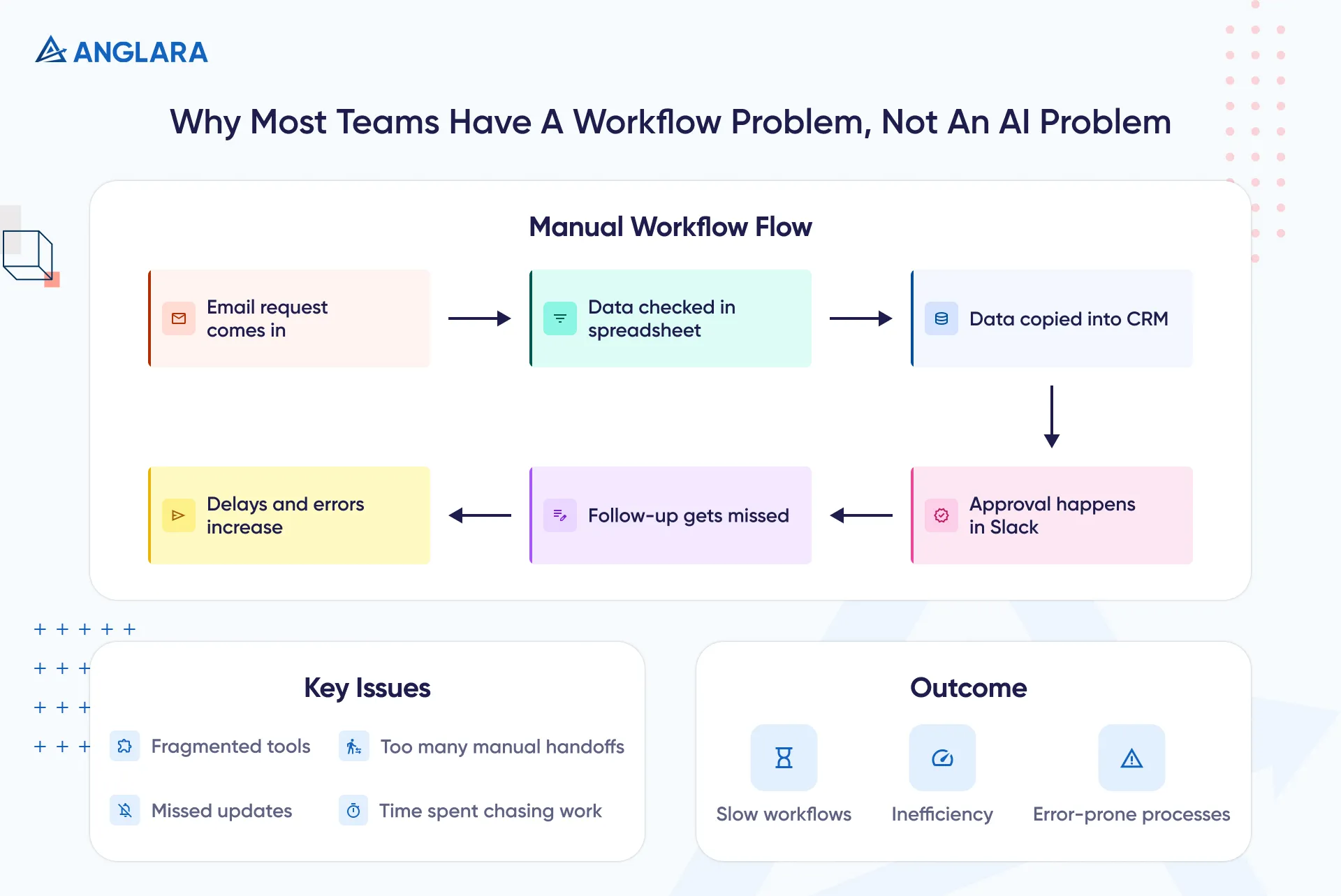
A request comes in by email. Someone checks a spreadsheet. Someone else copies data into the CRM. A manager approves it in Slack. Then a status update gets missed, a follow-up is late, and the team spends more time chasing work than doing it.
That is usually where AI workflow automation services become relevant. Not because every step needs machine intelligence, but because the whole chain is slow, fragmented, and full of manual handoffs.
The practical complaints from operators are very consistent: messy inputs, too many exceptions, and workflows that look simple on a whiteboard but break in the real world. Practitioners also tend to agree that the best early AI wins are repetitive, mostly deterministic tasks, not fuzzy or high-stakes decisions. (Reddit)
So the right question is not, “Where can we use AI?” It is, “Which workflow is repetitive enough, painful enough, and measurable enough to improve first?”
What AI Workflow Automation Services Are
Definition Block
AI workflow automation services are professional services that help a business design, build, test, and improve workflows where software and AI handle part of the work automatically.
Traditional automation follows fixed rules. AI workflow automation can go a step further by classifying inputs, extracting meaning from messy content, generating first drafts, choosing routes, prioritizing items, or recommending actions based on context.
That said, good automation still depends on good process design. AI is the enhancement layer, not the whole system.
What A Service Engagement Usually Includes
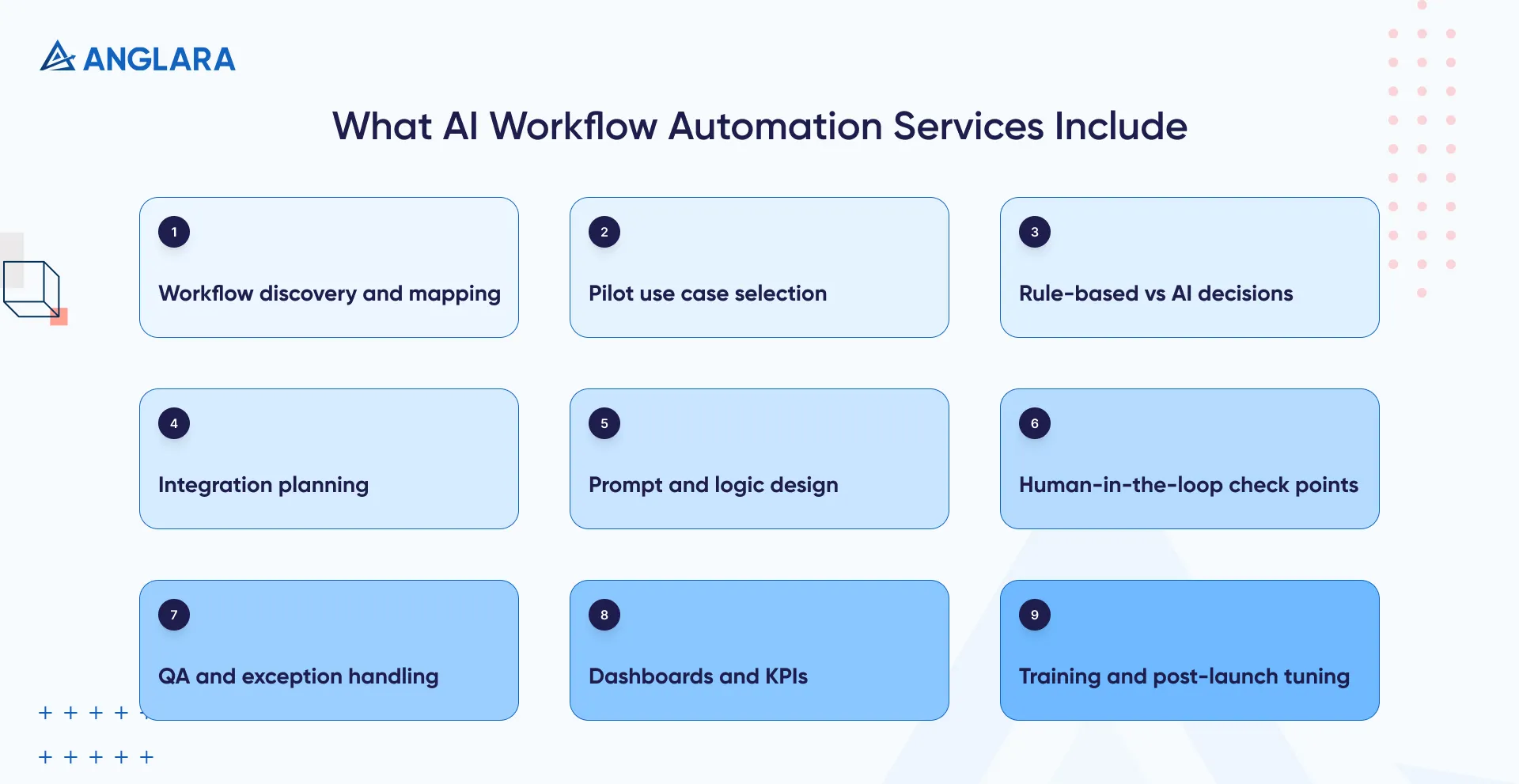
A solid engagement usually covers:
- workflow discovery and process mapping
- identifying the best pilot use case
- deciding which steps should stay rule-based and which should use AI
- integration planning across tools and data sources
- prompt, logic, and approval design
- human-in-the-loop checkpoints
- QA for exceptions and failure scenarios
- dashboards, KPIs, training, and post-launch tuning
This is where a serious delivery partner adds value. The work is not just “build a bot.” It is about turning an unstable manual process into something reliable, auditable, and easier to scale.
At Anglara, this is typically how we approach it too: start with one painful workflow, map the handoffs, define success, then automate only the parts that actually move the needle.
When AI Workflow Automation Services Are A Good Fit
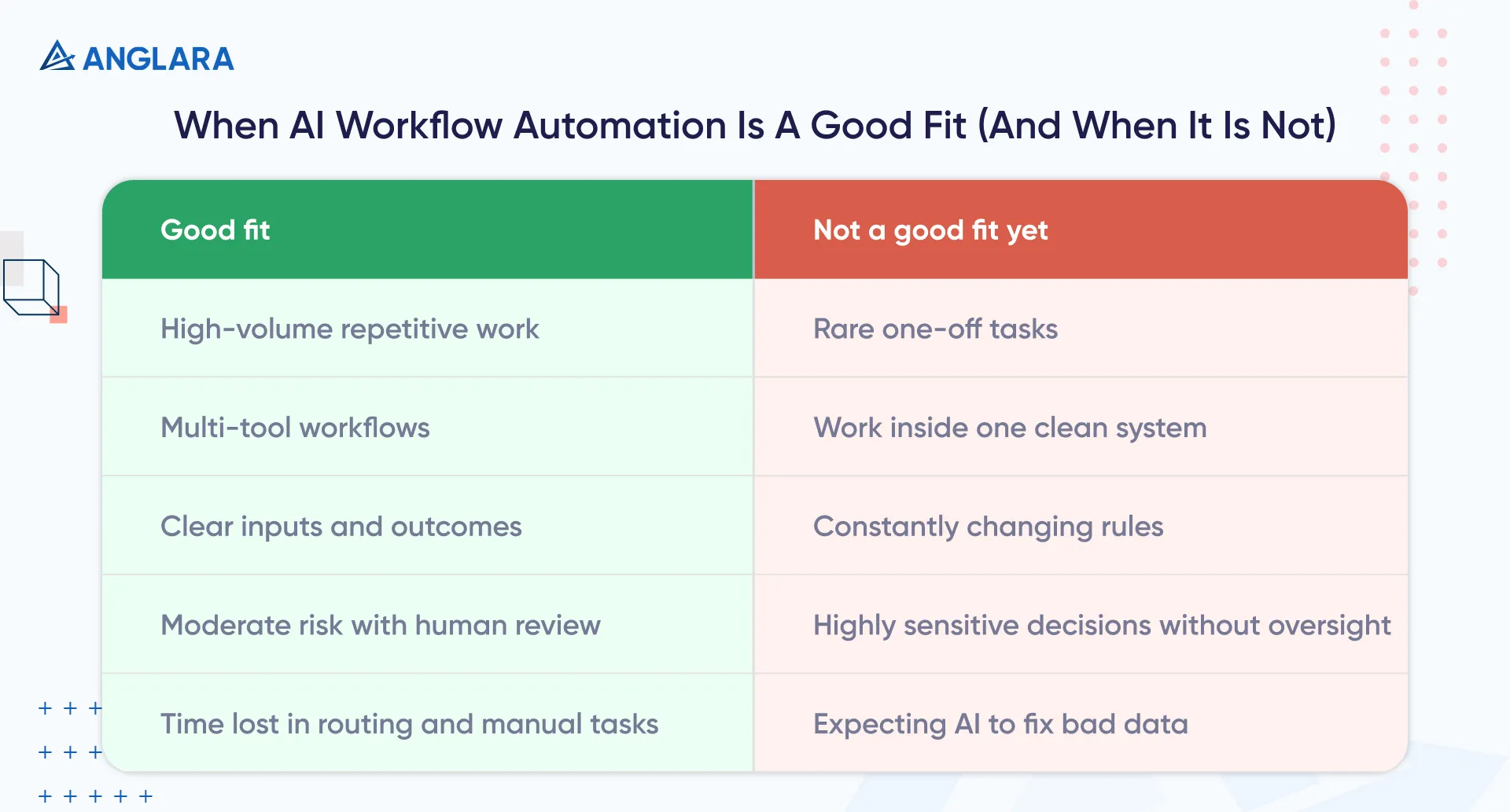
A good fit usually looks like this:
Good Fit | Not A Good Fit Yet |
High-volume, repetitive work | Rare, one-off tasks |
Workflows spread across multiple tools | Work that mostly happens inside one clean system already |
Clear triggers, inputs, and outcomes | Constantly changing process rules |
Moderate risk, easy human review | Highly sensitive legal, medical, or pricing decisions without oversight |
Teams losing time to triage, routing, extraction, summaries, follow-ups | Teams hoping AI will “fix” bad data and unclear ownership by itself |
If the workflow is already repetitive and the success metric is obvious, you are in a strong position to start.
If the process is chaotic, political, undocumented, or highly subjective, you probably need process cleanup before automation.
Real Use Cases And Examples
Customer Support And Triage
Support is one of the clearest starting points.
A good AI workflow can read incoming tickets, detect intent, classify urgency, draft a first response, route the case to the right queue, and attach the right knowledge article. Human agents still step in for exceptions, escalations, and sensitive conversations.
A practical example comes from the Portland Trail Blazers. Their team used AI and automation to triage guest survey feedback, cutting review time from 50 hours a week to 3 hours, saving 47+ hours weekly, and improving response times to under 24 hours. (Zapier)
That is the type of workflow many service, SaaS, and support teams can relate to: not replacing people, but removing the slow manual sorting work in front of them.
Finance And Approvals
Finance teams often deal with structured but tedious workflows: purchase order closure, invoice status checks, approvals, exception handling, and month-end coordination.
Atlassian is a useful example here. Its finance processes were highly manual and required more than 25,000 man-hours a year. After automating end-to-end workflows, the team was saving about 25,000 hours annually, closing books in 3 days instead of 8, and validating some requests in 2 minutes instead of 10–15. (Workato)
This is exactly why finance is often a strong candidate for workflow automation: the work is repetitive, cross-system, measurable, and full of status-chasing.
Operations And Order Workflows
Operations teams often lose time to order intake, inventory status, data validation, exception routing, and manual updates between platforms.
One Make case study showed Techflow.ai automating workflows for an Amazon vendor in Germany, saving 15 hours per week, cutting errors by 97%, and freeing up more than half a million euros in inventory. (Make)
That example matters because it shows a bigger truth: workflow automation is often not about a flashy front-end use case. It is about fixing the repetitive operational chain behind the scenes.
Benefits And Outcomes
The headline benefit is not “AI.” It is better throughput.
That usually shows up as:
- faster response times
- fewer manual errors
- less copy-paste work
- cleaner handoffs between teams
- more consistent service delivery
- more time for higher-value human work
McKinsey’s 2025 survey makes a very important point here: the biggest driver of EBIT impact from gen AI was workflow redesign, not simply having access to the technology. Yet only 21% of respondents said their organisations had fundamentally redesigned at least some workflows, and more than 80% were still not seeing material enterprise-wide EBIT impact. (McKinsey & Company)
That is the key lesson for buyers: do not bolt AI onto a broken process and expect transformation. Redesign the workflow first, then automate intelligently.
Risks, Compliance, And Governance
This is where a lot of weak projects fall apart.
The biggest risks are usually not futuristic. They are operational:
- bad input data
- unclear ownership
- too many exceptions
- poor handoff rules
- no audit trail
- no human fallback when the model is unsure
Again, practitioner feedback is useful here. Teams repeatedly call out messy inputs and edge cases as the points where automations break first. (Reddit)
On top of that, McKinsey found that high performers are more likely to define when model outputs need human validation and to build trust practices into rollout. (McKinsey & Company)
So for real deployments, governance should include:
- clear access controls and least-privilege permissions
- logging for every automated step
- confidence thresholds for AI decisions
- approval checkpoints for high-risk actions
- redaction or masking for sensitive data
- prompt/version control
- QA with edge-case testing before rollout
- clear escalation paths to humans
If your vendor cannot explain how the workflow fails safely, they are not ready to own the build.
Implementation Roadmap
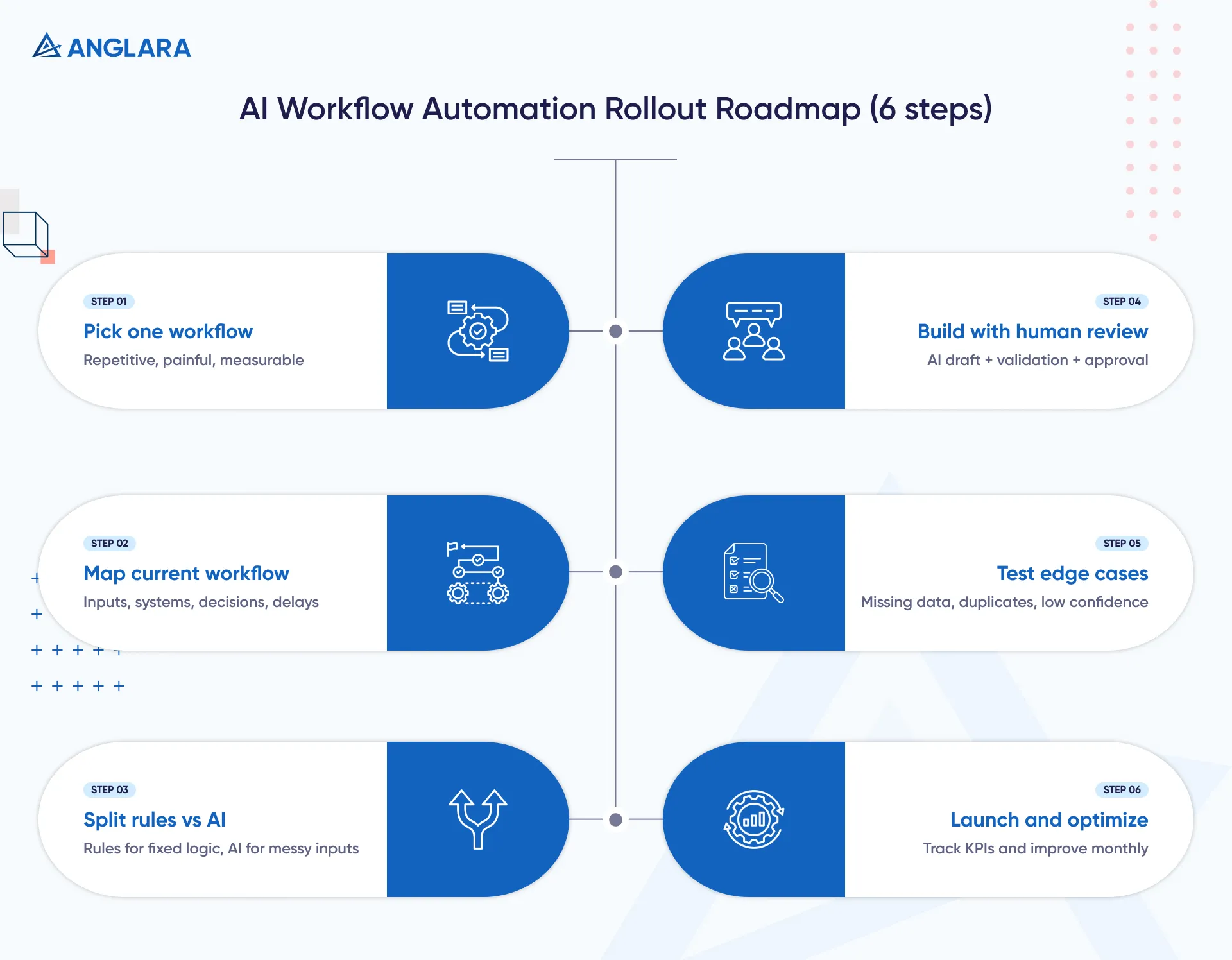
A sensible rollout usually looks like this:
1. Pick One Workflow, Not Ten
Start with a workflow that is repetitive, painful, and measurable.
Good first candidates include:
- inbox triage
- lead routing
- support classification
- meeting note summaries into CRM
- document extraction and routing
- approval flows
- recurring reporting workflows
2. Map The Current Workflow
Document the current state clearly:
- trigger
- input source
- decision points
- systems touched
- approvals
- exceptions
- handoff delays
- output and success metric
This is where hidden waste becomes obvious.
3. Split Rule-Based Steps From AI Steps
Not every step needs AI.
Use rules where the logic is fixed. Use AI where context is messy, unstructured, or language-heavy.
For example:
- routing by region or account owner = rules
- summarizing a long email thread = AI
- flagging uncertain cases for review = human checkpoint
4. Build For Review, Not Blind Autonomy
For most teams, the best first version is not fully autonomous.
It is:
- AI draft
- rule validation
- human approval on sensitive actions
- monitored release
That gives you speed without giving up control.
5. Test Edge Cases Aggressively
This is where many projects underestimate the effort.
Test for:
- missing fields
- duplicate records
- contradictory inputs
- poor OCR
- multiple languages
- low-confidence outputs
- conflicting system states
- retry logic and failure notifications
6. Launch With KPIs And Improve Monthly
Track metrics that matter to the business:
- hours saved
- response time
- error rate
- turnaround time
- SLA compliance
- cost per transaction
- percentage of cases automated safely
Then tune prompts, rules, thresholds, and handoffs every month.
Costs, Effort, And Timeline
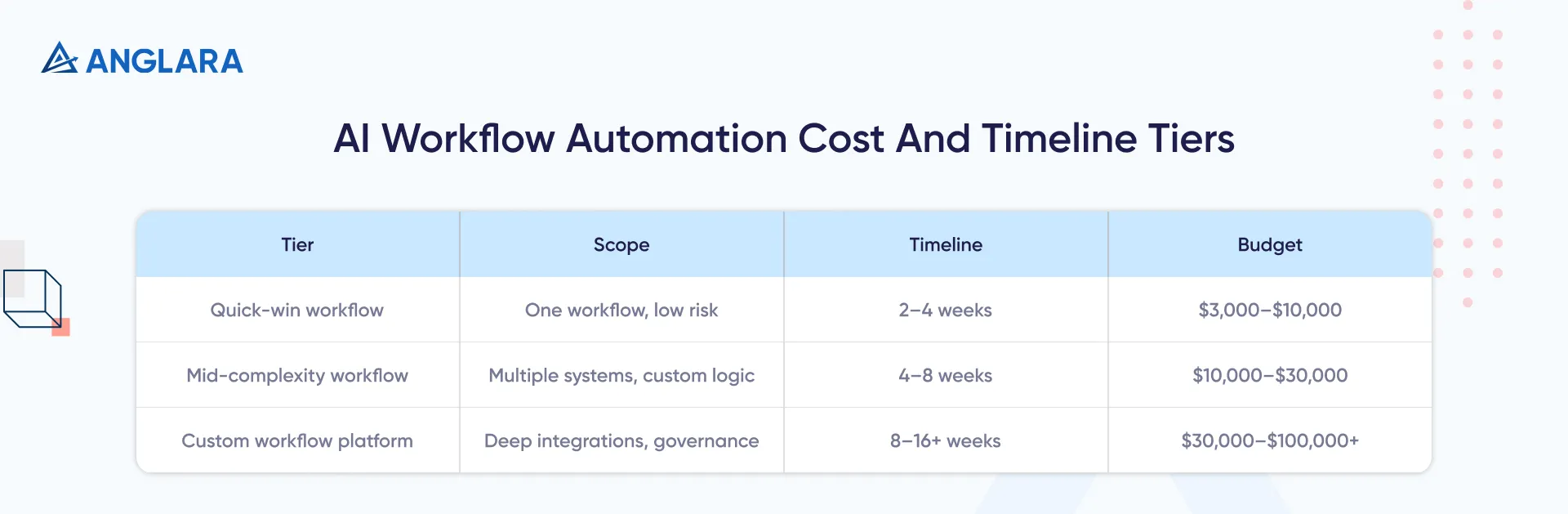
Pricing varies widely, but most projects fall into three practical bands.
Project type | Typical scope | Timeline | Directional budget |
Quick-win workflow | One workflow, mostly no-code, light AI, low-risk approvals | 2–4 weeks | $3,000–$10,000 |
Mid-complexity workflow | Multiple systems, custom logic, moderate exception handling | 4–8 weeks | $10,000–$30,000 |
Custom workflow platform | Secure multi-step automation, custom UI, dashboards, deep integrations, governance | 8–16+ weeks | $30,000–$100,000+ |
What drives cost the most:
- number of systems to integrate
- data quality and cleanup effort
- amount of exception handling
- model selection and prompt tuning
- security and compliance requirements
- reporting and admin controls
- change management and training
Timelines also vary for the same reasons. NIX’s guide, for example, notes that simpler implementations may take days to a couple of weeks, while broader custom integrations can take months. (NIX United)
The real mistake is not spending too much. It is scoping too vaguely, launching too broadly, and then discovering the workflow was never ready.
Common Mistakes
The first mistake is automating the wrong workflow.
Teams often start with a flashy use case because it sounds exciting, while the real waste is hidden in routing, approvals, document handling, and operational follow-through.
The second mistake is assuming AI can rescue poor process design. It cannot. If ownership is unclear, data is messy, and exceptions are undocumented, the automation will just fail faster.
The third mistake is skipping human review too early. Reddit operators say this bluntly: AI works best first on repetitive, mostly deterministic tasks, not decisions that depend on judgment, strategy, or high-stakes nuance. (Reddit)
The fourth mistake is treating go-live as the finish line. Good workflow automation is operational infrastructure. It needs logs, monitoring, feedback loops, and regular tuning.
FAQs
What are AI workflow automation services?
AI workflow automation services help businesses automate processes that move across tools, people, and decisions. The service usually includes process mapping, integration design, AI logic, human review steps, testing, deployment, and optimization.
How are AI workflow automation services different from basic automation?
Basic automation follows fixed rules. AI workflow automation can handle more variable inputs, such as emails, documents, ticket text, or conversation summaries. In many cases, the best solution combines both: rules for certainty, AI for interpretation.
What workflows should companies automate first?
Start with workflows that are repetitive, high-volume, cross-functional, and measurable. Common first wins include support triage, lead routing, note summaries, approval chains, reporting prep, invoice handling, and document classification.
When is AI workflow automation not a good fit?
It is usually a poor fit when the process is rare, highly subjective, legally sensitive, or constantly changing. It is also risky when data quality is poor and nobody owns the workflow end to end.
How long does implementation take?
A focused pilot can take 2–4 weeks. Mid-complexity workflows often take 4–8 weeks. Larger custom systems with deeper integrations, governance, and dashboards can take several months.
How much do AI workflow automation services cost?
A small pilot may start in the low thousands of dollars. A more serious cross-system implementation often lands in the low five figures. Larger custom builds with secure integrations, analytics, and advanced governance can go much higher.
Do we need custom development, or can no-code tools handle it?
It depends on the workflow. Some workflows can be handled well with platforms like Zapier, Make, or n8n plus good process design. Others need custom code, custom UI, internal APIs, or stricter security controls. The right partner should tell you honestly when no-code is enough and when it is not.
What should we measure after launch?
Track business outcomes, not vanity metrics. Good KPIs include turnaround time, hours saved, error rate, SLA performance, automation coverage, escalation rate, and cost per workflow instance.
How do we keep AI workflow automation safe and compliant?
Use least-privilege access, detailed logging, human approval for high-risk actions, data masking where required, version control for prompts and logic, and a clear fallback path when confidence is low.
What should we look for in a delivery partner?
Look for a team that can do four things well: map the workflow, choose the right tool stack, design safe human handoffs, and test edge cases thoroughly. Strong communication and practical business thinking matter as much as technical skill.
Key Takeaways
- AI workflow automation services are about fixing workflow bottlenecks, not just adding an AI layer
- The best first use cases are repetitive, cross-tool, and easy to measure
- Human review still matters, especially for exceptions and high-risk steps
- Workflow redesign matters more than hype
- Costs depend heavily on integration depth, edge cases, and governance
- A small, well-scoped pilot usually beats a broad, vague rollout
- The right partner should help you choose where AI belongs and where it does not
Next Steps
If your team is spending too much time on routing, approvals, manual updates, ticket triage, or repetitive operational work, start with one workflow audit.
Map the current process, find the biggest time leak, and test one pilot with a clear KPI.
And if you want a practical partner to scope it properly, Anglara can help you identify a strong first workflow, estimate the right build approach, and turn it into a controlled pilot. Book a free 30-minute consultation and we’ll help you assess where automation is worth it and where it is not.
