


Think an AI support agent is just a chatbot that answers FAQs? Think again. For B2B SaaS, the real win is predictable L1 coverage: fast answers, safe escalation, and fewer tickets created in the first place.
This guide shows two paths:
- Fast path: launch Anglara’s AI Support + Booking Agent for $499/month (built for SaaS teams serving small businesses).
- Build path: implement your own AI help desk agent using RAG + guardrails + human handoff.
Either way, you’ll leave with a rollout plan, a cost model, and a checklist your team can execute.
An AI support agent for SaaS reduces L1 workload by answering common questions using approved knowledge, then escalating anything risky or uncertain to humans with full context. The most reliable approach is RAG (retrieval) over your help docs and known-issues content, combined with guardrails and handoff rules. Many SaaS teams prefer a predictable option because per-resolution costs can rise with volume; Gartner has warned GenAI cost per resolution can exceed $3 by 2030 and regulation may increase assisted volume. (Gartner) If you want the fastest path without a long build cycle, Anglara offers an AI Support + Booking Agent at $499/month (with an optional voice assistant add-on), designed for SaaS products selling into small businesses.
What an AI Support Agent Is (Definition + What It’s Not)
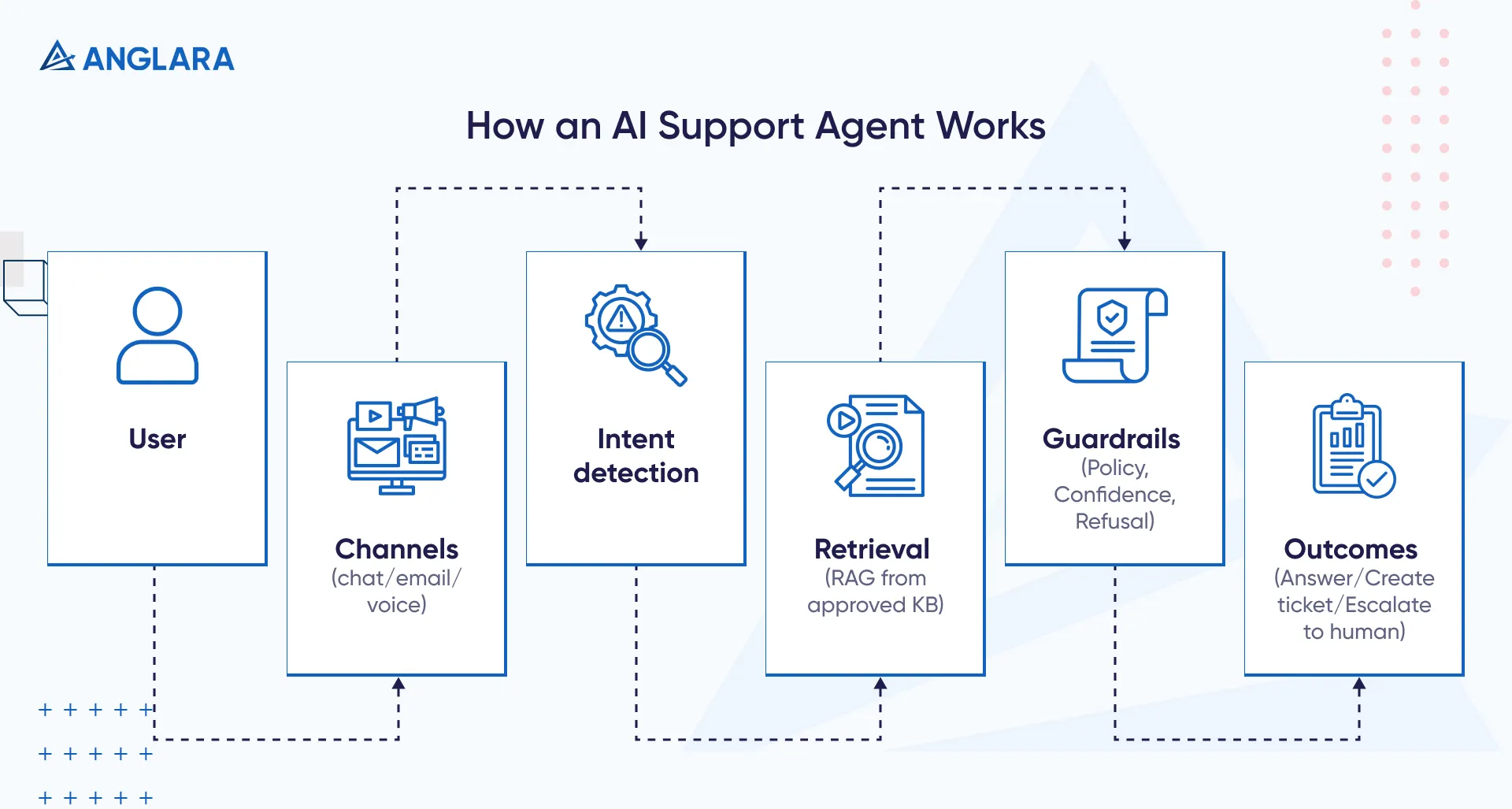
An AI support agent is a customer-facing assistant that can
- Understand user questions (chat, web widget, email, or voice)
- Retrieve answers from approved sources
- Respond with safe, consistent guidance
- Escalate to a human when the request is sensitive, complex, or uncertain
It’s also commonly used for ticket deflection - helping customers solve issues via self-serve so fewer tickets are created. (Zendesk)
Who this is for
This guide (and Anglara’s $499/mo option) is designed for:
- SaaS founders and CTOs who want to reduce L1 support load without breaking trust
- Support leaders who want real deflection, not “AI that creates more tickets”
- Product teams that want in-app guidance to reduce churn-driving confusion
- SaaS builders who want chat + voice for bookings (your “call assistant” vision)
Why Most SaaS Teams Struggle to Get Reliable Ticket Deflection
Most SaaS support teams aren’t struggling because they lack answers.
They struggle because:
- Answers are scattered across docs, tickets, and internal notes
- Agents waste time searching and rewriting the same guidance
- Customers wait, follow up, and then convert frustration into churn risk
A support agent that can retrieve, answer, and escalate safely targets the real issue: repeatable L1 resolution at scale-which is the core of ticket deflection. (Zendesk)
How Implementation Works (RAG, Guardrails, Escalation)
The Knowledge Layer (What It Can Safely Use)
Your agent should only answer from approved sources:
- Help center articles and docs
- Release notes and “what changed”
- Known issues and troubleshooting playbooks
- Policy pages (billing, cancellations, SLA)
If you want higher accuracy, keep a single “source of truth” and update it as part of release workflow.
RAG vs Fine-Tuning vs Rules (What to Choose)
RAG (Retrieval-Augmented Generation)
- The model retrieves relevant snippets from your docs and answers grounded in that content.
- This is the most practical approach for support because it reduces “made up” answers.
Rules / Workflows
- Best for deterministic actions: collecting fields, routing, ticket creation, calendar booking.
- AI handles conversation; automation executes the action.
Fine-Tuning
- Helpful later for consistent style or domain language.
- It doesn’t fix missing/contradictory documentation.
Guardrails + Human Handoff (The Trust Layer)
This is where most teams fail.
Community discussions around production RAG repeatedly highlight:
- “Silent retrieval failures” where retrieval brings weak chunks, but the model responds confidently anyway. (Reddit)
- The need for a validation layer, refusal rules, and escalation when confidence is low. (Reddit)
Non-negotiable guardrails:
- Refuse-to-answer when sources don’t support the response
- Escalate for billing disputes, security/privacy, angry sentiment, or “agent unsure”
- Log what sources were used (internal traceability)
Anglara’s packaged system emphasizes guardrails and handoff because one confident wrong answer can destroy adoption.
Best B2B SaaS Use Cases (What to Automate First)
In-App Help (The Highest ROI Starting Point)
- “Where is this setting?”
- “How do I integrate X?”
- “What does this error mean?”
- Onboarding: step-by-step guidance with links to exact doc sections
Ticket Triage +Routing (Before Full Automation)
- Classify intent (bug/how-to/billing/feature request)
- Extract required fields (workspace ID, logs, steps tried)
- Route to the right queue and attach a summary
This alone reduces back-and-forth and improves first-response quality.
Billing/Account Support (With Boundaries)
Good:
- Plan comparisons from docs
- Invoice retrieval steps
- Proration explanations (from policy)
Not good without strict control:
- Refund approvals
- Charge disputes
- Security/access exceptions
Incidents + Status Updates
During an incident, your agent should:
- Point to the status update
- Collect key details
- Create a ticket with structured fields
Adding Booking + Voice (Chat Widget + Call Assistant)
You mentioned your SaaS for small businesses will include:
- AI chat widget for booking
- Voice chat (call assistant)
That’s the right direction - because SMB buyers often want to book, not “submit a ticket.”
Booking Flow That Feels Human
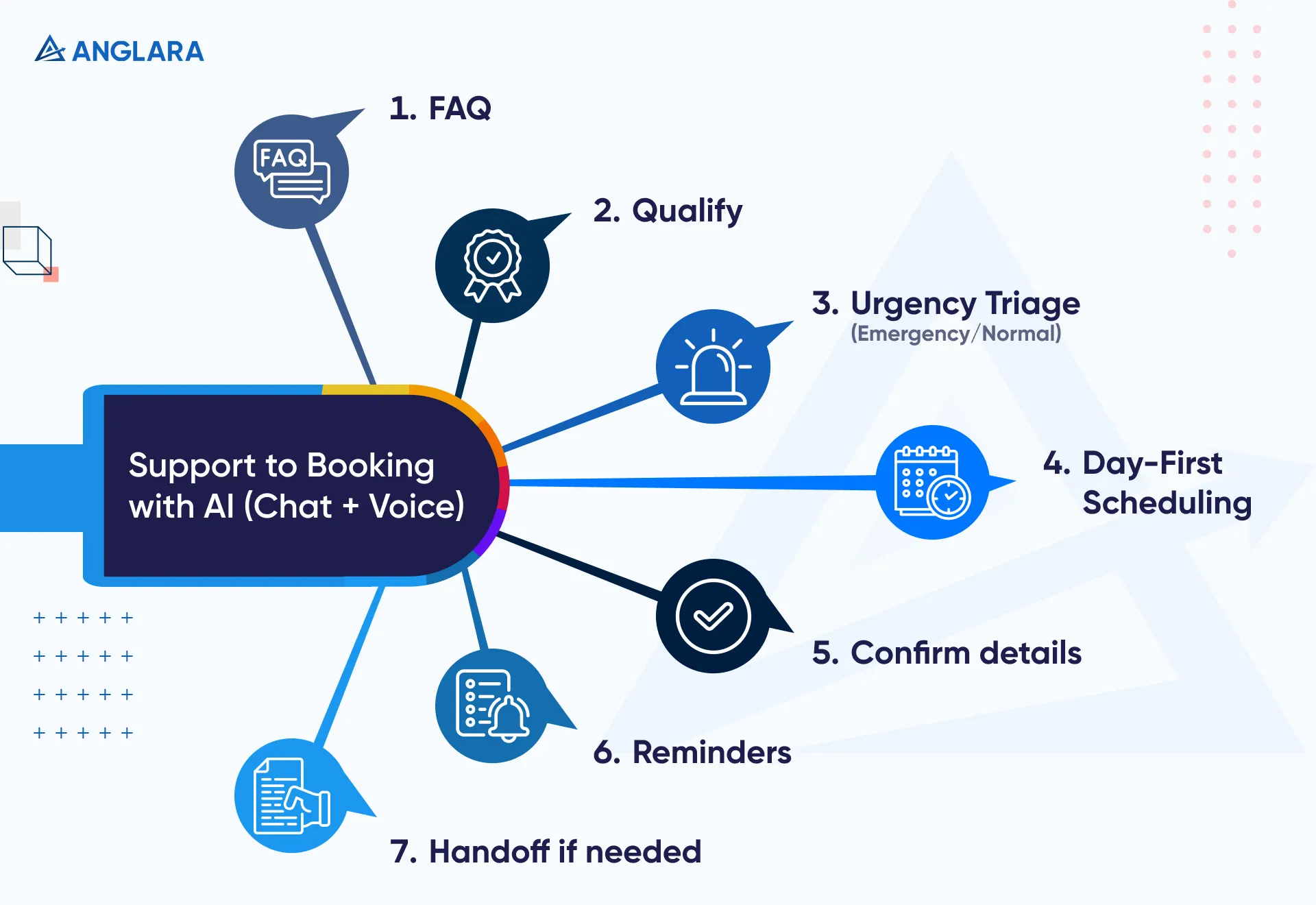
Best practice pattern:
- Ask day first (“What day works for you?”)
- Then narrow to time window (“Morning or afternoon?”)
- Confirm details
- Send reminders
Also include a simple triage:
- Emergency → prioritize callback or urgent slot
- Normal → book standard + pre-qualify with 3–5 questions
Voice Assistant Scope + Safety
Voice can be powerful, but keep the scope tight:
- FAQs + qualification + booking/rescheduling
- Confirm critical details back to the user
- Escalate when unsure
Voice is also where “predictable pricing” matters more, because usage can climb fast once customers start calling.
Risks, Governance, and How to Avoid Trust-Breaking Mistakes
Hallucinations and Wrong Answers
Mitigation checklist:
- Only answer when the agent has strong retrieved evidence
- Add refusal and escalation policies
- Maintain a test set of top intents and review weekly
Cost Shocks From Usage-Based Pricing
- Per-resolution models can be predictable at low volume (example: $0.99/resolution). (Intercom)
- But Gartner’s forecast of >$3 cost per resolution by 2030 makes cost control a real governance topic, not a finance footnote. (Gartner)
Success Metrics” That Create Bad Behavior
Don’t chase deflection at all costs.
Track:
- Correctness
- Repeat contacts
- Handoff quality
- CSAT impact
Implementation Roadmap
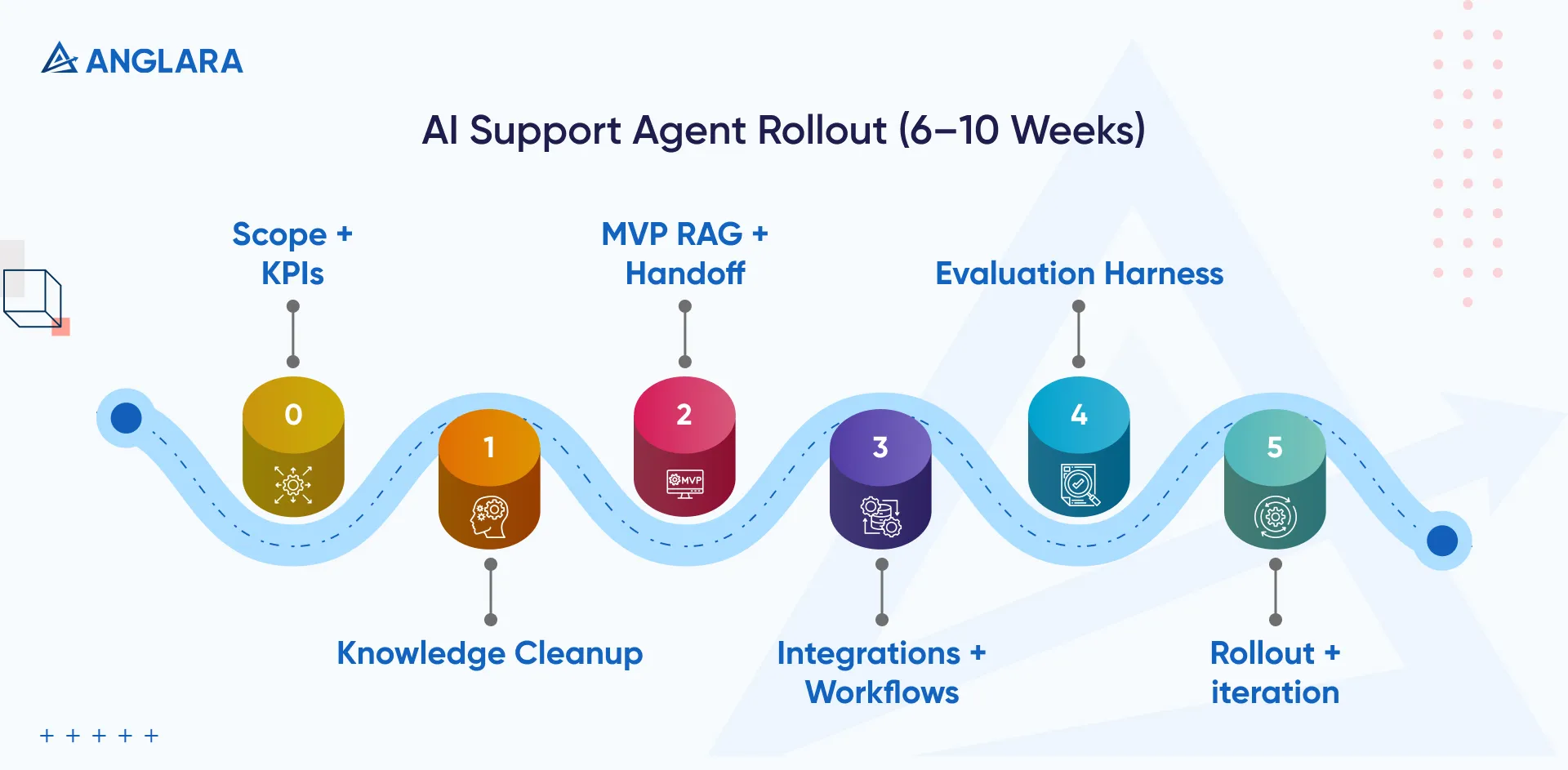
Step 0: Pick Scope + Success Metrics (Week 1)
- Select top 20–50 L1 intents
- Define: “resolved”, “escalated correctly”, “refused safely”
Step 1: Knowledge Cleanup + Taxonomy (Weeks 1–2)
- Remove duplicates, outdated steps
- Create a “known issues” page
- Tag articles to intents
Step 2: MVP Agent (RAG + Handoff) (Weeks 2–6)
- Start with one channel (in-app or web widget)
- Keep escalation easy and fast
Step 3: Integrate Workflows (Weeks 4–10)
- Help desk ticket creation + routing
- CRM fields + booking calendar integration
Step 4: Evaluation Harness + Hardening (Ongoing)
- Weekly eval against real tickets
- Expand scope only after quality stabilizes
Step 5: Rollout and Iterate
- 10% traffic → 50% → full
- Keep KB updates tied to product releases
Shortcut: If you want to skip months of iteration, Anglara’s $499/mo package gets you to “working and measurable” quickly, then you expand from there.
The Fastest Path: Anglara’s $499/mo AI Support + Booking Agent
If your goal is simpl-reduce L1 tickets and convert more conversations into bookings-a “build from scratch” route is often slower than it needs to be.
Anglara’s approach is intentionally packaged:
- $499/month for the core AI support + booking experience (ideal for SMB-focused SaaS)
- Optional upgrades for deeper integrations and voice
What You Get (Typical at $499/Month)
AI Chat Widget for Support
- Answers FAQs and how-to questions using your knowledge base
- Handles onboarding/setup questions that create repetitive tickets
Booking Assistant Flows (Built-In)
- Captures details, qualifies the request, and books an appointment
- Asks for day first, then narrows to time (more natural than dumping random slots)
Safe Escalation
- If unsure, it hands off to a human (or creates a ticket) with a clean summary
Basic Reporting
- Top questions, handoff rate, deflection trends, and “content gaps”
This structure exists for a reason: many teams underestimate how much time goes into knowledge cleanup, guardrails, and handoff design.
When It’s a Good Fit / Not a Good Fit
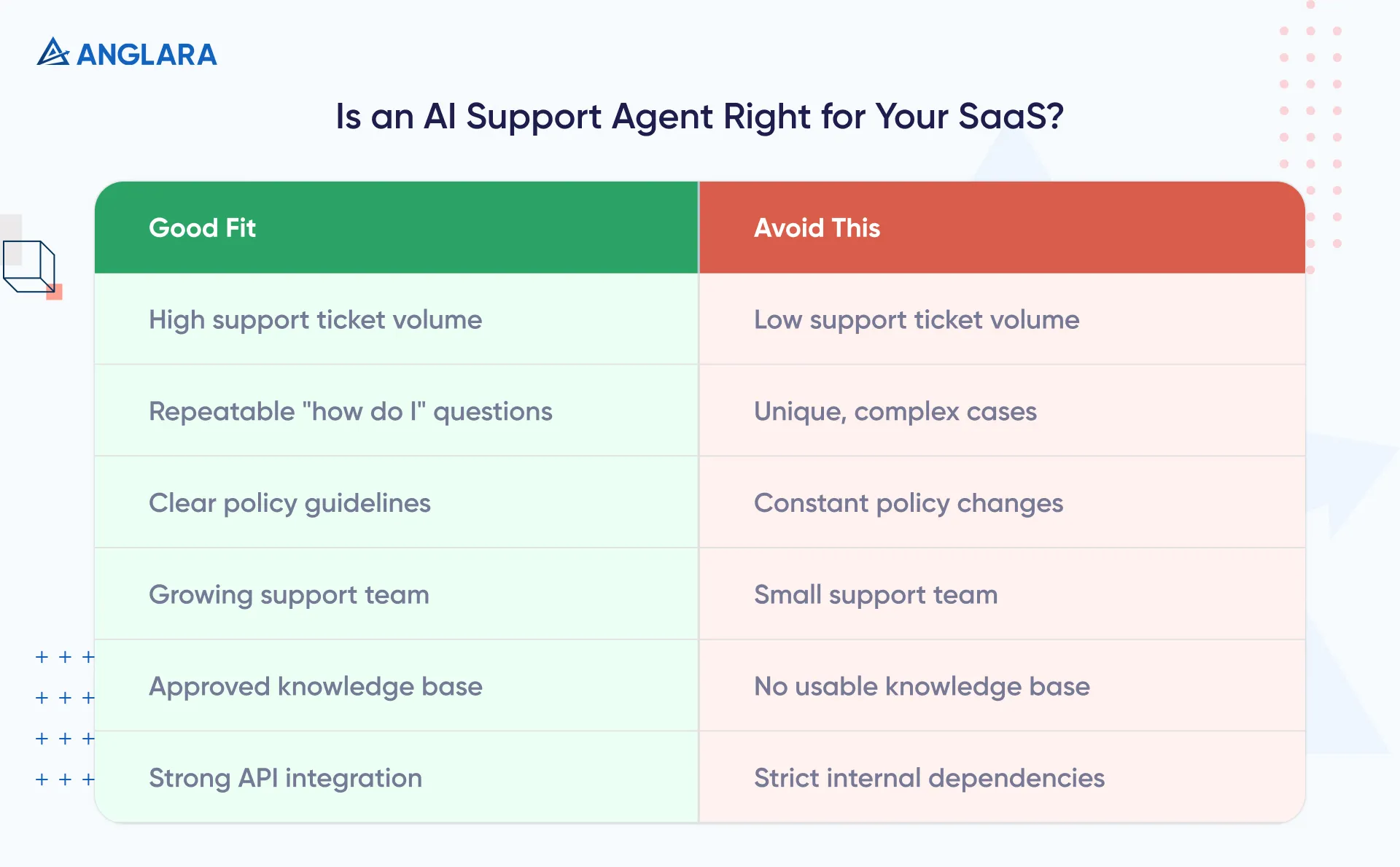
Good Fit
- You sell SaaS to small businesses (service booking, local operators, clinics, agencies)
- Your L1 tickets are mostly “how do I…”, onboarding, setup, and policy questions
- You want predictable costs (fixed monthly beats surprise per-resolution spikes)
- You need both support + booking in one system
Not a Good Fit (or Needs a Custom Layer)
- You require complex autonomous actions (refund approval, security exceptions)
- Your support answers depend on deep internal systems with strict access control
- You have no usable knowledge base yet (we can still help, but phase 1 becomes KB work)
Why Fixed Monthly Pricing Matters (and Why We Emphasize It)
A lot of “AI support agent” pricing today is usage-based-often per resolution. Intercom’s Fin AI Agent, for example, is priced at $0.99 per resolution. (Fin)
That can be great for some teams, but it creates forecasting risk when volume grows or when customers start using AI as the default channel.
Gartner has explicitly warned that GenAI cost per resolution for customer service may exceed $3 by 2030, and regulatory change may increase assisted service volume. (Gartner)
So if you’re a SaaS product expecting growth, a predictable $499/month base can be a smarter starting point than “we’ll see what the usage bill is.”
Cost: What you Should Budget in 2026
Quick Comparison: Buy vs Build vs Anglara Fixed Pricing
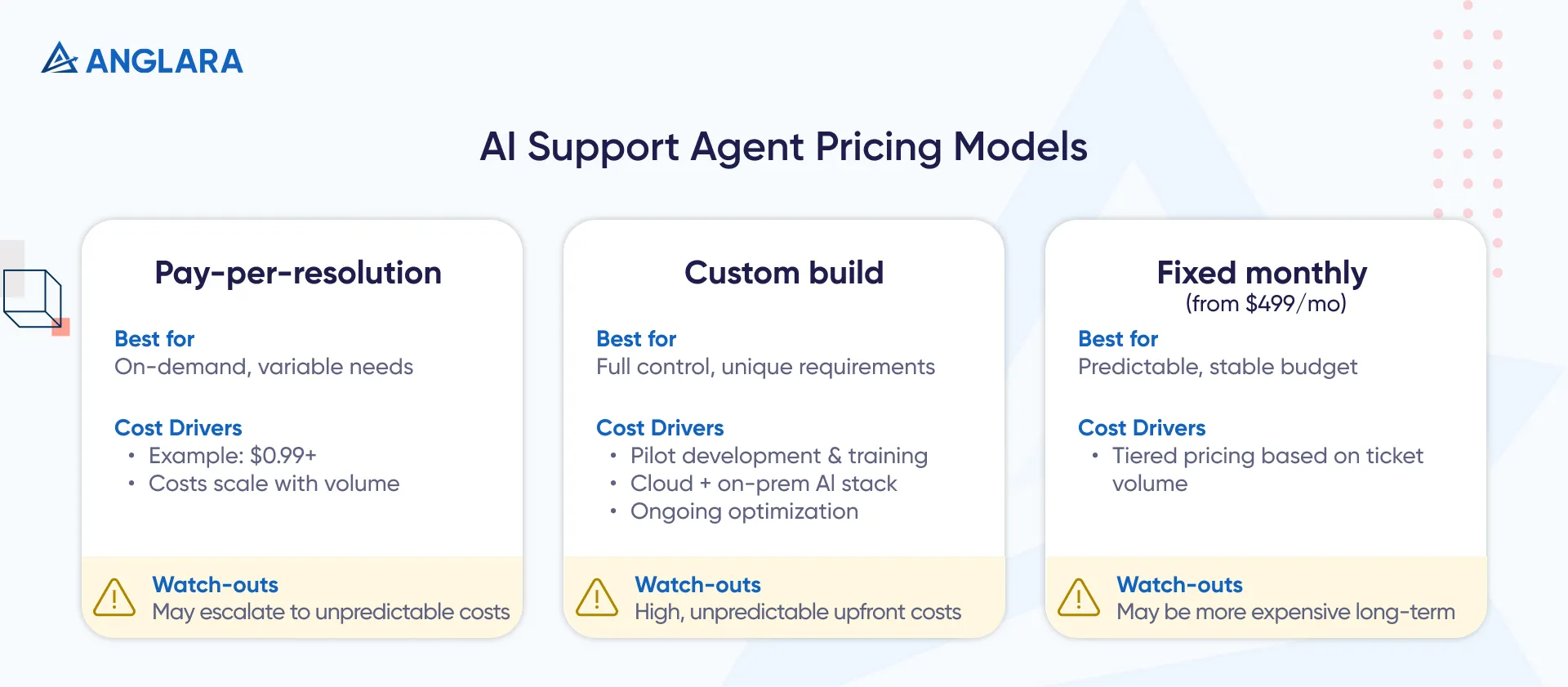
Budget Ranges (Practical Guidance)
- Anglara fast path: $499/month for the core AI support + booking agent
- Add-ons vary based on integrations + voice requirements.
- Pilot build (4–6 weeks): typically $12k–$35k (tight scope, 1 channel, RAG + handoff)
- Production build (8–16 weeks): typically $40k–$150k (multi-channel, workflows, evaluation, governance)
- Voice add-on: typically +$15k–$60k (call flow design, telephony integration, safety rules)
Why We Don’t “Promise” a Deflection %
Real-world examples exist-Klarna reported 2.3M conversations in a month and major efficiency gains with its AI assistant. (Klarna)
But your results depend on knowledge quality, scope, and escalation design. That’s why the safer promise is: predictable rollout + measurable improvement.
Common Mistakes
- Trying to automate everything on day one
- No refusal policy (“answer anything” kills trust)
- Skipping evaluation and just watching ticket volume
- Letting AI take risky actions without strict approvals
- Treating docs as static (support AI needs ongoing knowledge ops)
FAQs
1. What is an AI support agent for SaaS?
A support assistant that retrieves answers from approved knowledge, responds safely, and escalates complex or risky issues to humans with context. Ticket deflection is a common outcome. (Zendesk)
2. How do I implement an AI help desk agent without hallucinations?
Use RAG over approved sources, refuse-to-answer when evidence is weak, and escalate when confidence is low. Production RAG discussions highlight silent retrieval failures as a key risk. (Reddit)
3. Do I need fine-tuning for an LLM support agent?
Usually not initially. Most teams start with RAG + guardrails and add fine-tuning later only if needed for style consistency.
4. How much does an AI support agent cost for B2B SaaS?
Options range from per-resolution pricing (example: $0.99/resolution) to custom builds and fixed monthly packages. Anglara’s packaged option starts at $499/month for support + booking. (Intercom)
5. Is per-resolution pricing cheaper than fixed monthly pricing?
At low volume it can be. But per-resolution costs can scale with usage, and Gartner forecasts GenAI cost per resolution could exceed $3 by 2030. (Gartner)
6. What KPIs should I track besides ticket deflection?
Correctness, repeat contacts, handoff quality, and CSAT impact.
7. Can an AI support agent also book appointments?
Yes-especially for SMB-facing SaaS. The best pattern is day-first scheduling, qualification questions, and emergency vs normal routing.
8. Should I buy a platform AI agent or build custom?
If you want speed and predictability, start with a packaged option (like Anglara $499/mo) or a platform add-on; go custom if you need deep control and complex integrations.
Key Takeaways
- If you want the fastest path, start with Anglara’s AI Support + Booking Agent at $499/month.
- For building: use RAG + guardrails + escalation, not “answer anything”.
- Treat cost as a strategy: per-resolution pricing can scale unpredictably; fixed monthly is easier to forecast.
- Start with top 20–50 intents, then expand only after quality stabilizes.
- Add booking + voice once chat deflection is stable-voice magnifies both wins and risks.
Next Steps
- Action #1 (self-serve): Use the downloadable worksheet below to scope your top intents, guardrails, and handoff rules.
- Action #2 (fastest outcome): Launch Anglara’s $499/month AI Support + Booking Agent and expand only after you see clean metrics.
- Action #3 (custom): If you need deeper integrations or strict enterprise governance, book a free 30-min consultation and we’ll recommend the best-fit approach.
