


TL;DR
Automated content creation works when you automate repeatable tasks like research, briefs, drafts, and distribution, and keep humans in charge of approvals, accuracy, and brand voice. It's not about replacing writers; it's about removing bottlenecks while scaling quality.
- Works well for: briefs, drafts, SEO, repurposing
- Needs humans for: brand voice, approvals, POV
- Guardrails: content decay checks, legal review, originality
Marketing teams are drowning in content demand with more formats, more channels, and faster, more demanding cycles. But that velocity often hits a wall with approval bottlenecks, inconsistent quality, and piles of half-finished drafts.
That’s where AI-powered content workflows, often backed by custom AI development, come in.
When done right, they take the busywork like research, drafts, and rewrites off your plate while letting your team focus on what matters: brand, strategy, and quality.
In this guide, we’ll show you a complete, repeatable automation system that actually produces helpful content and doesn’t get penalized by Google.
Automated content creation (what it is + what it isn’t)
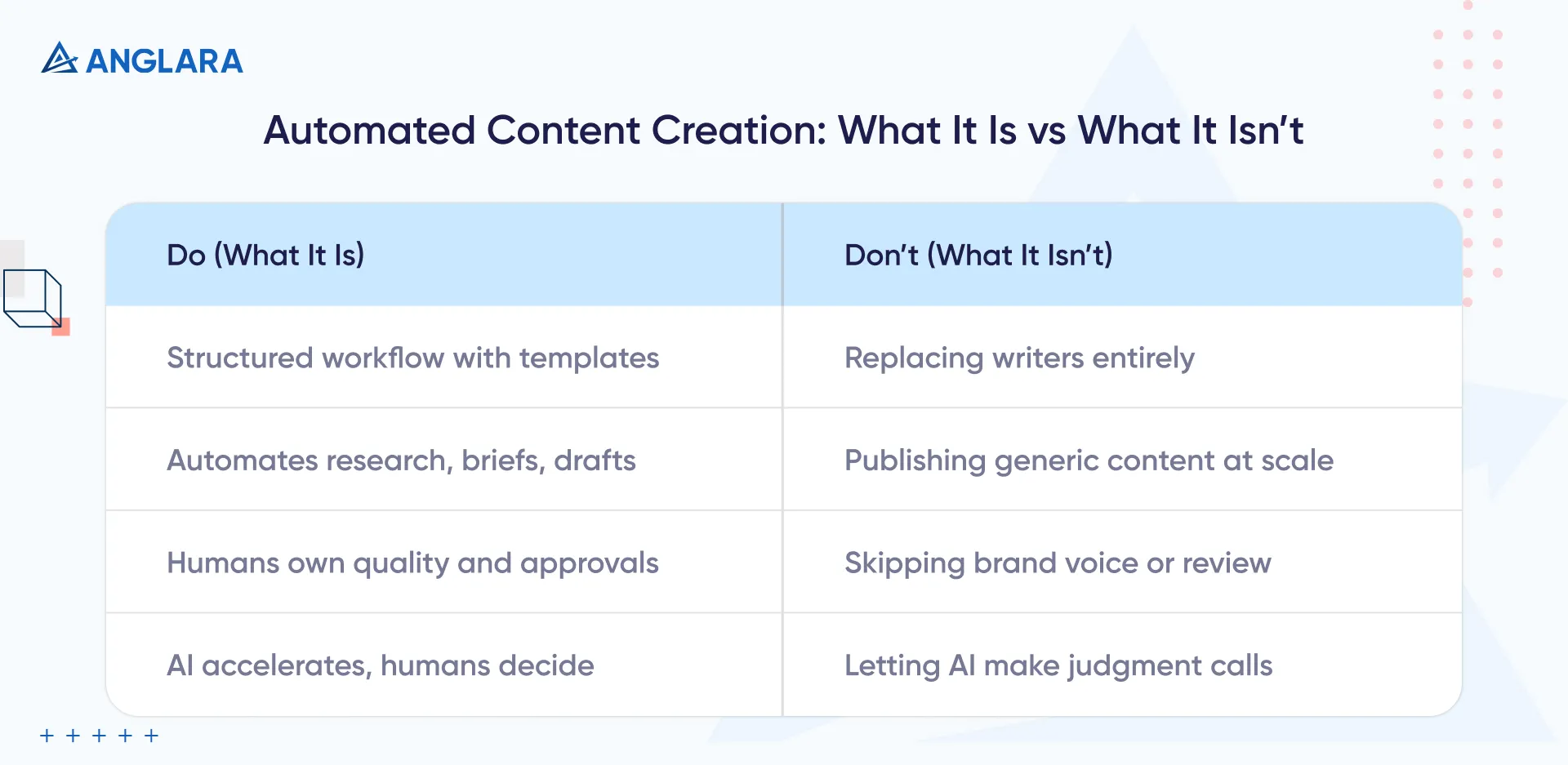
Automated content creation isn’t about publishing generic blog posts at scale or swapping writers for machines. Done right, it’s a structured workflow powered by templates, approvals, and analytics.
Think of it like this:
- Automation = system: It includes intake processes, brief templates, approval steps, and content performance measurement.
- AI is a tool, not a brain: It accelerates research and drafting, but accuracy, nuance, and judgment still belong to humans.
- You still own quality: Automation helps scale, but your brand voice, compliance, and unique POV can’t be outsourced.
When grounded in strategy and QA, automated content creation becomes a force multiplier rather than a liability.
Automated content creation workflow (8-step system you can copy)
Most automation guides stop at the draft. But ours covers the entire loop from idea to approvals to performance tracking.
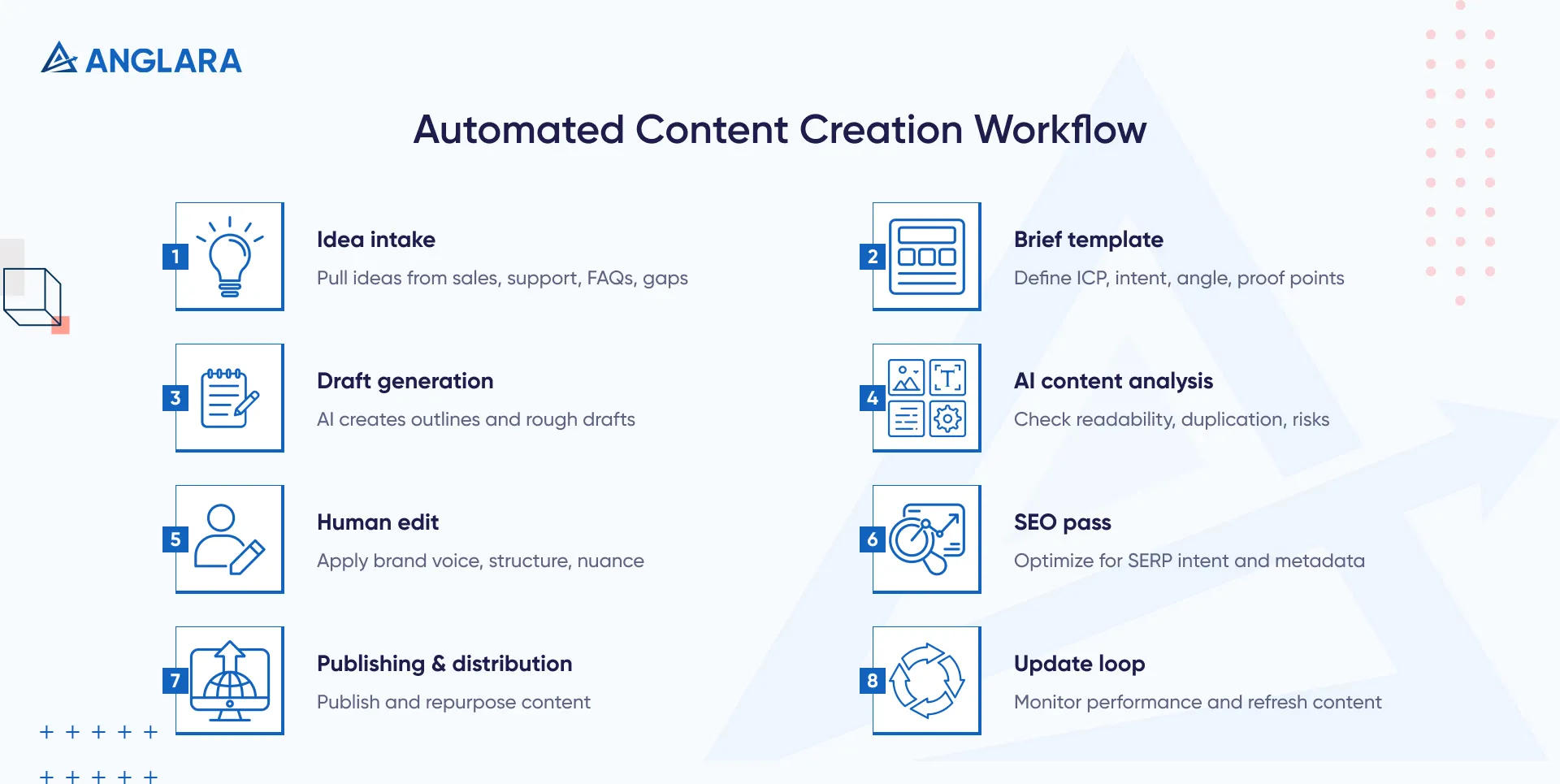
Here’s the 8-step workflow we use (and you can too):
1. Idea intake
Start by pulling inputs from the front lines, like sales and support calls, customer FAQs, and content gaps in competitor materials. This ensures content ideas are demand-driven rather than brainstormed in isolation.
2. Brief template
Create a structured brief that includes your ideal customer profile (ICP), the user’s search intent, the core message or angle, and any required proof points (stats, quotes, links). A strong brief is the difference between a laser-focused draft and a vague one.
3. Draft generation
Feed the brief into an AI tool to produce outlines and rough section drafts. Don’t aim for final quality here, just velocity. The goal is to unblock writers and give them something to edit, not to ship AI-written fluff.
4. AI content analysis
Run automated checks for readability, duplication, hallucinated claims, or compliance risks. Think of this as QA-before-editing. Tools that flag weak or repetitive sections upfront reduce rework downstream.
5. Human edit
A skilled editor applies the brand voice, restructures the flow, and strengthens arguments. They inject nuance, examples, and narrative clarity. This is where human insight adds some personality to the machine output.
6. SEO pass
Once the narrative holds, optimize for SERP intent. Add internal links, refine titles and headers, and ensure the content aligns with how top-ranking pages frame the topic. Don’t forget structured data or metadata.
7. Publishing and distribution
Hit publish, then get it seen. Distribute via newsletter, social, Slack communities, or partner channels. Repurpose into carousels, email sequences, or scripts. Publishing is just the midpoint; it’s the distribution that matters.
8. Update loop
Set regular checkpoints to revisit content. Monitor rankings, CTRs, and conversions. Refresh winners (new stats, clearer intros), prune losers, and consolidate outdated pieces. Content automation without an update loop is just volume without performance.
This full-cycle system ensures that AI doesn’t just write; it enables repeatable, measurable, and high-performing content at scale.
Content approval workflow (how to keep quality + compliance)
Even great content falls apart when the approval process is a mess. Chasing down feedback in Slack threads, email chains, or outdated docs creates the risk of missed errors, legal issues, or simply stalled publishing.
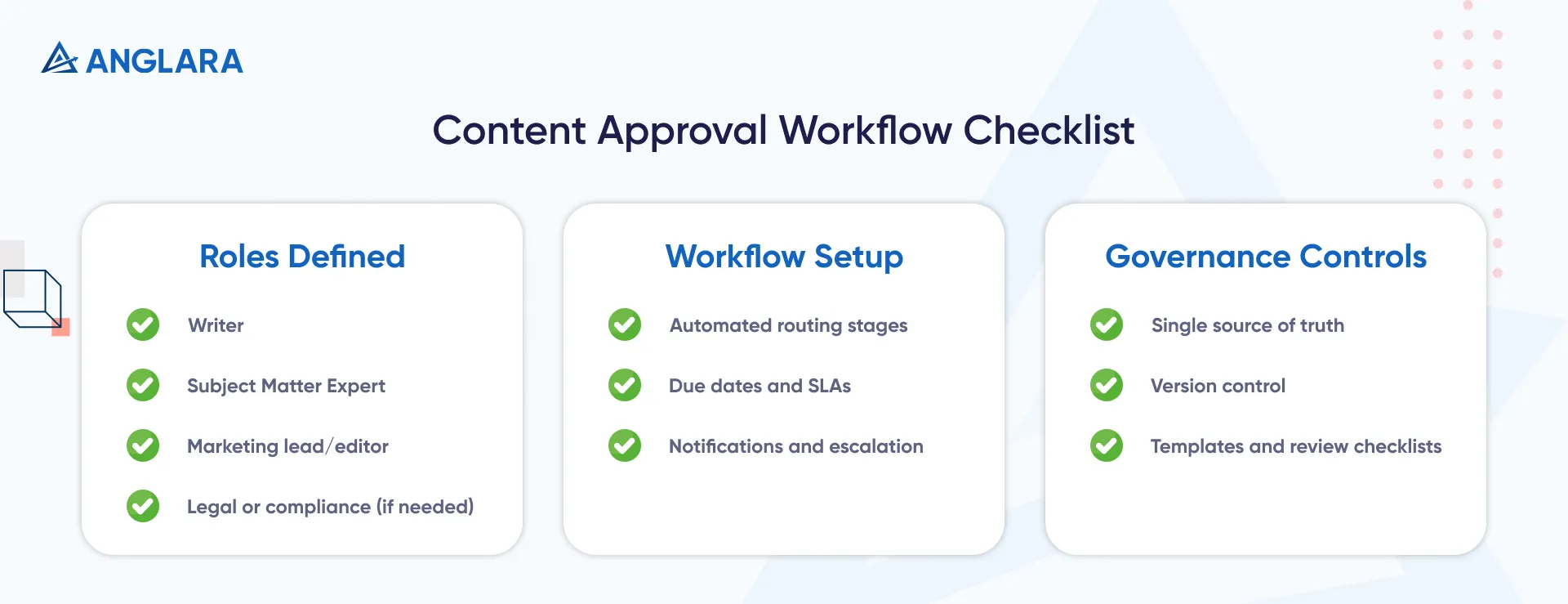
A solid content approval workflow gives you speed and quality. Here’s what you need:
1. Define Roles & Responsibilities
Assign clear stages to specific roles:
- Writer: creates the draft based on the brief.
- SME (Subject Matter Expert): reviews for accuracy, relevance, and technical soundness.
- Marketing Lead or Editor: enforces brand voice, structure, and messaging.
- Legal/Compliance (if needed): performs final check for regulatory or legal risk (especially for YMYL content).
Each person should know their role and what to look for.
2. Set Routing & Automation
Use a single content platform or workflow tool to handle routing. Instead of emailing drafts around, configure automated stages. Once a writer marks the draft complete, it moves to the SME, then to marketing, and so on.
Automation tools also allow you to:
- Assign due dates and enforce SLAs
- Notify reviewers via Slack/email
- Auto-escalate overdue approvals to team leads
This removes the guesswork of “who’s got it now?” and keeps content velocity intact.
3. Single Source of Truth
Centralize all content in one place to avoid version sprawl and conflicting feedback. Most CMS platforms or content collaboration tools offer version control and comment tracking.
Make that the standard.
4. Escalation Paths
If an approver misses a deadline or goes dark, the system should trigger escalation.
For example, if legal hasn’t signed off within two business days, auto-notify their backup. Delays in approval are one of the top causes of missed launches, but escalation rules keep things moving.
5. Templates & Checklists
Use pre-built forms or checklists during approval:
- Brand voice checklist
- Claims and citations verified
- Compliance risks checked
Having these baked into the review flow ensures consistency and reduces subjective reviews.
Done right, a content approval workflow becomes invisible but fast, reliable, and traceable. And it eliminates the “Who signed off on this?” drama that derails teams. Companies implementing content marketing automation are seeing remarkable results, with 68% reporting increased content marketing ROI.
AI content strategy (templates that make automation not sound generic)
Automation doesn’t have to mean robotic. With the right strategy and templates, generative AI can help with content creation that sounds as sharp, clear, and brand-aligned as anything written in-house.
Use this checklist to keep output consistent and high-quality:
- Brand voice rules: Define your do’s and don’ts with preferred tone, banned buzzwords, sentence length, and phrasing examples. Train your AI prompts on these rules.
- House-style intros/outros: Create reusable templates for how you open and close blog posts, guides, and landing pages. This avoids cold starts and creates instant voice consistency.
- Start with the right formats: Automate content types where precision matters more than flair with FAQs, PPC ad variants, product descriptions, and landing page copy. Start with formats where AI excels, like FAQs, PPC variants, or even AI chatbot development for handling dynamic, conversational content.
For high-stakes content teams, Anglara’s AI business consulting can help architect workflows that combine governance with velocity.
Note: Avoid using AI alone for thought leadership, trend prediction, or anything requiring deep subject-matter expertise. These need human input to add real value.
AI content management (where drafts, approvals, and assets live)
Nothing slows down a content machine like missing docs, outdated drafts, or endless digging through folders. A clean content management system keeps everything and everyone aligned.
Here’s a simple structure to organize your AI-powered content ops:
- One backlog: A shared board or spreadsheet that tracks all ideas, drafts, and their current status (e.g., Not Started, In Progress, In Review, Published).
- One doc home: A centralized folder or workspace where all final drafts, source materials, and approval history live. Everyone works from the same version.
- One asset folder: A labeled repository for visuals, citations, screenshots, and embeds linked to each piece of content.
Have three organized layers: plan, produce, and publish. Whether you're using Notion, Airtable, Google Drive, or a CMS, consistency beats complexity.
AI content for SEO (how to use AI without getting hit)
AI can absolutely help you rank but only when used responsibly. Here’s how to stay aligned with Google’s guidelines and avoid getting flagged.
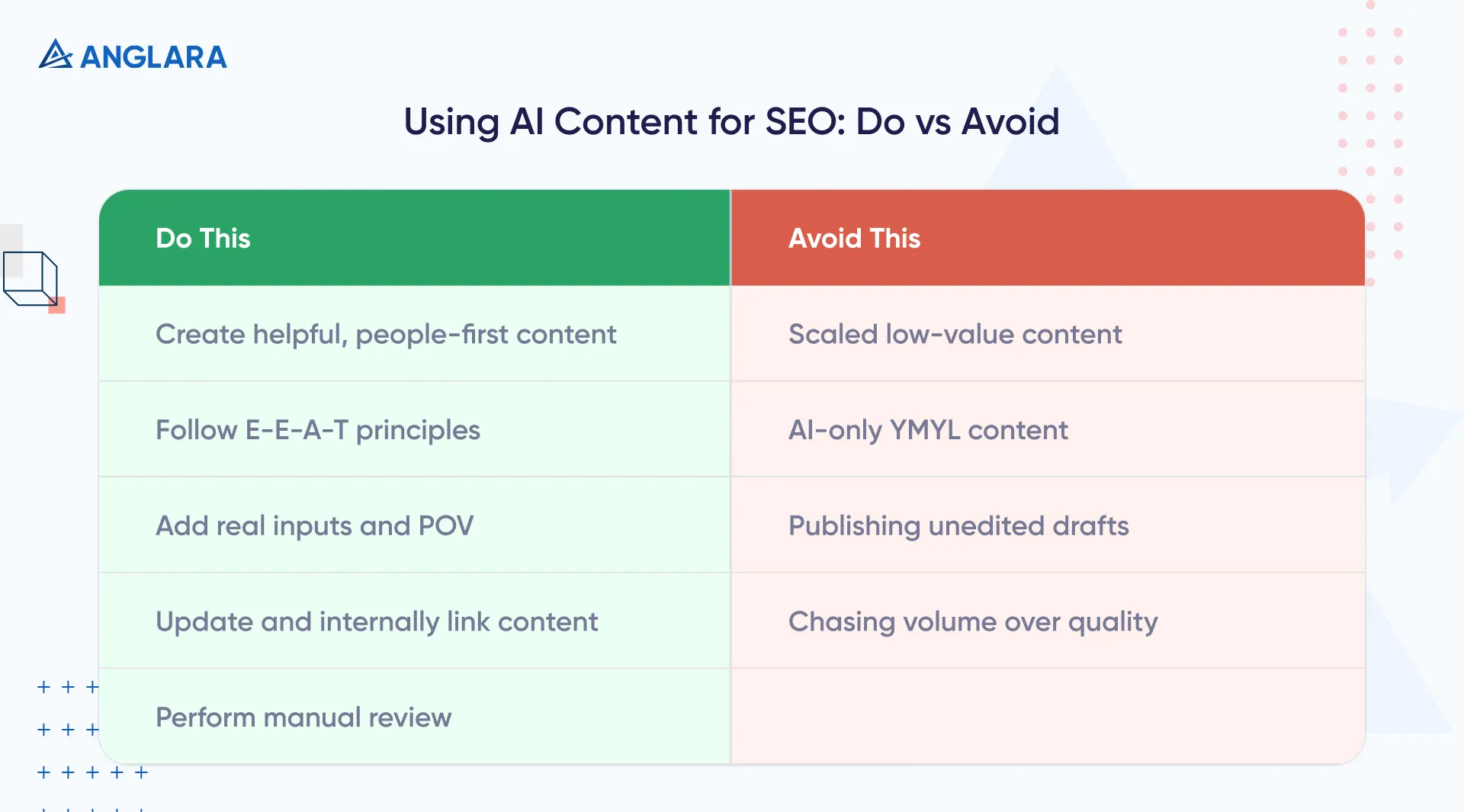
Do This:
- Create content that’s genuinely helpful, original, and people-first: Google has confirmed that AI content is fine if it’s useful and not made to manipulate rankings.
- Follow the E-E-A-T framework: demonstrate expertise, experience, authoritativeness, and trustworthiness, especially on topics where accuracy matters.
- Add real inputs: Add data, screenshots, unique POVs, or expert reviews. These differentiate your content from mass-produced clones.
- Use internal linking generously and update older posts: Google favors fresh, connected content ecosystems and not just net-new articles.
- Perform manual review: Fact-check, rewrite, and refine for clarity and tone. AI is a draft engine, not a publisher.
Avoid this:
- Generating dozens or hundreds of low-value pages with similar structure or content: Google calls this scaled content abuse and penalizes it heavily.
- Relying on AI alone for Your Money or Your Life (YMYL) topics (e.g. health, finance): Lack of E-E-A-T (experience, expertise, authoritativeness, trust) can hurt rankings and credibility.
- Publishing unedited drafts or filler content: Don’t try to just “hit a number,” as volume doesn’t equal performance.
As per Google’s AI content guideline, SEO still rewards depth, clarity, and originality. AI just helps you get there faster, not cheaper.
Automated content generation
You don’t need 20 tools; you just need the right tools, mapped to the right stages of your workflow. Here’s how to think about your stack by function, not brand.
- Research + Clustering: Tools that help surface topics, group related ideas, and identify content gaps across your funnel.
- Writing + Rewriting: AI drafting tools, summarizers, and rephrasers to accelerate first drafts and content variants. Advanced workflows might even integrate AI agent development to auto-generate responses or trigger workflows across platforms.
- SEO Checks: Optimizers that analyze keyword alignment, readability, SERP match, and metadata coverage.
- Approval + Collaboration: Platforms that manage handoffs, comments, version control, and multistage sign-offs.
- Scheduling + Distribution: Tools that automate publishing across blogs, social media, email, and internal channels.
- Analytics + Reporting: Track performance across rankings, traffic, and conversions, and flag what to refresh or retire.
AI content analysis (what to measure each week)
Automation isn’t complete without measurement. These KPIs tell you what’s working and what’s quietly decaying:
- Rankings: Track movement from top 20 → top 10 for priority keywords. It shows if the content is maturing or stagnating.
- Click-through rate (CTR): Test and compare title/meta formats to see what earns more clicks in SERPs.
- Leads: Measure form fills, signups, or purchases by page type. Don’t just look at traffic; track outcomes.
- Content decay: Monitor posts losing clicks despite stable rankings. These are often ripe for refresh or consolidation.
If you’re scaling fast, integrating AI software development into your content ops can prevent fragmentation and boost consistency. A weekly dashboard across these metrics can turn your AI content system from reactive to proactive.
Common mistakes in AI content automation (and quick fixes)
Even with the best tools, it’s easy to fall into avoidable traps. Watch for these common pitfalls:
- Publishing without approvals: Skipping review steps kills quality and trust. Always route through your approval workflow.
- No brand voice template: Without guidance, AI defaults to generic. Document tone, style, and phrasing rules.
- No citations or proof: Unsupported claims reduce credibility. Always include data, links, or expert validation.
- Automating distribution but not updates: Evergreen content isn’t set-and-forget. Schedule refreshes like you schedule posts.
- Measuring “posts shipped” instead of leads: Output is not impact. Prioritize metrics tied to conversions.
Catch these early, and automation becomes a performance engine and not a content treadmill.
Example: One “Automated Content Creation” Run (From Idea → Published)
Here’s what a typical AI-powered content creation run looks like, start to finish:
Idea intake + brief creation: 30 minutes
Pull topic from sales enablement gap → fill out structured brief (ICP, angle, proof points)
AI-assisted draft generation: 60 minutes
Prompt AI to produce an outline and section drafts → lightly structure and tag areas for expansion
Human editing pass: 45 minutes
Adjust tone, tighten flow, insert brand voice and POV → fact-check and polish
SEO pass + internal linking: 20 minutes
Optimize headers, add metadata, link to related posts, and match SERP intent
From kickoff to CMS-ready draft in under 3 hours without sacrificing quality, compliance, or strategy.
At Anglara, we help businesses implement AI in marketing in ways that actually drive performance and not just output. If you’re scaling content and want systems that balance speed with quality, we’d love to help. Book your free 30-minute consultation and let’s make AI work for your marketing team.
FAQs
1. What is automated content creation?
Automated content creation uses systems and AI tools to streamline repetitive content tasks from research and briefing to drafting and distribution while keeping humans in control of accuracy, quality, and approvals.
2. How do I automate content creation without sounding generic?
Start with strong brand voice templates, structured briefs, and tight editorial review. Automation works best when it’s built around a clear process and not left to AI alone. Human editors add personality to what automation accelerates.
3. Is AI content bad for SEO?
Not if it’s helpful and people-first. According to Google, AI-generated content is fine as long as it’s not designed to manipulate rankings. Focus on quality, originality, and E-E-A-T.
4. What is an AI content strategy?
An AI content strategy defines what you’ll automate, how you’ll maintain voice and quality, and which roles stay human-led. It’s a framework for scaling content without sacrificing performance or trust.
5. How do approvals work in content automation?
Approvals follow a multi-step process with clear roles: typically writer, SME, marketing, and legal (if needed). The key is using structured handoffs, defined checkpoints, and version control to ensure quality without slowing velocity.
6. What should I track in AI content analysis?
Track rankings, CTR, leads per page, and content decay. These metrics show not just reach, but also whether your content performs and when it’s time to refresh or retire pieces.
7. Do I need an AI content management system?
If you're producing at scale, yes. An AI content management system (or a tightly organized stack) ensures that drafts, approvals, assets, and performance data live in one place, preventing lost work and inconsistent output.
