

Why SMB AI Projects Stall
Most small businesses don’t fail at AI because “AI doesn’t work.” They fail because they start with tools instead of workflows: no owner, no baseline metric, and no plan for adoption.
Adoption is moving fast: 58% of small businesses say they use generative AI, up from 40% in 2024 (U.S. Chamber of Commerce). (U.S. Chamber of Commerce) But usage ≠ implementation. That’s where AI consulting is useful: turning “we tried ChatGPT” into measurable operational changes.
If you want a fit check for your business, Team Anglara can help you scope a pilot and pick the simplest approach.
AI consulting for small businesses is structured help to pick the right AI use case, prepare your data/workflows, implement a pilot safely, and scale what works. The fastest wins usually come from workflows that already have volume (support, lead intake, invoicing, reporting). You should consider consulting when the workflow touches multiple tools, involves customer data, or needs adoption across your team. If the task is purely repetitive and rules-based, you may not need “AI” at all—simple automation can be enough.
What AI Consulting Means For A Small Business
AI consulting (for SMBs) typically includes:
- Opportunity selection (what to do first, what not to do)
- Implementation planning (buy vs build vs hybrid)
- Workflow + data readiness (so outputs are reliable)
- Pilot execution (one workflow, measurable)
- Training + adoption (SOPs, handoffs, guardrails)
- Ongoing monitoring (so the system stays accurate)
This matches how mature guides describe consulting: identify value, develop strategy, and oversee implementation—not just “recommend tools.” (RTS Labs)
Light early mention (not a pitch): Anglara provides end-to-end AI business consulting (strategy → implementation → ongoing optimization). (Anglara Digital Solutions)
Who This Is For
This guide is for SMB owners/COOs and functional leads (support, operations, finance, marketing) who:
- have repeatable work that steals hours every week
- use tools like CRM/helpdesk/accounting/spreadsheets
- want a 90-day plan with measurable outcomes (not a “tool list”)
The Problem In Plain Language
Small businesses have 3 constraints that change the AI approach:
- Time: you need wins in weeks, not quarters
- Data reality: information lives in email + Google Sheets + the CRM
- Change management: your team won’t adopt a complex system unless it’s simpler than the old way
Also, definitions vary. One SBA/Census-based snapshot showed small business AI usage rising from 6.3% to 8.8% (using a “business uses AI” definition), while “generative AI usage” can be much higher depending on what counts as use. (Office of Advocacy)
So the goal of consulting is not “add AI everywhere.” It’s: pick one workflow, implement safely, prove impact, then scale.
What AI Consulting Typically Includes
Opportunity Audit
Deliverables you should expect:
- Top 5–10 workflows ranked by impact × feasibility
- Clear success metrics (time saved, faster response, fewer errors, higher conversion)
- “Not now” list (workflows too risky or too early)
Data + Workflow Readiness
This is where most DIY efforts stall:
- Define the source of truth (CRM? helpdesk? accounting tool?)
- Identify missing fields and standardize them
- Decide what the system is allowed to read/write
Buy vs Build vs Hybrid
A practical decision:
- Buy: faster deployment, less customization
- Build: more control, higher upfront work
- Hybrid: buy a platform + custom layers where differentiation/risk demands it
Pilot Build + Adoption
A real pilot includes:
- A working workflow in one channel (e.g., web chat, email triage, invoice intake)
- Human handoff path (who takes over, and what context they get)
- A training plan: “how we use it daily” (not a 30-page doc no one reads)
Monitoring + Iteration
If it’s not measured, it will drift:
- weekly review of failures/edge cases
- monthly improvement plan
- ownership: “who maintains prompts, policies, and knowledge?”
Decision Helper: DIY vs Consultant
Use this quick rubric to decide.
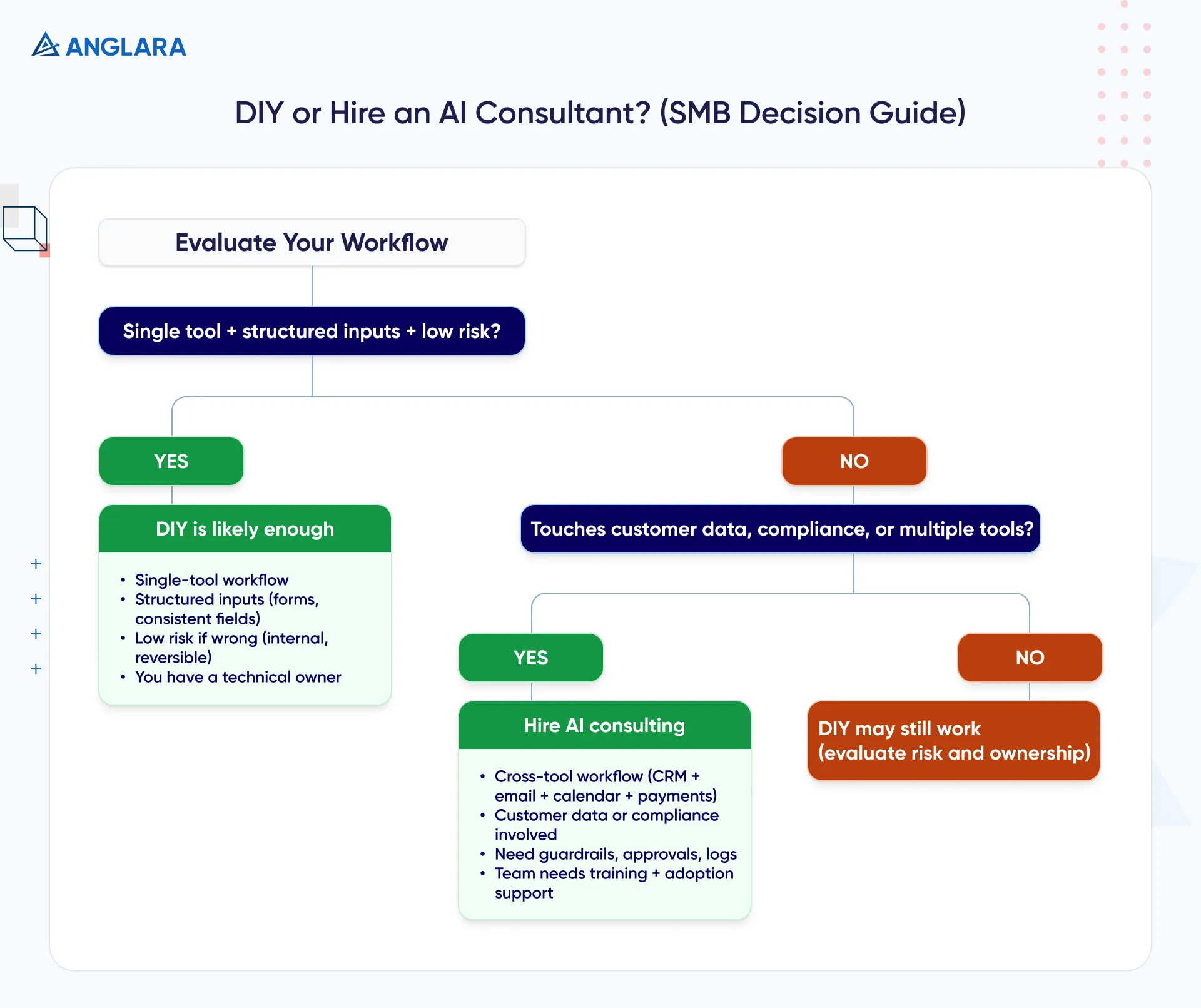
DIY Is Enough When…
- The workflow is single-tool (e.g., one spreadsheet process)
- Inputs are structured (forms, consistent fields)
- Risk of being wrong is low (internal-only, reversible)
- You have a technical owner who can implement and iterate
Hire Consulting When…
- It touches customer data or compliance requirements
- It spans multiple tools (CRM + email + calendar + payments)
- Your team needs training + adoption support (change management)
- You need guardrails, approvals, logs (especially for “agent” workflows)
Red Flags When Hiring
- “We’ll automate everything in week one”
- No mention of governance, access control, or human handoff
- No plan for measuring results
- They push a tool before understanding your workflow
High-Impact Use Cases SMBs Actually Implement
A Reddit thread asking “where does AI actually help small businesses (without hype)?” quickly surfaces practical themes: scheduling, customer support, email follow-ups, and sales pattern analysis—not sci-fi projects. (Reddit)
Here’s the shortlist that usually wins first.
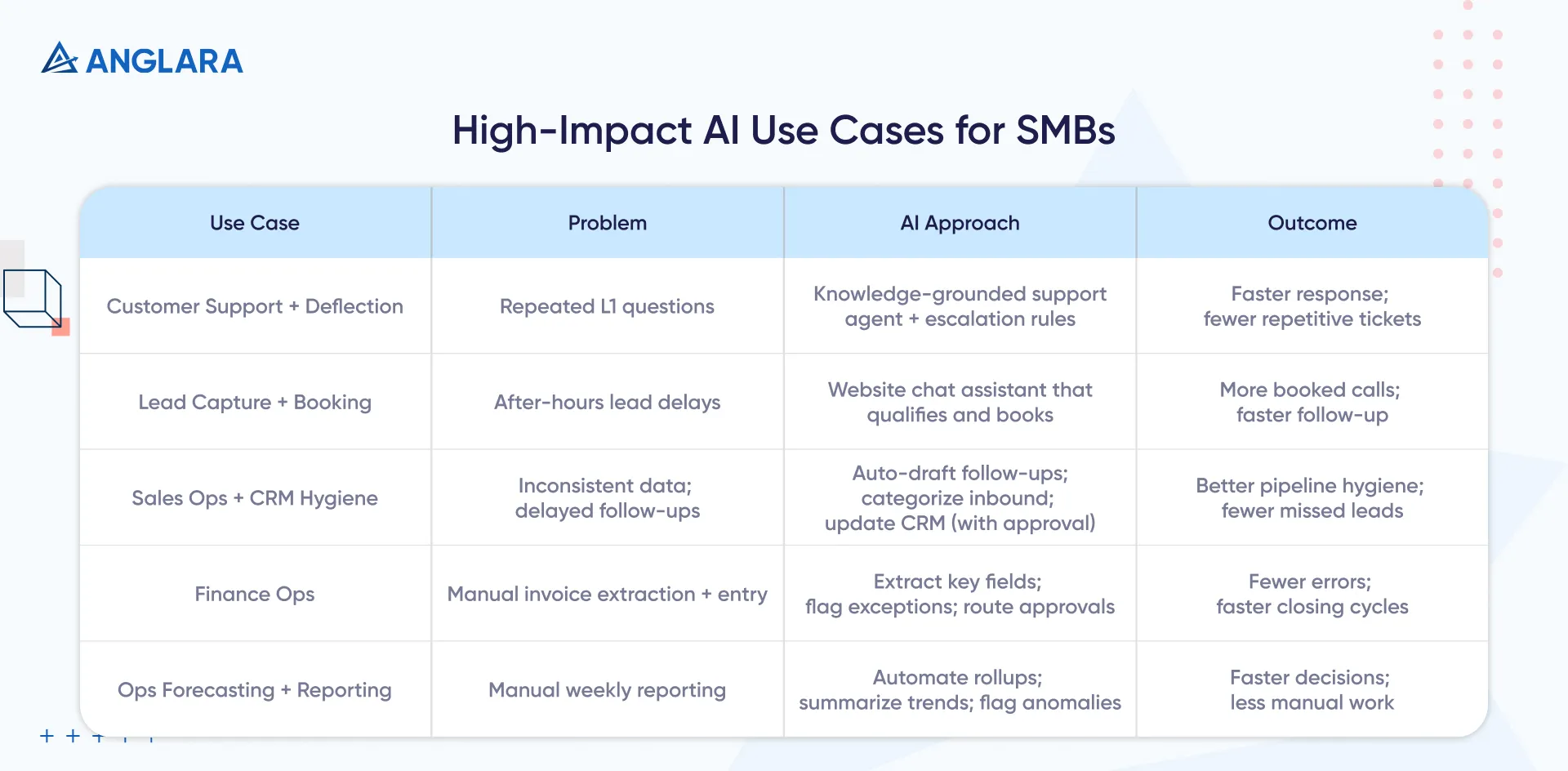
Customer Support + Deflection
- Problem: repeated L1 questions
- AI approach: knowledge-grounded support agent + escalation rules
- Outcome: faster response, fewer repetitive tickets
(If you want examples to cite in internal docs, your Anglara blog has “companies using AI for customer service” case-style proof points.) (Anglara Digital Solutions)
Lead Capture + Booking Assistant
- Problem: leads arrive after hours; response delay kills conversion
- AI approach: website chat assistant that qualifies and books
- Outcome: more booked calls/appointments, faster follow-up
Sales Ops + CRM Hygiene
- Problem: inconsistent data, delayed follow-ups
- AI approach: auto-draft follow-ups + categorize inbound + update CRM fields (with approval)
- Outcome: better pipeline hygiene, fewer missed leads
Finance Ops (Invoices, Reconciliation Support)
- Problem: manual invoice extraction + entry
- AI approach: extract key fields, flag exceptions, route approvals
- Outcome: fewer errors, faster closing cycles
Ops Forecasting + Reporting
- Problem: time wasted building weekly reports
- AI approach: automate rollups; summarize trends; flag anomalies
- Outcome: faster decisions with less manual reporting
Risks, Compliance, Governance
You don’t need “enterprise governance,” but you do need minimum viable governance.
NIST’s AI Risk Management Framework is built around core functions (including GOVERN as a cross-cutting function and activities to MAP, MEASURE, and MANAGE risk). (NIST Publications)
Minimum Viable Governance Checklist (SMB Version)
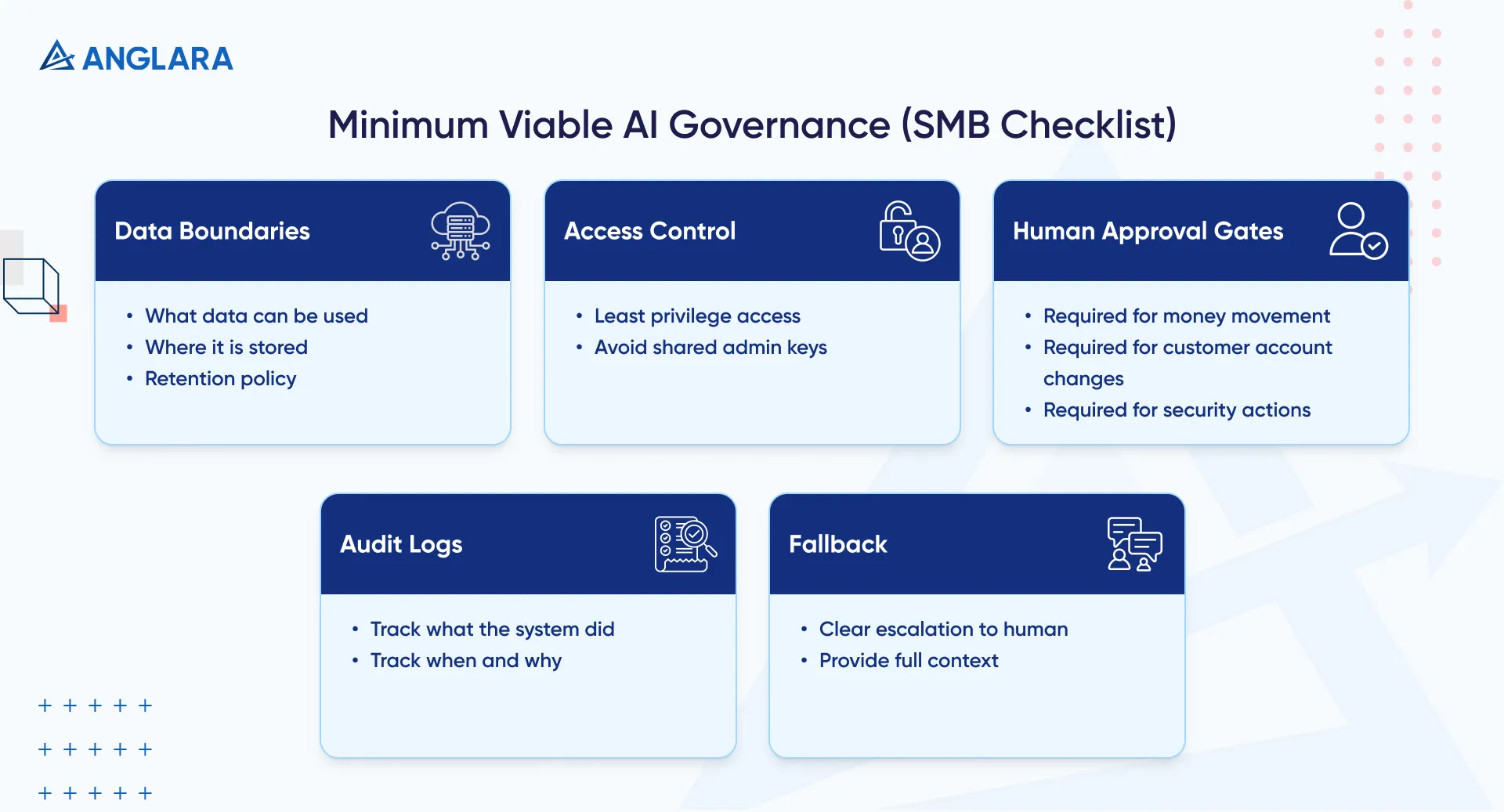
- Data boundaries: what data can be used, where it’s stored, retention policy
- Access control: least privilege; avoid shared admin keys
- Human approval gates: money movement, customer account changes, security
- Audit logs: what the system did, when, and why
- Fallback: clear escalation to a human with context
Implementation Roadmap: 30/60/90 Days
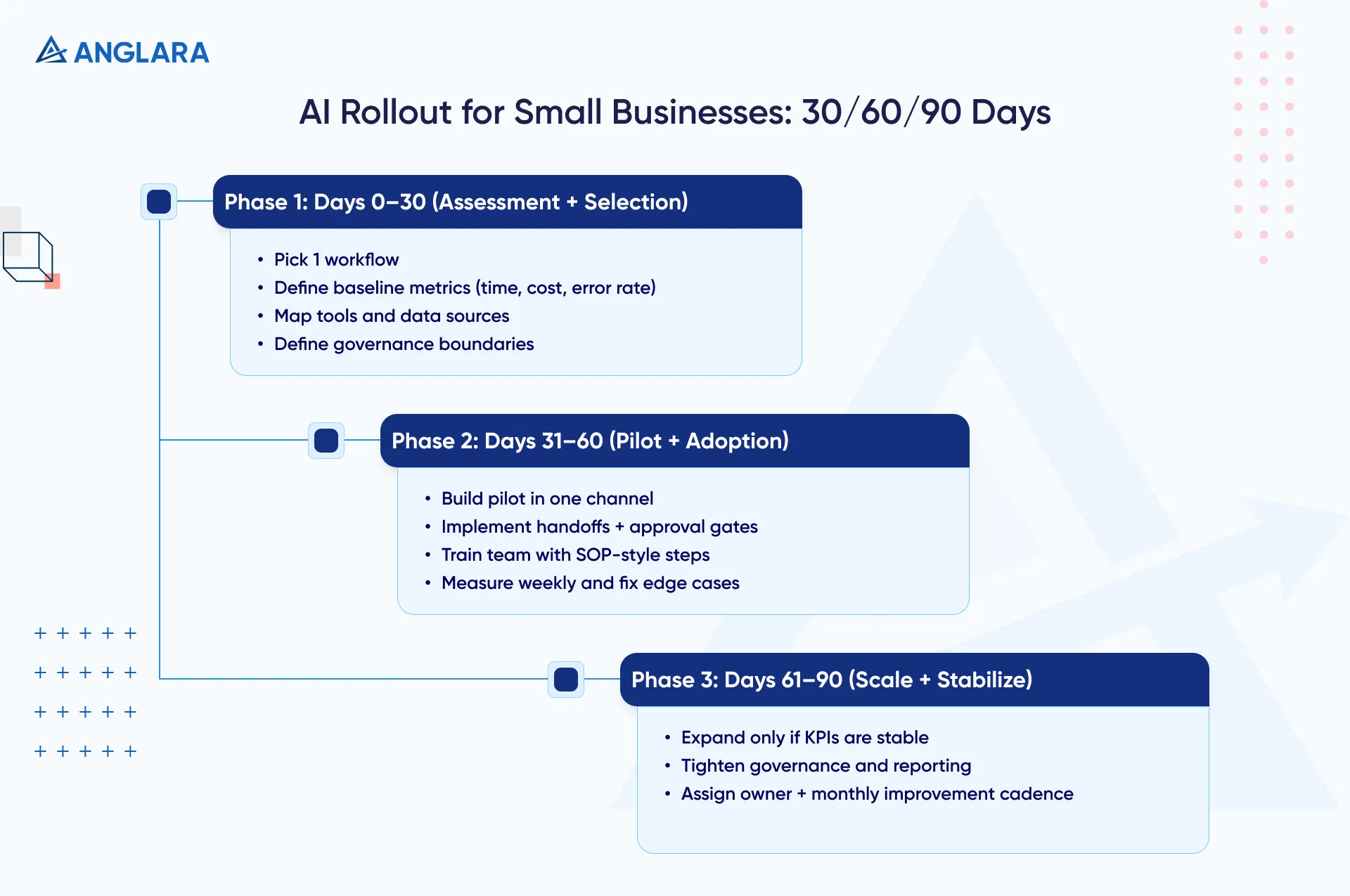
Days 0–30: Assessment + Use Case Selection
- pick 1 workflow (not 5)
- define baseline metrics (current time/cost/error rate)
- map tools and data sources
- define governance boundaries (what’s allowed)
Days 31–60: Pilot Build + Adoption
- build the pilot in one channel
- implement handoffs + approval gates
- train the team with SOP-style steps
- measure weekly (and fix edge cases)
Days 61–90: Scale + Stabilize
- expand to next workflow only if pilot KPIs are stable
- tighten governance and reporting
- assign an owner and a monthly improvement cadence
Costs, Effort, Timeline
Pricing Models You’ll See
- Fixed-fee assessment (use case shortlist + roadmap)
- Project-based pilot (one workflow end-to-end)
- Monthly advisory/retainer (continuous improvement + governance)
Cost Drivers (What Actually Changes The Bill)
- Number of systems/integrations (CRM, helpdesk, accounting, calendar)
- Data cleanup required
- Risk controls (approvals, logs, access boundaries)
- Training + adoption time
Benchmarks To Sanity-Check Your Budget
For SMBs, a helpful baseline is market benchmarks on AI consultant rates and AI engineering support:
- Upwork notes AI consultants average around $55/hour (varies heavily). (Upwork)
- Upwork also shows AI engineering talent often ranges from $25 to $100+ / hour, depending on seniority. (Upwork)
Use these as reference points, not “quotes.” A real budget depends on the workflow and risk level.
Common Mistakes
- Starting with tools instead of a workflow
- Trying to automate 3–5 workflows before one is stable
- No owner and no KPIs
- No governance boundaries (“just connect everything”)
- Forgetting adoption (the best system unused is still a failure)
FAQs
Does a small business really need AI consulting?
Not always. If your workflow is simple, low-risk, and single-tool, DIY can work. Consulting helps most when you need cross-tool automation, governance, or team adoption.
How much does AI consulting cost for a small business?
It varies by scope. A small assessment is cheaper than a pilot build; multi-tool integrations and governance increase cost. Hourly benchmarks like Upwork’s AI consultant averages can help sanity-check expectations. (Upwork)
What’s the fastest AI use case to implement?
Usually: customer support deflection, lead capture/booking, or internal reporting—because the value is immediate and measurable.
What should I prepare before hiring an AI consultant?
A list of top pain workflows, current tools, sample inputs/outputs, and who owns each process. Also define what “success” looks like in metrics.
How do I keep customer data safe with AI?
Set data boundaries, least-privilege access, approval gates for sensitive actions, and audit logs. Use a simplified governance approach aligned with NIST AI RMF. (NIST Publications)
Key Takeaways
- AI consulting is about workflow outcomes, not tools.
- Start with one high-volume workflow and measurable KPIs.
- Use a 30/60/90 plan: assess → pilot → scale.
- Minimum governance is non-negotiable (data boundaries, approvals, logs).
- Costs are driven by integrations, cleanup, and risk controls—not “the model.”
