

Think an AI automation agency is just another chatbot vendor? Think again.
The right partner does not simply bolt GPT onto your workflows and call it innovation. A strong AI automation agency helps you find repetitive, slow, error-prone work inside your business, redesign the workflow, connect the right systems, and add the right level of AI so your team moves faster without losing control.
This guide explains what AI automation agency services actually include, where they create business value, what they typically cost, and when hiring one makes sense.
AI automation agency services help businesses automate workflows, reduce manual work, improve response times, and connect disconnected systems using a mix of rules-based automation, AI models, and human review. In practice, this can include customer support automation, lead qualification, document processing, CRM updates, reporting, knowledge assistants, and internal tools. The best agencies do more than tool setup: they map the workflow, define guardrails, connect your stack, test carefully, and track KPIs after launch. That matters because many companies are using AI in at least one function, but far fewer have actually scaled it well across the business.
Who This Is For
This article is for:
- CMOs and RevOps leaders trying to remove manual work from lead handling, reporting, campaign operations, or CRM hygiene
- CTOs and product owners evaluating AI-enabled workflows, internal copilots, or support automation
- Founders who want to automate repetitive work before adding more headcount
- Operations teams dealing with document-heavy, approval-heavy, or multi-step processes
It is especially useful if your team already feels stretched. Salesforce reports that sales reps spend 60% of their time on non-selling tasks, which is exactly the kind of drag AI automation is often brought in to reduce.
What AI Automation Agency Services Actually Mean
Definition Block
AI automation agency services are professional services that combine workflow automation, AI capabilities, and system integration to reduce manual effort and improve business performance.
That sounds broad, so here is the simpler version:
An AI automation agency looks at work your team repeats every day, identifies what can be automated safely, and builds systems that can read, decide, route, draft, summarize, classify, trigger, or respond with much less manual effort.
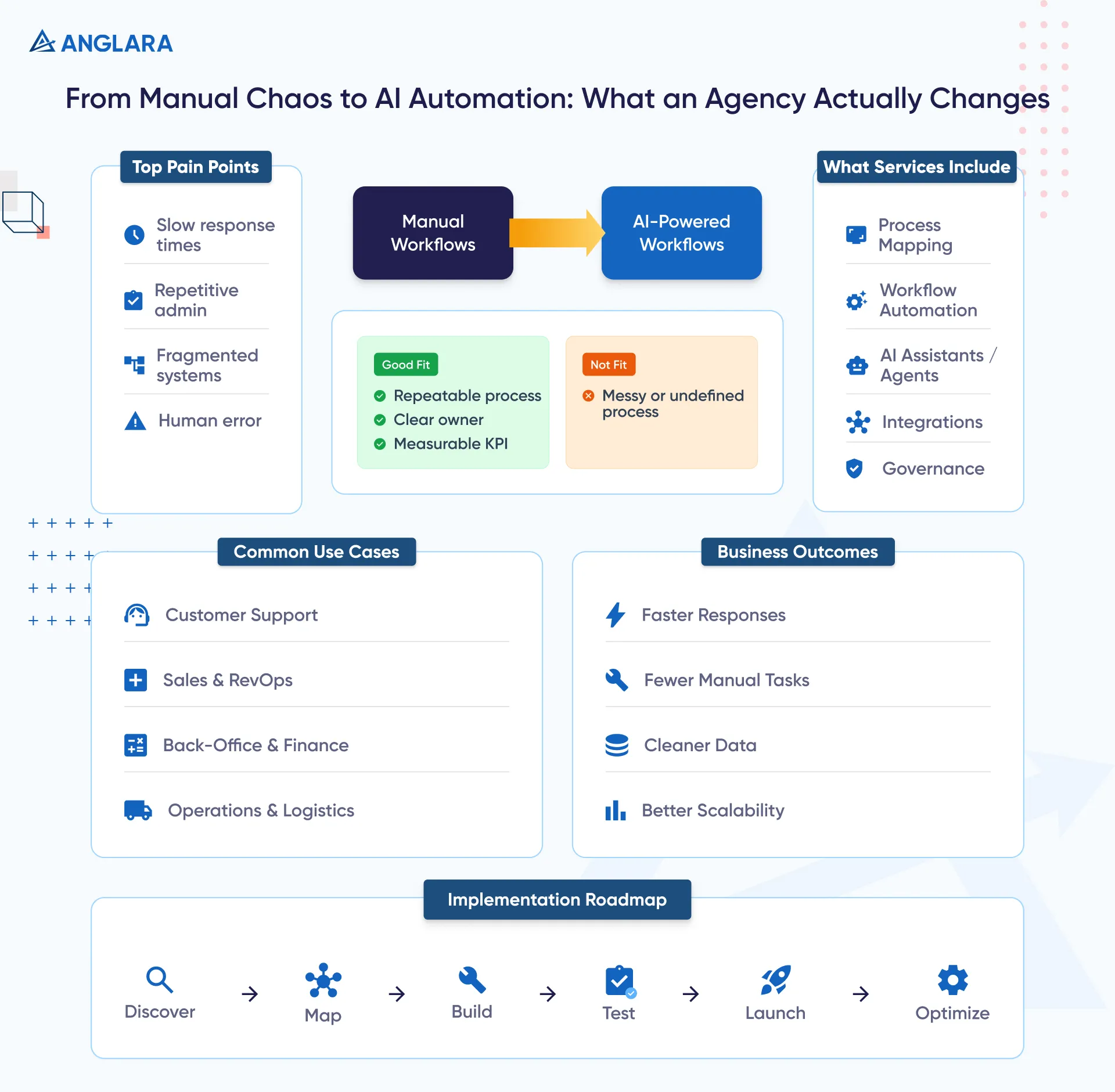
These services can be lightweight or deep. Sometimes the job is a simple workflow inside tools like HubSpot, Zapier, Make, or n8n. Sometimes it includes a custom AI assistant, a private knowledge bot, a document workflow, or a more advanced agent system connected to your CRM, helpdesk, ERP, or product.
AI vs Automation vs AI Agents
This distinction matters because buyers often hear all three terms mixed together.
- Automation follows rules. Example: when a lead fills a form, create a CRM record and assign it to a rep.
- AI adds judgment-like capability. Example: summarize the lead’s request, classify urgency, or draft a response.
- AI agents go further by handling multi-step tasks with defined goals, tools, memory, and escalation logic.
A good agency knows when you only need automation, when AI adds value, and when an “agent” is overkill. That matters because buyers do not really want “AI” as a label. They want fewer delays, less manual work, and better outcomes. That exact frustration shows up in practitioner discussions too: business owners keep saying they care more about saving time and running smoothly than hearing generic AI jargon.
The Problem In Plain Language
Most businesses do not have an “AI problem.” They have a workflow problem.
Leads sit unassigned. Support tickets bounce between teams. Staff re-enter the same data across multiple systems. Documents get reviewed too slowly. Reports take hours to assemble. Managers chase approvals manually. Everyone knows the process is clunky, but nobody has time to redesign it.
That is why generic AI demos rarely fix much. The value usually does not come from the model alone. It comes from redesigning the workflow around it.
McKinsey’s latest survey points in the same direction: AI use is broad, but scaled business impact is still uneven, and workflow redesign is one of the strongest contributors to meaningful results.
What an AI Automation Agency Typically Does
Workflow Automation
This is the foundation.
An agency maps the current process, finds repetitive steps, documents triggers and handoffs, and automates what is stable enough to automate. Common examples include form routing, approval flows, CRM updates, status notifications, reminders, document extraction, and report generation.
AI Assistants and Agents
This is where intelligence gets layered in.
Instead of only moving data from A to B, AI can classify inquiries, summarize calls, extract fields from documents, draft responses, route tickets, answer questions from a knowledge base, or flag anomalies for human review.
The strongest use cases are not “AI for everything.” They are narrow, useful workflows with clear business goals.
Integrations, Analytics, and Governance
This is what separates a real delivery partner from a demo builder.
An AI automation agency should also handle:
- integration with your existing stack
- logging and fallback rules
- human approval points
- permission and access design
- monitoring, QA, and KPI tracking
- prompt and workflow iteration after launch
In other words, the service is not just “build a bot.” It is “build a system the business can trust.”
Real Use Cases and Examples
Customer Support
Support is one of the fastest starting points because the pain is obvious: repetitive queries, slow routing, inconsistent answers, and pressure on human teams.
A practical AI automation setup might:
- answer common questions from approved help content
- classify and prioritize inbound tickets
- summarize conversations for human agents
- route requests by topic, urgency, or account tier
- draft responses for approval
This is one reason support automation keeps getting attention. In many SaaS and service teams, AI is already being used to resolve routine questions faster while keeping human agents focused on exceptions.
Sales and RevOps
This is another strong fit because the process is full of admin work.
An agency may automate:
- lead enrichment
- qualification summaries
- meeting booking sequences
- CRM hygiene
- follow-up reminders
- proposal drafting support
- pipeline alerts for stale deals
The logic is simple: if reps and ops teams are drowning in low-value admin, automation gives time back to revenue work. Salesforce’s latest numbers underline the issue: too much sales time still goes to non-selling tasks.
Back-Office and Finance
Finance, HR, and admin teams often have the highest hidden automation potential.
Examples include:
- invoice and receipt extraction
- expense classification
- document review support
- contract summary generation
- onboarding workflows
- payroll or compliance reminders
- approval and exception routing
These use cases usually succeed when there are clear documents, repeatable steps, and good escalation rules.
Operations and Logistics
Operations teams benefit when AI is paired with strong process logic.
Examples include:
- dispatch and scheduling support
- document-heavy intake workflows
- inventory or stock alerts
- exception handling in service delivery
- SOP-based internal assistants
- predictive service triggers
- route, handoff, or maintenance coordination
Across the economy, the upside is meaningful. McKinsey estimates that combining generative AI with other automation technologies could add 0.5 to 3.4 percentage points annually to productivity growth, which helps explain why this category is getting serious budget attention.
Benefits and Outcomes
When the scope is right, AI automation agency services can help businesses:
- reduce repetitive manual work
- improve speed to response
- lower operational friction
- reduce avoidable errors
- make systems and teams easier to scale
- improve visibility through cleaner data and reporting
But the real benefit is not “doing AI.” It is getting more output from the same team without burning people out.
That is why the strongest agencies position themselves around outcomes, not hype. The best-performing organizations are not just adding tools; they are redesigning workflows, adding governance, and measuring business impact.
When This Is A Good Fit And When It Is Not
Good Fit Checklist
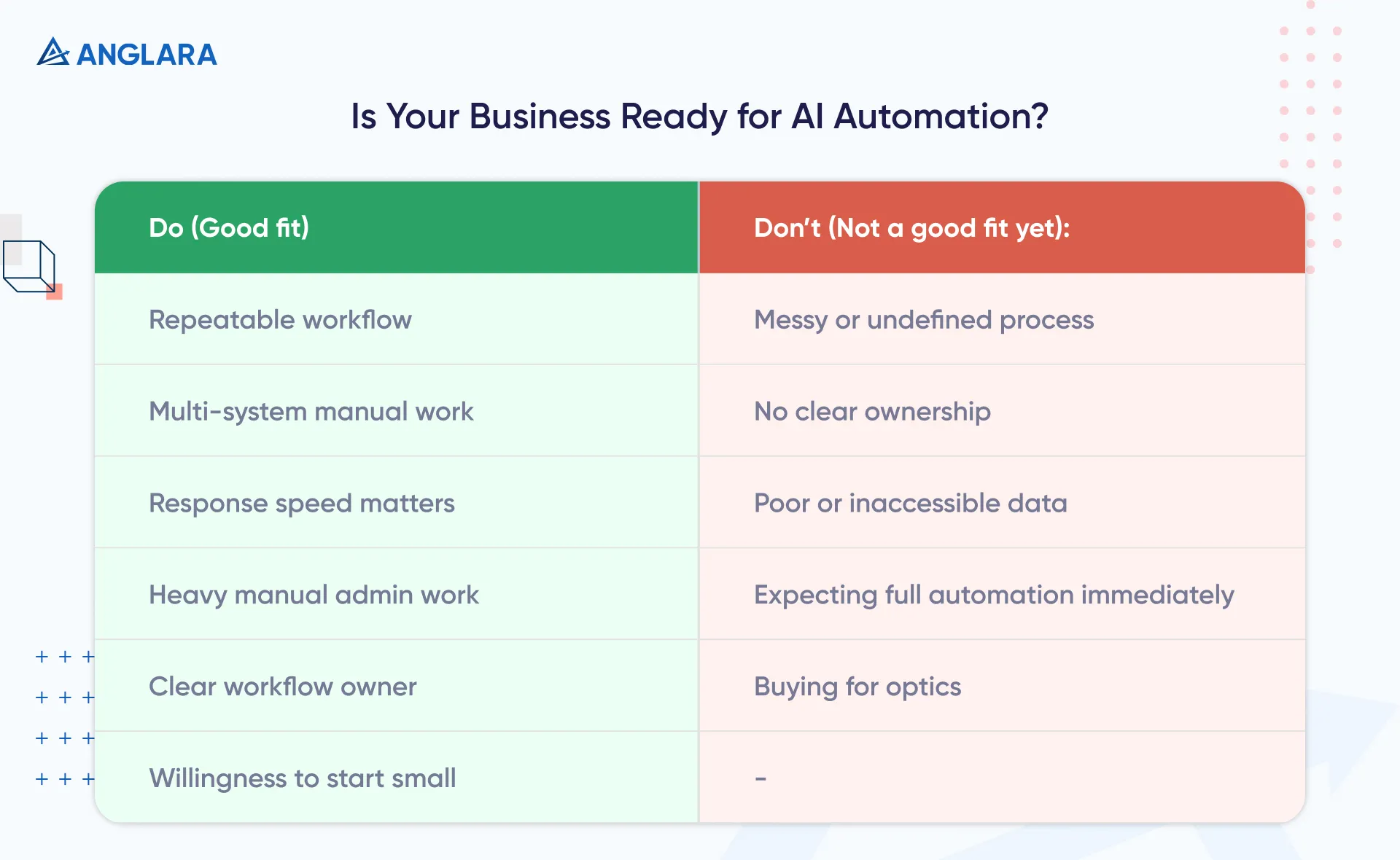
This is usually a good fit when:
- your team repeats the same process many times a week
- work moves across multiple systems manually
- response speed affects revenue or customer experience
- staff spend too much time on sorting, copying, reviewing, or chasing updates
- you have at least one process owner who can define success
- you are willing to start with one workflow and expand
Not A Good Fit Yet
This is usually not a good fit when:
- the underlying process is still messy or undefined
- nobody owns the workflow end to end
- your data is inaccessible or unreliable .
- you expect zero human review from day one
- you want a “fully autonomous” system before proving a narrower use case
- you are buying for optics rather than an operational need
This point comes up repeatedly in practitioner conversations too: teams often want to “do AI” before they have documented the workflow they actually want improved.
Risks, Compliance, and Governance
This is where many pages ranking today are weak.
AI automation is not just a tooling decision. It is an operational and risk decision.
The common risks include:
- wrong or overconfident outputs
- privacy and permission issues
- bad routing or bad escalation
- weak auditability
- automation running on poor data
- unclear human accountability
- fragile prompts or brittle workflow logic
McKinsey’s 2025 survey found that 51% of respondents from organizations using AI say they have seen at least one negative consequence, with inaccuracy among the most commonly reported issues.
That does not mean “do not automate.” It means automate with guardrails:
- use approved data sources
- define who reviews what
- log outputs and failures
- set fallback paths
- start narrow
- track accuracy, response time, adoption, and business outcomes
Implementation Roadmap
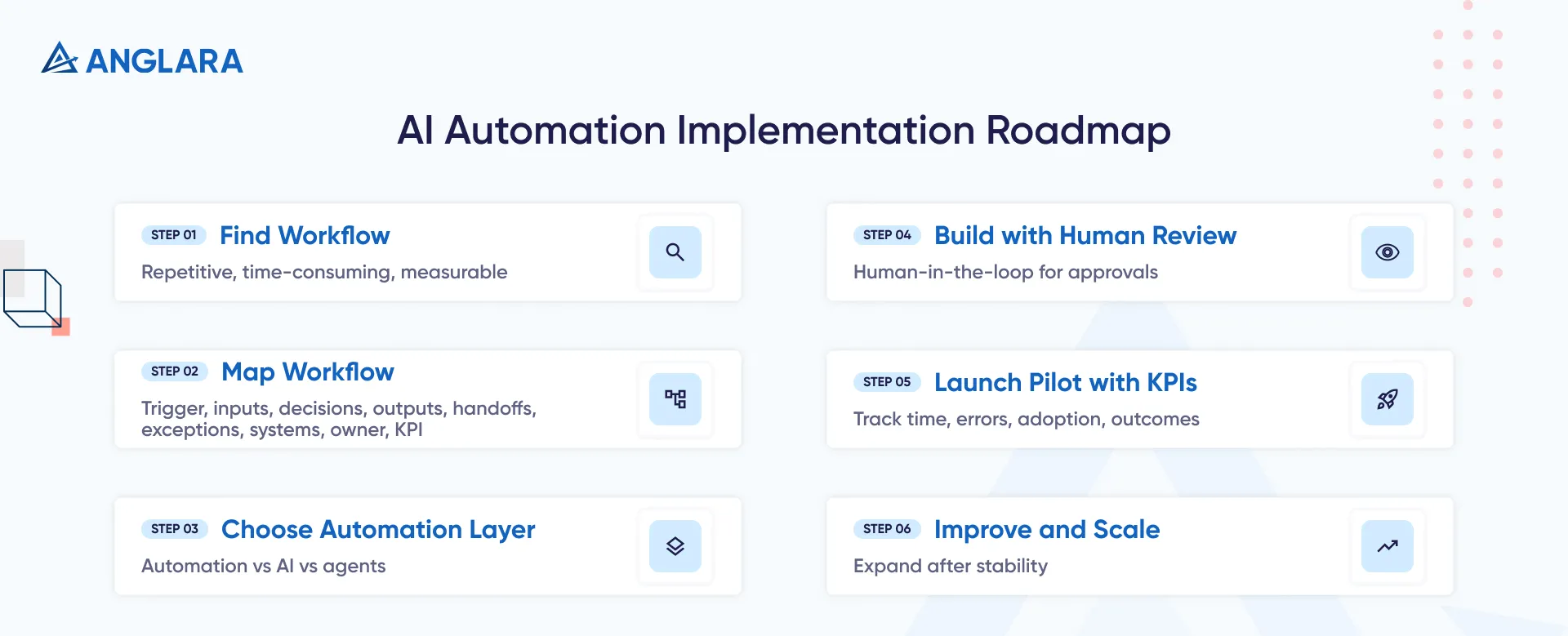
A practical rollout usually looks like this.
1. Find One High-Friction Workflow
Start where the pain is visible and measurable.
Look for a process that is repetitive, time-consuming, and important enough to matter. Examples: inbound lead triage, support ticket routing, invoice extraction, onboarding, or weekly reporting.
2. Map The Workflow Before Picking Tools
Document:
- trigger
- inputs
- decisions
- outputs
- handoffs
- exceptions
- systems involved
- owner
- success metric
This is the step many teams skip, and it is often the reason pilots stall.
3. Choose The Right Automation Layer
Not every workflow needs the same stack.
Some need basic automation only. Some need AI summarization or classification. Some need a knowledge assistant. A few need a multi-step agent with approvals and memory.
4. Build With Human Review In Mind
For most teams, the safest model is not full autonomy. It is human-in-the-loop.
That means the system can draft, recommend, route, or summarize, while a person approves high-risk actions until confidence is strong enough to expand.
5. Launch As A Pilot With KPIs
Good KPIs include:
- turnaround time
- resolution time
- manual hours saved
- deflection rate
- conversion rate
- error rate
- adoption rate
- customer satisfaction
- cost per workflow
6. Improve and Scale
Once the first workflow is stable, expand carefully.
McKinsey’s latest data supports this phased approach: many organizations are experimenting, but only a minority are scaling successfully, and the difference often comes down to operating model discipline.
Costs, Effort, and Timeline
Pricing varies a lot because “AI automation agency services” can mean anything from a focused workflow setup to a custom production-grade system.
Typical Budget Ranges
- Small workflow pilot: around $3,000 to $10,000
- Multi-workflow project with integrations: around $10,000 to $30,000
- Custom internal AI tools, agents, or regulated workflows: often $30,000+
Typical Timeline Ranges
- Simple pilot: 2–4 weeks
- Mid-scope rollout: 4–8 weeks
- Larger custom implementation: 8–16+ weeks
What Usually Drives Price:
- number of systems to integrate
- document complexity
- data cleanup needed
- security and compliance needs
- custom UI or internal tool requirements
- reporting depth
- volume of testing and approval logic
For many teams, the best move is not a giant rollout. It is a small paid discovery followed by one pilot workflow with a clear KPI target.
Common Mistakes
The biggest mistakes are surprisingly consistent.
- buying tools before defining the workflow
- trying to automate everything at once
- using AI where simple automation would be enough
- expecting a chatbot to fix process design
- skipping QA and fallback rules
- ignoring permissions, privacy, and ownership
- measuring “activity” instead of business results
- treating the first version like the final version
There is also a messaging mistake many agencies make: they sell “AI magic” instead of a business fix. That is exactly the complaint practitioners keep raising online. Buyers want a plain-English solution to a specific operational problem.
FAQs
What do AI automation agency services include?
They usually include workflow discovery, process mapping, tool selection, integrations, AI-assisted workflows, knowledge assistants, testing, launch support, and KPI tracking.
How is an AI automation agency different from a normal automation agency?
A normal automation partner may focus on rules-based flows only. An AI automation agency can also add capabilities like classification, summarization, document understanding, knowledge retrieval, or agent-style execution where that makes sense.
Do I need a custom build or can this be done with no-code tools?
Both are possible. Many strong first use cases can be delivered with no-code or low-code tools plus APIs. Custom development becomes more relevant when you need deeper integrations, custom interfaces, strict permissions, or proprietary workflows.
Are AI automation agency services only for enterprises?
No. SMBs and mid-market teams can benefit too, especially when they have a repetitive workflow that directly affects revenue, speed, or service quality.
What is the best first use case to automate?
Usually the best first use case is one that is repetitive, measurable, and painful enough that the team will actually adopt the solution. Lead triage, support routing, reporting, and document-heavy processes are common starting points.
How long does it take to see ROI?
That depends on the workflow. Some teams see value quickly when a pilot removes obvious manual work. Larger returns typically come after the workflow is tuned, adopted, and expanded into adjacent processes.
Is this the same as buying a chatbot?
No. A chatbot can be one part of the solution, but AI automation agency services are broader. They often involve end-to-end workflow redesign, integrations, business rules, approvals, and internal process automation.
What are AI automation agency services?
AI automation agency services help businesses automate workflows using a mix of rules-based automation, AI models, agents, and integrations. The goal is usually to save time, reduce manual work, improve accuracy, and scale operations more cleanly.
What does an AI automation agency actually do?
A good agency typically handles discovery, workflow mapping, automation design, integrations, AI layer selection, testing, governance, and post-launch improvement. The strongest partners focus on business outcomes rather than just shipping a bot.
Are AI automation agency services worth it for small businesses?
They can be, especially when a small business has repetitive admin work, slow follow-up, support volume, or fragmented systems. The key is to start with one measurable workflow instead of a broad transformation.
How much do AI automation agency services cost?
Small pilots often start around $3,000 to $10,000. Multi-workflow or integration-heavy projects can range from $10,000 to $30,000, and more advanced custom systems can go higher depending on compliance, data, and product complexity.
What are the best AI automation use cases to start with?
Strong starting points include inbound lead qualification, support ticket routing, CRM hygiene, invoice processing, knowledge assistants, onboarding workflows, and reporting automation.
What is the difference between AI automation and traditional automation?
Traditional automation follows predefined rules. AI automation can also classify, summarize, predict, retrieve information, or handle more variable inputs. In simple terms: automation executes; AI adds judgment-like capability.
How long does an AI automation project take?
A basic pilot may take 2–4 weeks. A more complete rollout with multiple systems or custom requirements may take 4–12 weeks or longer.
How do I choose the right AI automation agency?
Choose a partner that can clearly explain scope, business fit, risks, review points, KPIs, and rollout phases. Avoid agencies that promise full autonomy before understanding your workflow and data constraints.
How do I choose the right agency?
Look for a partner that can explain:
- what should be automated first
- what should stay human-led
- how data will flow
- how the system will be tested
- what KPIs will prove success
- what risks and guardrails are involved
Key Takeaways
- AI automation agency services are about workflow improvement, not just AI tools.
- The best projects start with one high-friction workflow, not a giant transformation.
- Strong use cases often sit in support, sales ops, finance admin, and internal operations.
- Real value usually comes from process redesign + integrations + governance.
- Human review matters, especially in the early stages.
- A good agency should help you decide what not to automate yet, not just what can be automated.
Next Steps
If you are exploring AI automation agency services, start with a shortlist of 3–5 workflows that are repetitive, slow, and measurable. Pick one that affects revenue, service quality, or team productivity the most.
Use the checklist below to pressure-test the opportunity internally. Then, if you want a second opinion, book a free 30-minute consultation with Anglara. We can help you identify the best first use case, flag risk early, and map a rollout that is practical for your team.
