


Think an “AI agent” is just a smarter chatbot? Think again. Most teams don’t fail at automation because of tools - they fail because they pick the wrong type of automation for the workflow.
This guide helps you choose between AI agents, chatbots, and RPA based on how your workflow actually behaves: how predictable it is, how risky it is, and whether it needs judgment or repetition.
If you want a quick sanity check for your workflow, Team Anglara can help you map it and choose the simplest working option.
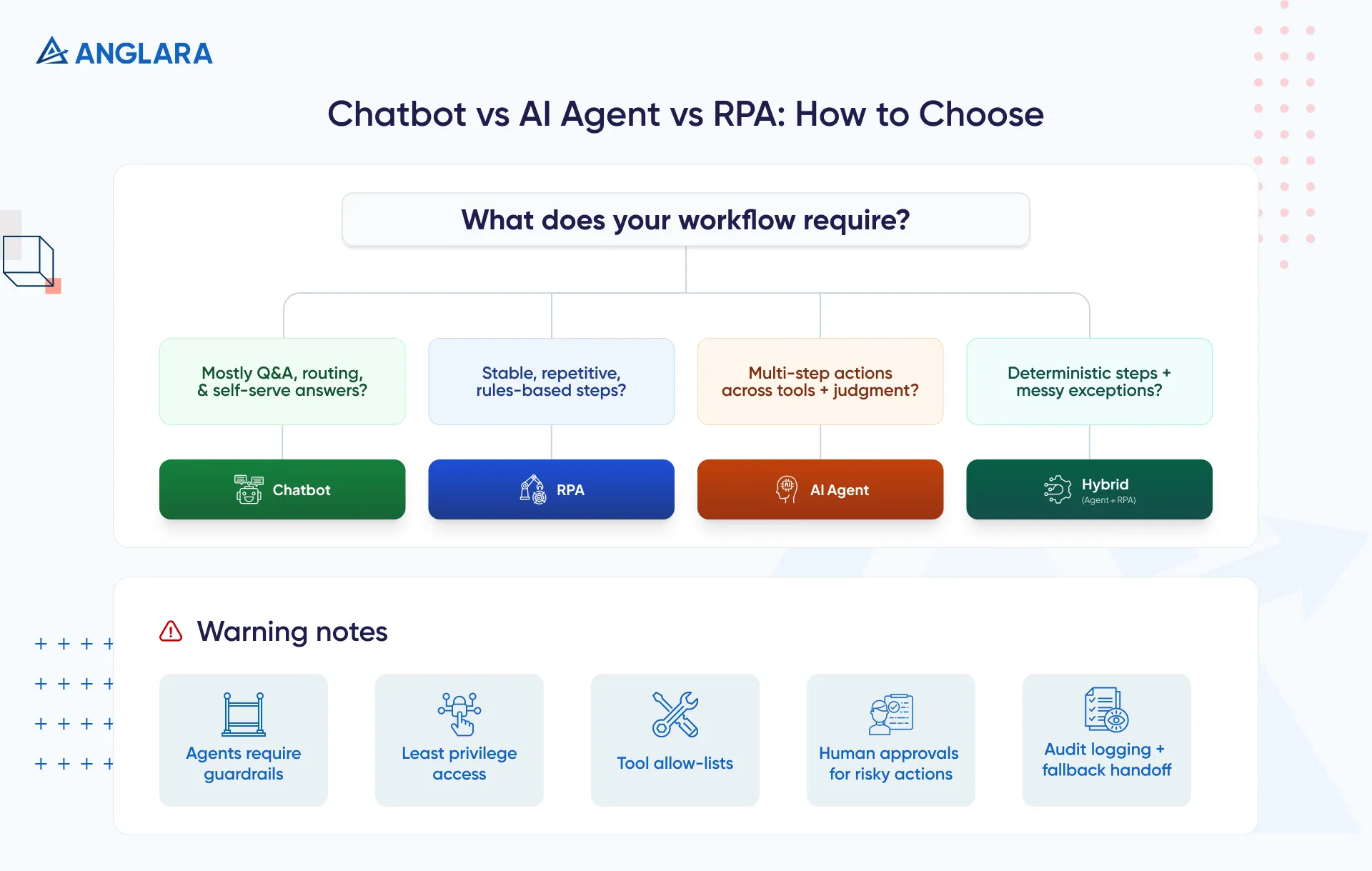
Use a chatbot when your workflow is mostly Q&A, routing, and self-serve support. Use RPA when the workflow is stable, repetitive, and rules-based - the same steps every time. (Appian)
Use an AI agent when the workflow needs multi-step actions across tools plus judgment, with guardrails and human approvals for risky steps. (Salesforce)
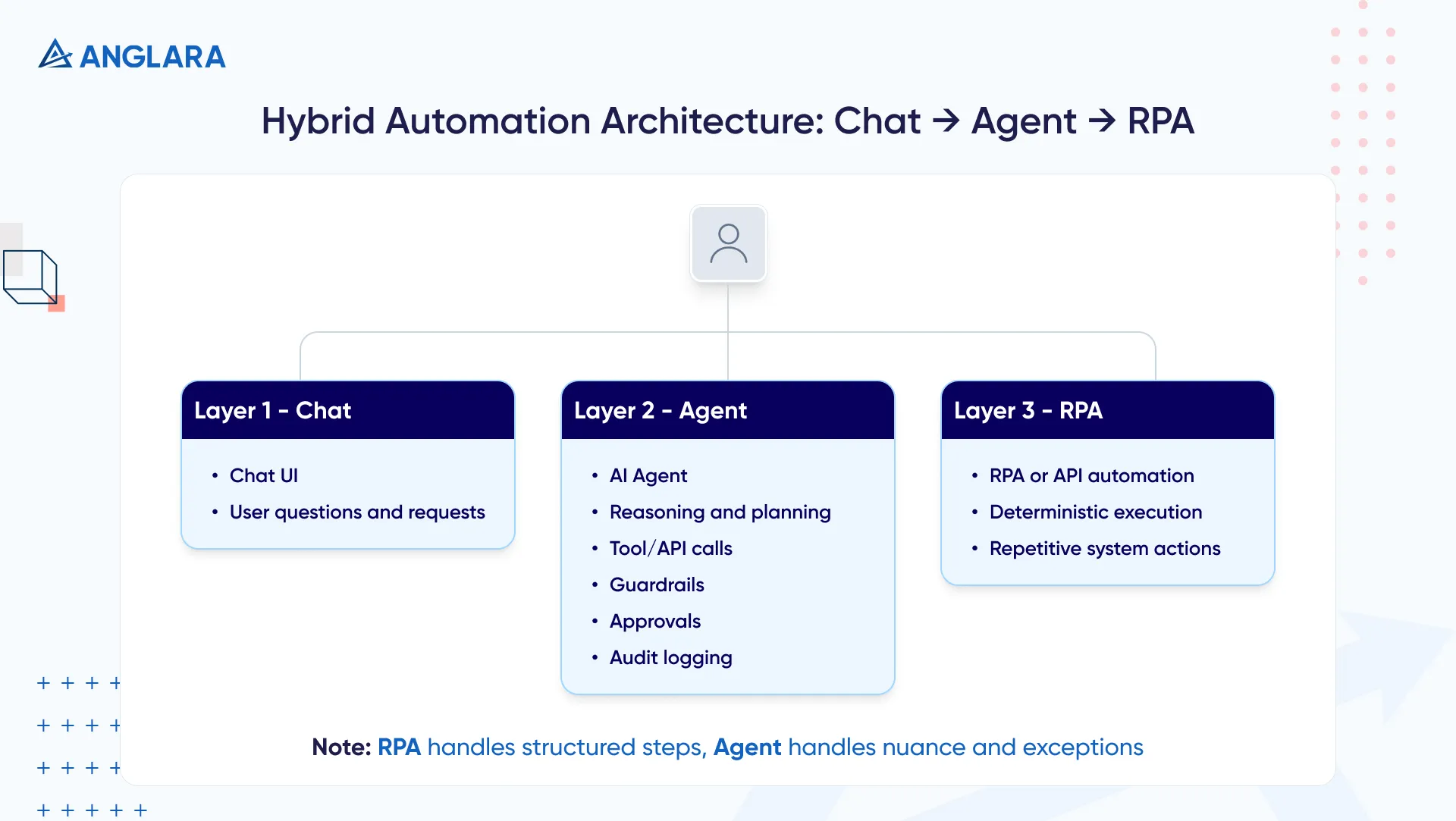
Most mature setups are hybrids: RPA handles deterministic steps while agents handle messy inputs and exceptions. (TechTarget)
Agent vs Chatbot vs RPA
What is a Chatbot?
A chatbot is a conversation interface designed to answer questions and guide users. In many implementations, it responds to routine queries and routes requests, but doesn’t reliably complete multi-step work across systems. (Salesforce)
What is an AI Agent?
An AI agent is designed to do more than respond: it can reason, plan, and take actions (often by calling tools/APIs) to achieve a goal - ideally with boundaries, logging, and approvals. (Salesforce)
What is RPA?
RPA (Robotic Process Automation) imitates how humans interact with software to execute simple, high-volume, repetitive tasks - clicking through screens, copying data, and following deterministic rules. (Appian)
The Real Problem: “Automation” is Overloaded
In most orgs, “automation” becomes a catch-all word. That’s how teams end up:
- Buying RPA when they actually needed a Q&A layer
- Building an “agent” when a simple workflow automation would do
- Expecting a chatbot to complete multi-step work it was never designed to do
A clean way to think about it:
- Chatbots answer and route
- RPA repeats known steps
- Agents decide and act (with guardrails)
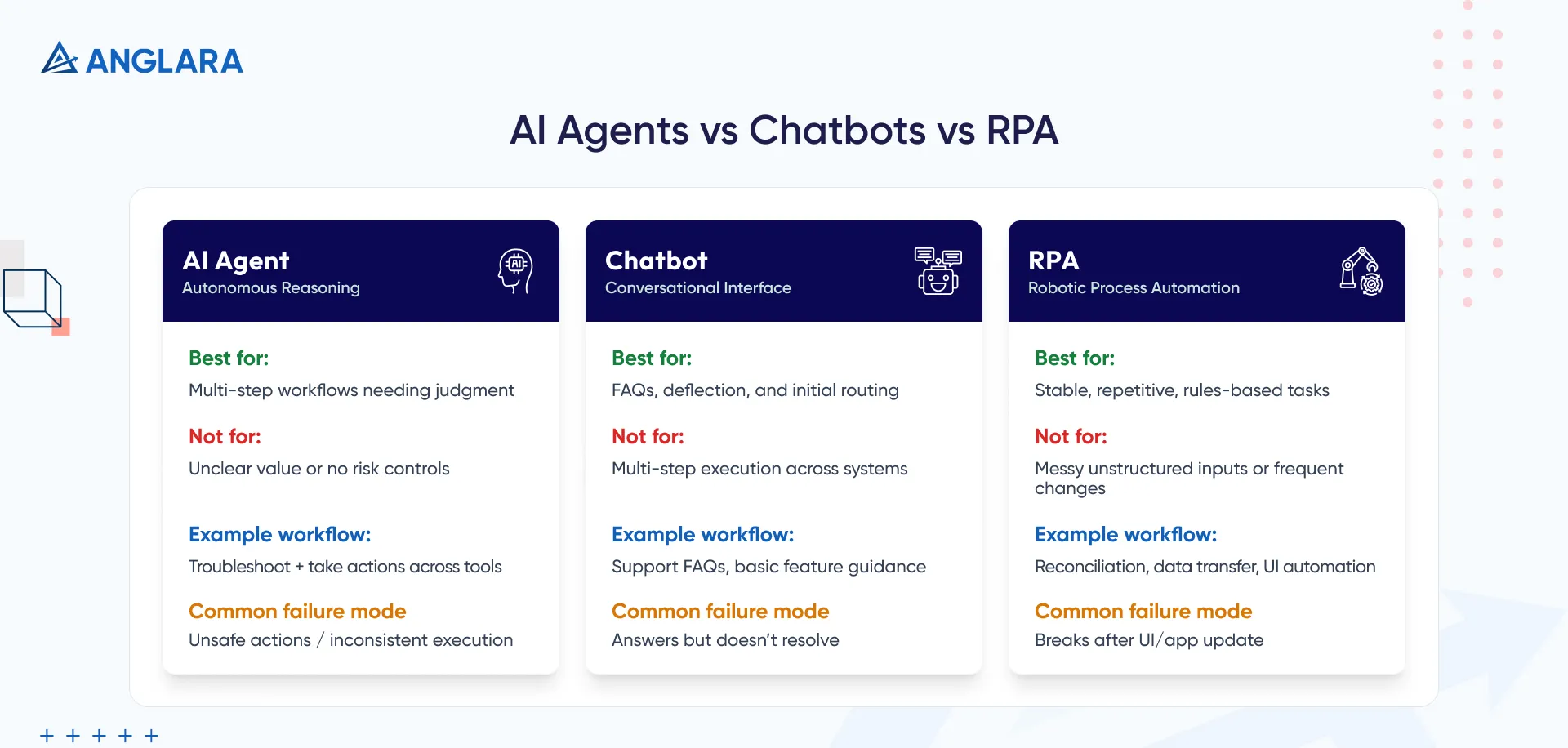
Comparison Table: AI Agents vs Chatbots vs RPA
Shortcut rule:
If the workflow needs a human to think, use an agent.
If it needs a human to repeat, use RPA.
If it needs a human to answer, use a chatbot.
When Each Is a Good Fit and Not a Good Fit
Chatbots Are a Good Fit When
- You want faster answers and self-serve resolution
- The goal is deflection + routing, not multi-step execution
- You have decent docs/KB and can keep them updated
Chatbots Are Not a Good Fit When
- The user expects the system to complete multi-step work (plan changes, provisioning, data updates across tools)
- The workflow requires tool/API calls and decision-making beyond answering
- You need strict audit logs + approvals for actions (that’s agent territory)
AI Agents Are a Good Fit When
- The workflow needs multi-step actions across tools
- Inputs are messy (emails, chats, partial data) and judgment is required
- You can enforce: least privilege, allow-listed tools, logging, and human approvals
AI Agents Are Not a Good Fit When
- The business value is unclear or success metrics are vague
- You can’t control permissions, approvals, and error handling
Gartner predicts over 40% of agentic AI projects will be canceled by end of 2027 due to escalating costs, unclear value, or inadequate risk controls. Treat this as a warning label: build agents like production systems, not demos. (Gartner)
RPA Is a Good Fit When
- The process is rules-based, repeatable, and stable
- You’re bridging legacy systems and UI flows
- You want consistent execution over “smart” interpretation
RPA Is Not a Good Fit When
- Steps change often or require interpretation
- Exceptions are common and unstructured (free-text emails, varied documents)
Real Workflow Examples By Team
Support / CX
- Chatbot: FAQs, feature guidance, routing to the right queue
- Agent: troubleshoot + gather context + create ticket + trigger safe actions (e.g., reset access)
- RPA: copy/paste or reconciliation steps in older tools
RevOps / Sales Ops
- Chatbot: internal “how do I” + policy lookup + enablement answers
- Agent: qualifies inbound leads, drafts follow-ups, updates CRM fields (with approvals)
- RPA: exports/imports, repetitive data hygiene, scheduled report pulls
Finance Ops
- RPA: repetitive reconciliations, invoice data transfer
- Agent: exception handling and classification (flagging risky or unclear cases for humans)
IT / Internal Ops
- Chatbot: “how do I request access?” + knowledge lookup
- Agent: intake + policy checks + guided provisioning steps (approval gates)
- RPA: repeatable onboarding/offboarding tasks in stable systems
Practitioner signal (paraphrased): a common view is that agents and RPA are complementary - RPA handles structured end-to-end rules, agents handle nuance and exceptions. (Reddit)
Risks, Compliance, Governance
This is the part that separates “cool demo” from a system people trust.
What Typically Breaks In Production
- Over-permissioned agents that can do too much
- No approval gates for risky actions
- No audit trail (you can’t explain why it did something)
- No fallback path when the model is uncertain
Practical Guardrails That Work
- Least privilege: agent gets minimum required access
- Tool allow-list: only approved tools/APIs
- Human-in-the-loop: approvals for money, security, deletion, role changes
- Audit logging: every action recorded
- Fallback handoff: escalate with a clean summary + required fields
Implementation Roadmap
Step 1: Map Your Workflow Like a Machine Would
- Inputs: chat/email/forms/files
- Decision points: where judgment is needed
- Systems touched: CRM/helpdesk/billing/internal tools
- Risk level: low/medium/high
Step 2: Choose The Simplest Fit First
- Mostly Q&A → chatbot
- Stable repetitive steps → RPA
- Multi-step actions + judgment → agent
- Mixed → hybrid (agent + RPA)
Step 3: Build The Foundation
- Knowledge: docs, policies, known issues
- Actions: APIs + workflow tools
- Escalation path: who takes over and when
Step 4: Add Guardrails Before Scaling
- Permissions, approvals, logging
- Confidence thresholds + fallbacks
Step 5: Pilot One Workflow
- Measure: resolution rate, error rate, handoff quality, time saved
- Expand only after results stabilize
Costs, Effort, Timeline
Costs vary by complexity, but what drives spend is usually:
- Number of tools/integrations
- Risk controls + approvals + logging
- Exception handling depth
- Maintenance (RPA breaks on UI change; agents need ongoing evaluation)
A practical buyer check:
- If a vendor can’t clearly explain permissions, approvals, and audit logs, you’re not buying a production-ready agent.
Common Mistakes
- Buying “agentic” because it sounds modern, without clear success metrics (Gartner)
- Using RPA for messy unstructured inputs and expecting it to “understand”
- Expecting a chatbot to complete multi-step work across systems
- Skipping guardrails and fallback handoffs
- Piloting too many workflows at once
FAQs
What’s the difference between an AI agent and a chatbot?
A chatbot focuses on conversation and answering, while an AI agent can reason, plan, and take actions to achieve a goal (with guardrails). (Salesforce)
Is RPA dead because of AI agents?
No. RPA is still strong for stable, repetitive tasks. Many teams combine RPA for deterministic steps and agents for exceptions. (TechTarget)
When should I choose RPA over an AI agent?
Choose RPA when the process is rule-based and stable, especially when you’re automating UI steps across legacy systems. (Appian)
When should I avoid AI agents?
Avoid agents if you can’t enforce least privilege, tool allow-lists, approvals for risky actions, and strong monitoring. Gartner’s cancellation prediction is a useful warning label. (Gartner)
What’s the best “first workflow” to automate?
Pick a high-volume workflow with clear success criteria and low-to-medium risk. Pilot one workflow first, then expand.
Can I start with a chatbot and upgrade later?
Yes. Many teams start with Q&A + routing, then add agent capabilities for actions.
What’s the biggest risk with agents?
Overconfidence + over-permissioning without approvals, audit logs, and safe fallbacks.
How do I know if I should build hybrid (agent + RPA)?
If your workflow has deterministic steps and messy exceptions, hybrid is often the most reliable path. (Reddit)
Key Takeaways
- Chatbots: answer and route
- RPA: repeat stable, rules-based steps (Appian)
- Agents: decide and act across tools (with guardrails) (Salesforce)
- Most real workflows are hybrids, not either/or (TechTarget)
- Treat agentic projects like production systems - Gartner predicts many will be canceled without value clarity and risk controls (Gartner)
Next steps (Anglara)
If you want a quick recommendation, bring one workflow (steps + tools + exceptions) and we’ll tell you:
- chatbot vs RPA vs agent vs hybrid
- what to build first
- what guardrails you need
- the fastest pilot plan
Mid-callout (help-first): If your workflow is customer support + booking (common in SMB-focused SaaS), and you’d rather skip a long build cycle, Anglara offers a ready-to-launch AI Support + Booking setup. Book a free 30-min consultation for a fit check.
